
Home
Services
About us
Blog
Contacts
Custom Renovation Management App Development: Turning Apartment and Small Commercial Repairs into a Controlled Digital Workflow
A small renovation project rarely feels small to the person paying for it.
For a property owner, even a single apartment renovation can become a stream of decisions, delays, payments, material choices, unfinished details, and questions that never seem to stay in one place. For a site manager or foreman, the same project is a daily balancing act between the client, workers, subcontractors, suppliers, hidden technical problems, budget pressure, and the constant need to explain why something has changed. For workers, it is often a practical field problem: what exactly needs to be done today, which material is available, what was approved, what is missing, and who should confirm the result.
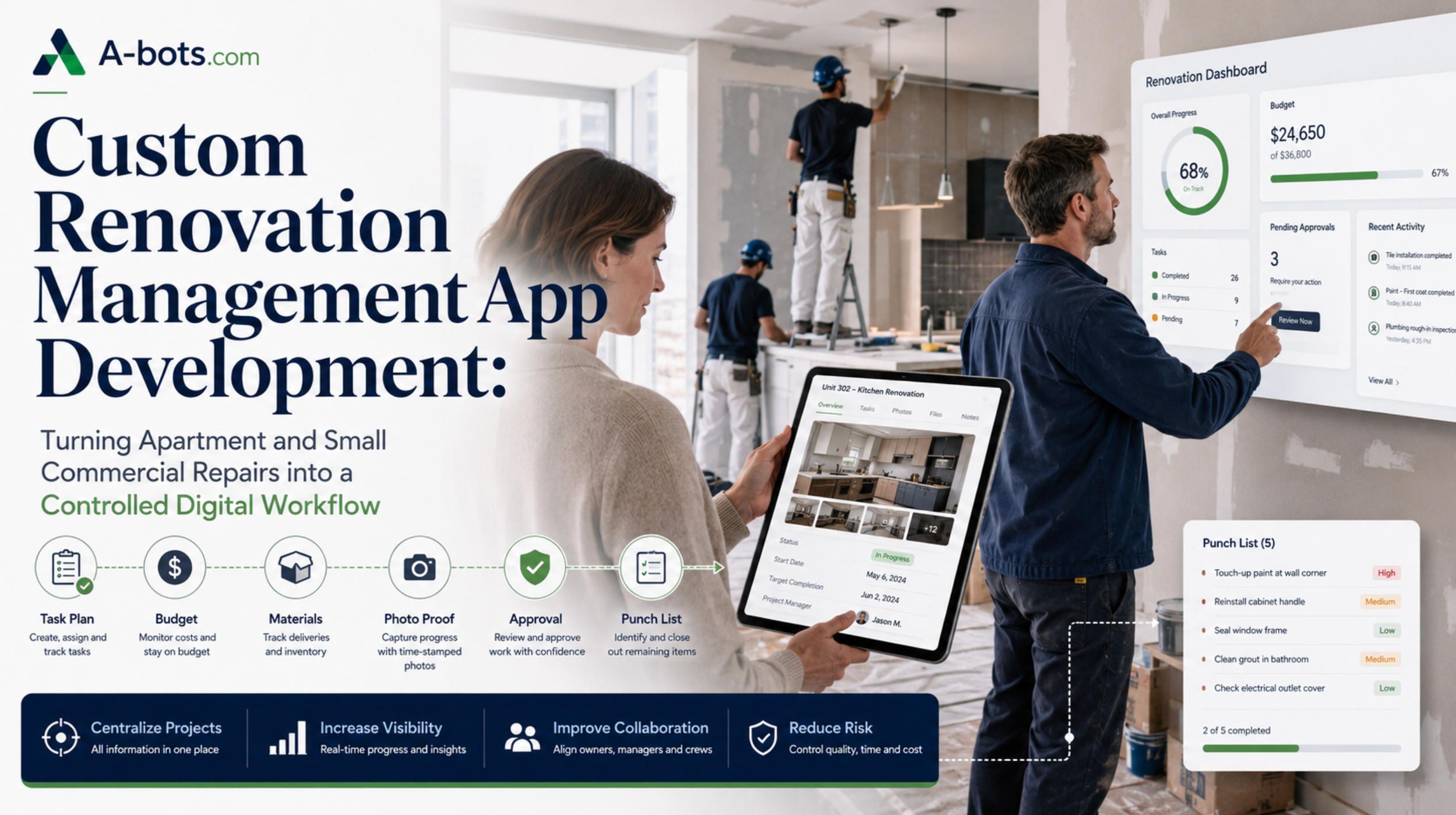
This is why renovation management is no longer just a matter of experience, trust, and phone calls. Experience still matters. Trust still matters. But when the entire project is managed through fragmented chats, verbal agreements, paper estimates, photo galleries, spreadsheets, and memory, the renovation gradually becomes a black box. Everyone is busy. Everyone is doing something. But no one has a clean, shared, structured picture of the real state of the project.
A custom renovation management app can solve this problem not by replacing the site manager, but by giving the site manager, the property owner, and the workers one operational system. The goal is not to create another generic task tracker. The real value is to connect the scope of work, budget, materials, approvals, photos, issues, and acceptance process into one digital workflow.
For companies that manage apartment renovations, small retail fit-outs, office repairs, rental property upgrades, design-build projects, or multi-trade maintenance work, this type of system can become a serious business advantage. At A-bots.com, we can help transform this concept into a detailed technical specification and then develop a custom mobile and web platform around real renovation workflows, not abstract software assumptions.
The Small Renovation Project Is Operationally Complex
A full apartment renovation, a small shop fit-out, or a compact office repair may not have the scale of a large construction site, but it has many of the same operational problems. There is a project scope. There are dependencies between stages. There are materials to buy, store, replace, return, or justify. There are workers with different responsibilities. There are defects and rework. There are payments, extra works, client approvals, photos, deadlines, and final acceptance.
The complexity is hidden because the physical object is small. One apartment may contain demolition, electrical work, plumbing, plastering, drywall, tiling, flooring, painting, furniture installation, lighting, ventilation, doors, fixtures, appliances, cleaning, and punch list corrections. Each of these stages has its own logic. Some tasks cannot start before previous tasks are completed. Some defects become visible only after the next stage begins. Some materials must be ordered early. Some decisions depend on the owner. Some changes affect both the budget and the schedule.
The traditional way to manage this is usually a mix of messaging apps, calls, photos, handwritten notes, invoices, receipts, spreadsheets, and personal control by the foreman. This can work while the project is simple and the relationship is stable. But the moment the owner changes a material, the supplier delays delivery, the electrician finds a hidden problem, or the worker needs an urgent decision, the project starts producing information faster than the team can structure it.
That is the real problem. Renovation projects do not fail only because someone made a mistake. They often fail because the system cannot preserve decisions in a reliable form.
A message in a chat is not the same as an approved change order. A photo in a gallery is not the same as proof of completed work linked to a specific task. A receipt is not the same as material cost control. A verbal approval is not the same as a clear record of who accepted what, when, and under which conditions.
A renovation app should be designed around this reality. It should not try to make renovation look simpler than it is. It should make complexity visible, structured, and manageable.
The Core Product Idea: Structured Trust
The future of small renovation management is not more messaging. It is structured trust.
Messaging is fast, but it does not hold responsibility well. A chat can answer “what happened?” in the moment, but it is weak at answering more important questions later: who approved the change, what exactly was changed, how much it added to the budget, which room it affected, whether the work was accepted, and whether the material was already purchased.
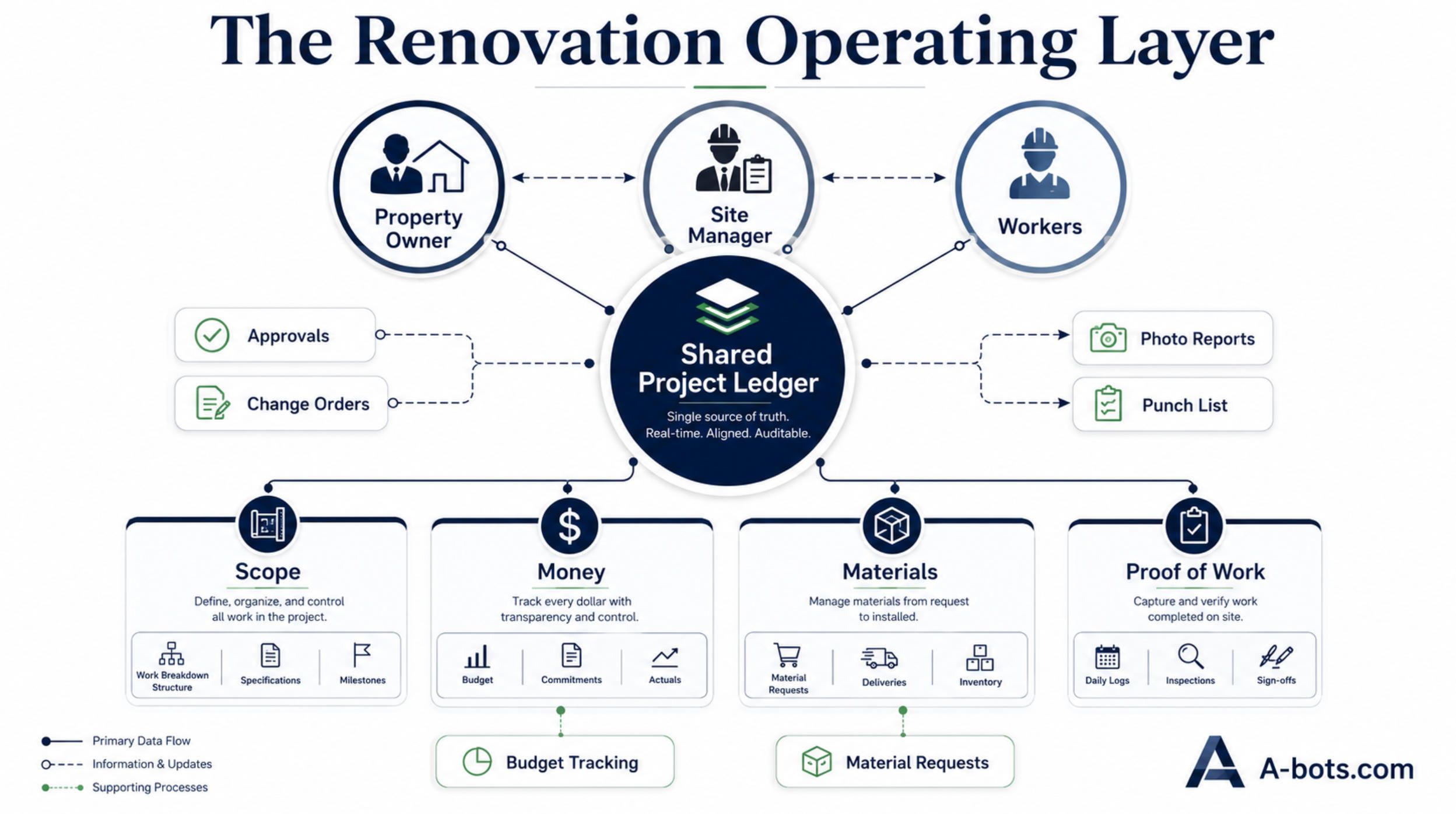
A custom renovation management app creates a different model. Every important event becomes part of the project record. A task belongs to a stage. A stage belongs to a room or zone. A material request belongs to a task. A receipt belongs to a purchase. A photo belongs to proof of work. A defect belongs to a punch list item. A budget change belongs to an approved change request. A client decision belongs to a documented approval.
This is the difference between communication and control.
The app should not remove human conversation. Renovation still requires discussion, judgment, negotiation, and field decisions. But the system should convert important decisions into structured records. When that happens, the project becomes easier to manage because the team no longer depends entirely on memory, screenshots, and emotional explanations.
For the owner, structured trust means transparency without micromanagement. For the site manager, it means fewer repeated explanations and fewer disputes. For workers, it means clear daily execution. For the renovation company, it means stronger cost control, better documentation, and a more scalable operating model.
Three User Roles, Three Different Interfaces
A strong renovation app cannot use the same interface for everyone. The owner, the site manager, and the workers participate in the same project, but they do not need the same tools.
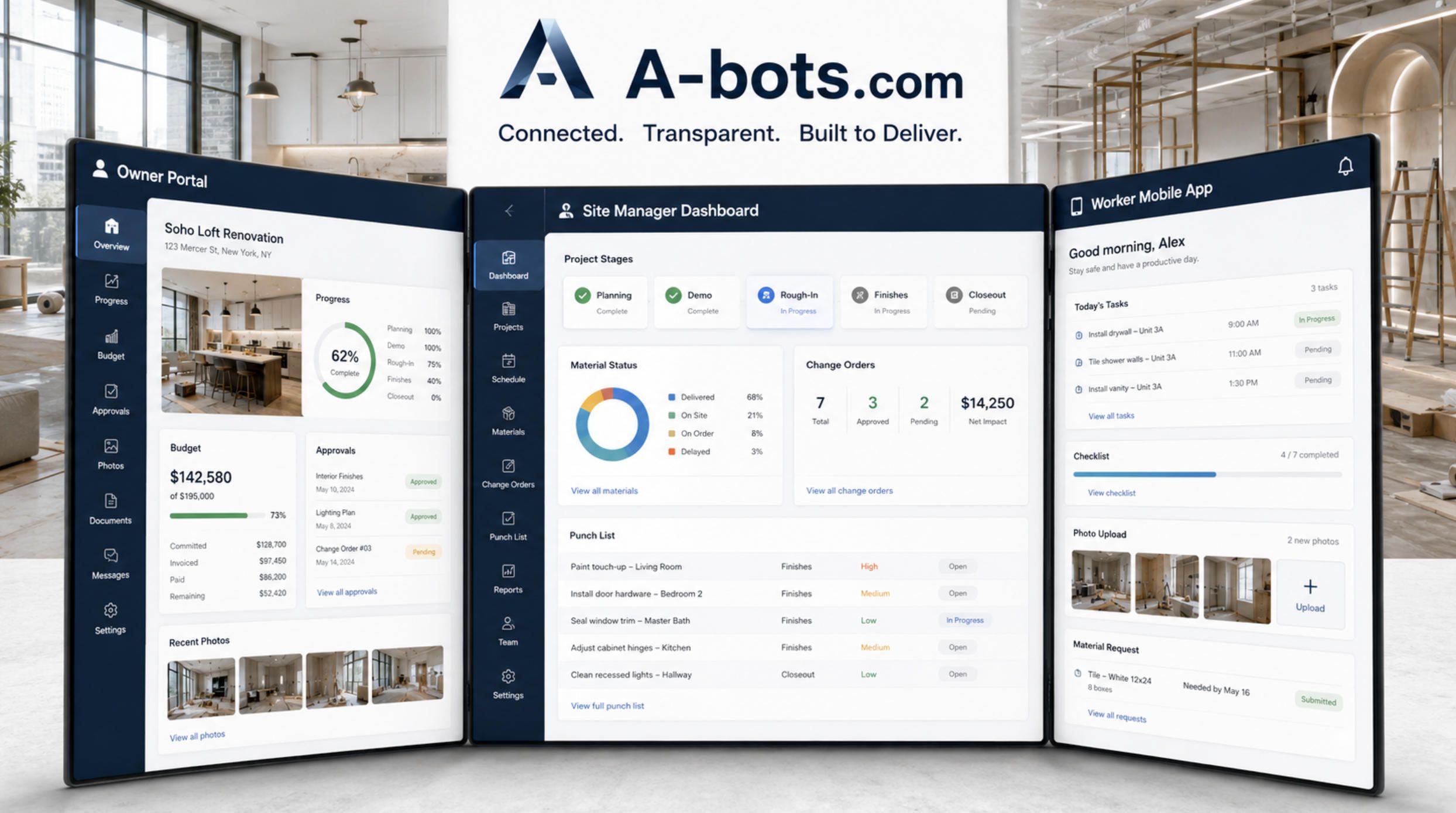
The property owner needs clarity. They want to understand progress, budget, decisions, material status, expected dates, and unresolved issues. They do not need to see every internal operational detail. A good owner interface should show the project timeline, current stage, approved budget, actual expenses, pending approvals, photo reports, important documents, and acceptance status. The tone of the interface should be calm, readable, and trust-building. The owner should feel informed, not overloaded.
The site manager needs control. This is the central operational role. The site manager creates the plan, divides the project into stages, assigns tasks, hires workers or crews, controls materials, checks quality, communicates with the owner, records changes, approves intermediate results, and manages rework. The site manager interface should feel like a renovation cockpit: project plan, daily tasks, worker assignments, material requests, budget deviations, owner approvals, issues, photos, documents, and notifications in one place.
Workers need execution simplicity. Their interface must be fast, field-friendly, and almost impossible to misunderstand. They need today’s tasks, location, description, checklist, required material, photos, comments, status updates, and a simple way to report blockers. The app should allow quick photo capture, voice notes where appropriate, offline work if the site has poor connectivity, and a clear “done / blocked / needs review” logic.
This role separation is essential. If the worker app is too complex, workers will avoid it. If the owner dashboard exposes too much operational noise, the owner will become anxious. If the site manager has to duplicate data, the system will feel like bureaucracy. The product must respect the real behavior of each user group.
From Renovation Chaos to Four Connected Registers
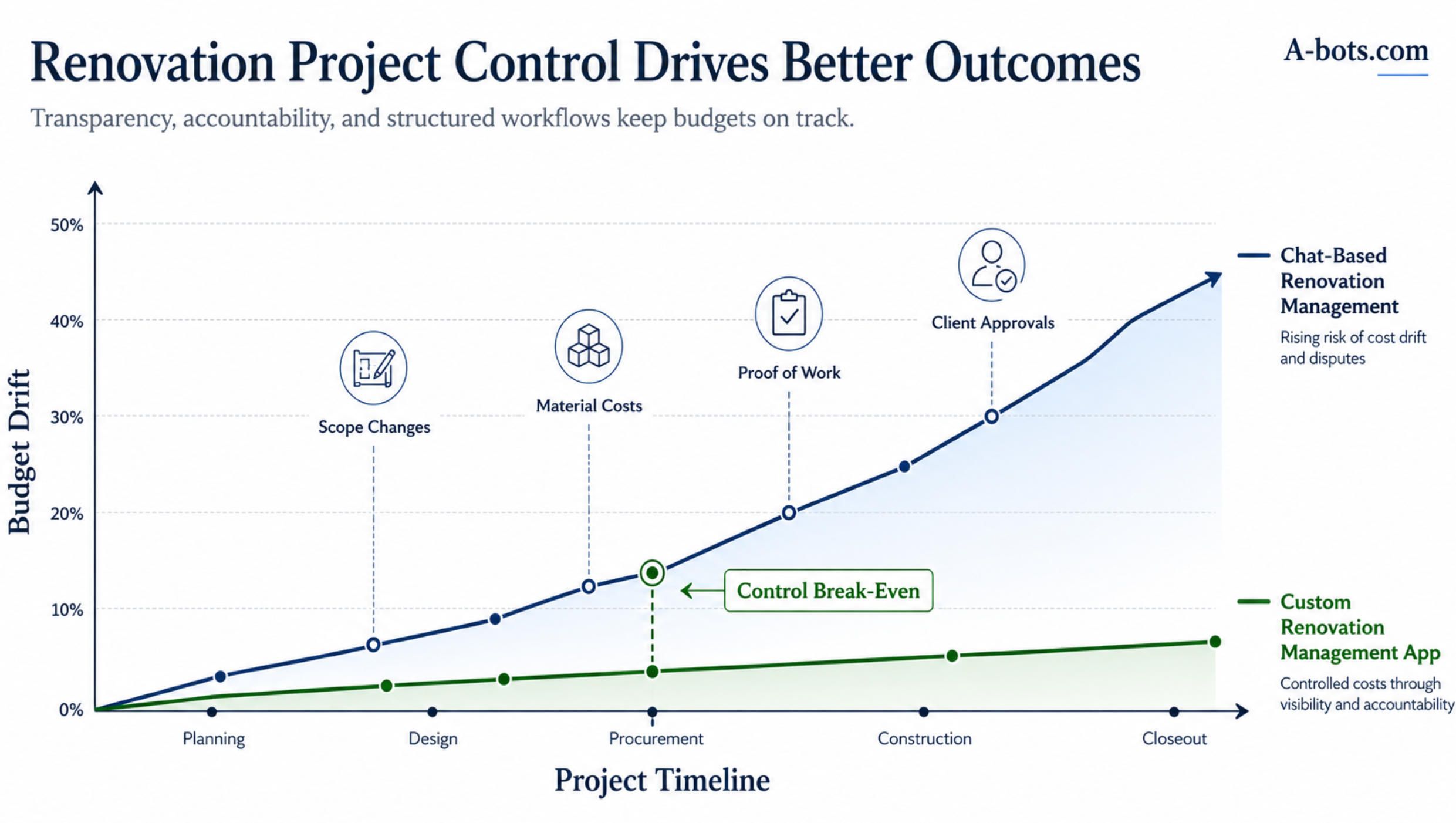
The most powerful way to design this type of system is to think in four connected registers: scope, money, materials, and proof.
The scope register answers what is included in the project. It contains rooms, zones, stages, tasks, dependencies, technical notes, specifications, hidden works, defects, and change requests. Without a clear scope register, every renovation becomes vulnerable to “I thought this was included” disputes.
The money register answers what the project costs. It includes the original estimate, planned labor cost, material budget, actual expenses, paid amounts, pending payments, extra works, refunds, and final forecast. Without a money register, the owner sees spending as unpredictable, while the site manager struggles to explain why the budget moved.
The material register answers what is needed, what was purchased, what is on site, what is missing, what was replaced, and what remains unused. This is especially important in apartment renovations, where material choices can change quickly and small delays can block entire stages. A missing fitting, tile batch, paint color, cable type, or door hardware can stop work or force an expensive workaround.
The proof register answers what was actually done. It includes photos, videos, checklists, timestamps, comments, signatures, acceptance records, rework history, and final handover documents. This is where the app becomes more than a planner. It becomes a defensive record for both sides: the contractor can prove work was completed, and the owner can clearly record what still needs correction.
When these registers are separated, the project becomes fragile. When they are connected, the project becomes manageable.
For example, if the owner approves a higher-grade tile, the change should not exist only as a chat message. It should update the scope, affect the material list, adjust the budget, create a purchase record, and eventually be linked to photo proof and acceptance. That is the level of structure a custom app can provide.
The Project Plan Should Be Practical, Not Decorative
Many renovation tools fail because they treat the plan as a beautiful timeline rather than a living operational system.
A real renovation plan must change. The app should support this without losing control. The site manager should be able to create a project from a template, adjust stages, add rooms, assign crews, set dependencies, and update dates when something changes. The system should show not only what is planned, but also what is blocked and why.
For a standard apartment renovation, the project template might include assessment, demolition, rough electrical, rough plumbing, wall preparation, waterproofing, tiling, flooring, painting, doors, lighting, fixtures, furniture installation, cleaning, and final punch list. For a small retail object, the structure may include layout adaptation, electrical load, signage preparation, lighting, HVAC adjustments, display furniture, security systems, compliance checks, and opening readiness.
The important point is not to force every project into the same structure. A custom app should allow the business to define its own renovation logic. A company that renovates rental apartments will need one workflow. A design-build studio will need another. A company doing small commercial fit-outs will need more approval checkpoints and supplier coordination. A maintenance-oriented business will need faster issue intake and repeat-service records.
This is where custom development becomes valuable. Instead of adapting the company to generic software, the software is designed around the company’s actual operating model.
Change Orders Are the Heart of Renovation Control
Almost every renovation changes during execution. The question is not whether changes will happen. The question is whether changes will be controlled.
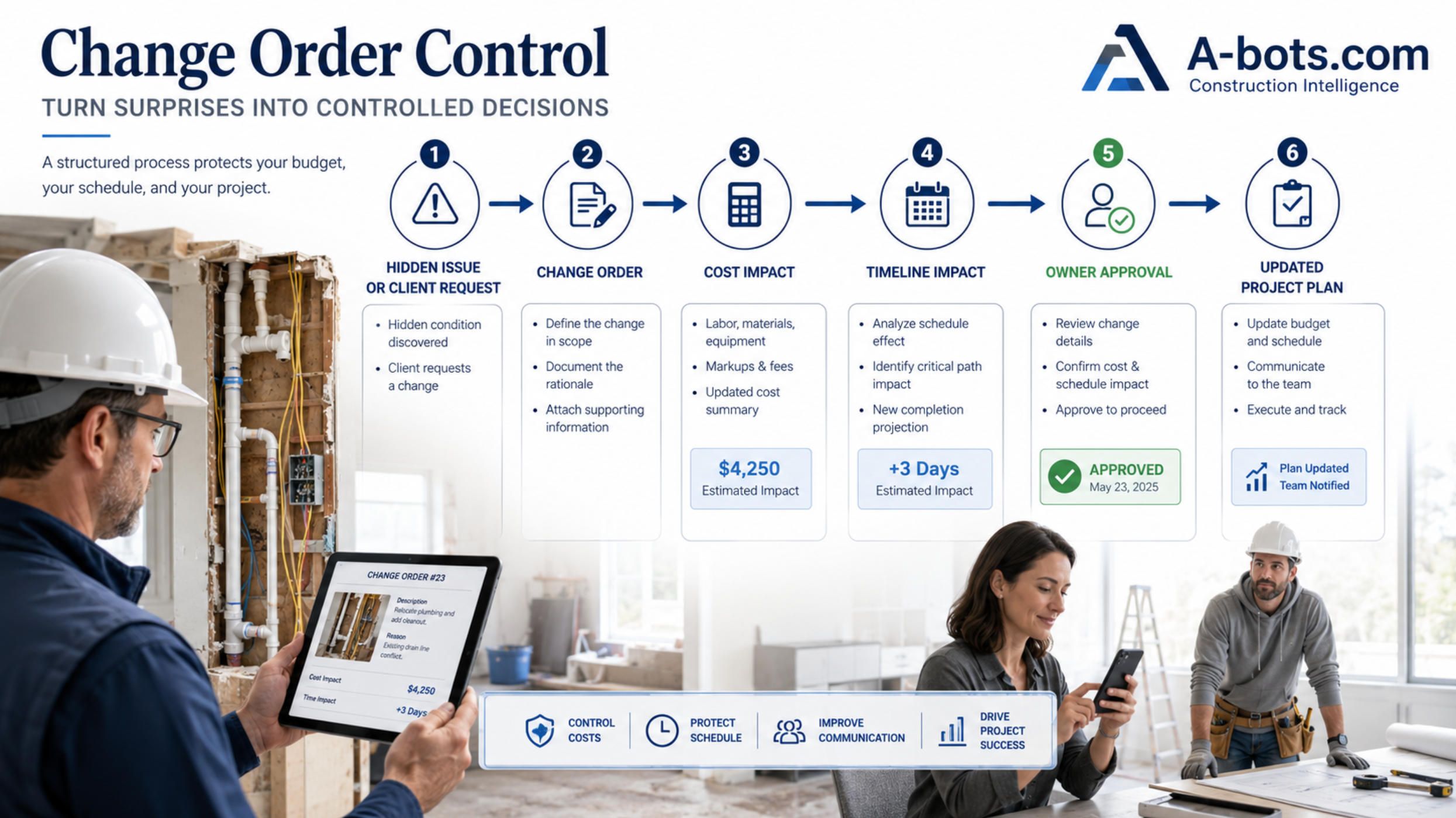
A change may start with a client decision: “Let’s use another material.” It may start with a hidden condition: “The wall is worse than expected.” It may start with a technical recommendation: “This electrical line should be replaced.” It may start with a design improvement: “This lighting scheme will work better.” In each case, the project changes in three dimensions: scope, cost, and time.
If this is handled informally, it creates tension. The owner may feel that the contractor is constantly adding costs. The contractor may feel that the owner keeps expanding the job without accepting the financial consequences. Workers may continue without knowing whether the change was approved. The final invoice may become a conflict document instead of a natural result of approved decisions.
A renovation management app should give change orders their own workflow.
A proper change request should explain what is changing, why it is needed, which room or stage it affects, how it changes the cost, whether it changes the timeline, what materials are required, and who must approve it. The owner should be able to approve, reject, ask a question, or request an alternative. Once approved, the change should become part of the project plan and budget automatically.
This is one of the strongest reasons to build a dedicated system. In renovation, many financial disputes are not caused by bad intentions. They are caused by weak change documentation. A custom app can reduce this risk by making every important change visible before it becomes a billing problem.
Material Control Is Where the Budget Often Drifts
Materials are one of the most underestimated sources of renovation complexity.
In a small apartment, the material list can still be long: tiles, grout, adhesive, pipes, fittings, cables, sockets, switches, paint, primer, drywall, screws, profiles, waterproofing, flooring, doors, handles, lights, fixtures, appliances, sealants, trims, and consumables. Some materials are chosen by the owner. Some are selected by the site manager. Some are bought by workers. Some are replaced because the original item is unavailable. Some remain unused. Some are returned. Some disappear into general site consumption and are never linked to a task.
Without material tracking, the owner sees expenses but not logic. The site manager knows the logic but spends too much time explaining it. Workers may request the same item twice or stop work because a required material was not delivered. The final budget becomes harder to defend.
A custom renovation app should treat materials as part of the workflow, not as a separate shopping list.
A material request should be linked to a task or stage. A purchase should have a supplier, cost, receipt photo, delivery status, and responsible person. Material on site should be visible to the site manager. Material shortages should create blockers. Substitutions should require approval when they affect quality, design, or budget. Leftover materials should be recorded at the end of the project.
For small commercial projects, this becomes even more important. A delayed lighting component, flooring batch, door system, sign installation element, or network cable can affect the opening date of a shop or office. The app should help the site manager see these dependencies early, before they become delays.
Proof of Work Changes the Acceptance Process
The final stage of renovation is often emotionally difficult because the owner sees details, the contractor sees completed work, and the workers see corrections as extra effort. A weak acceptance process can damage the relationship even when most of the project went well.
Proof of work should not start at the end. It should be collected throughout the project.
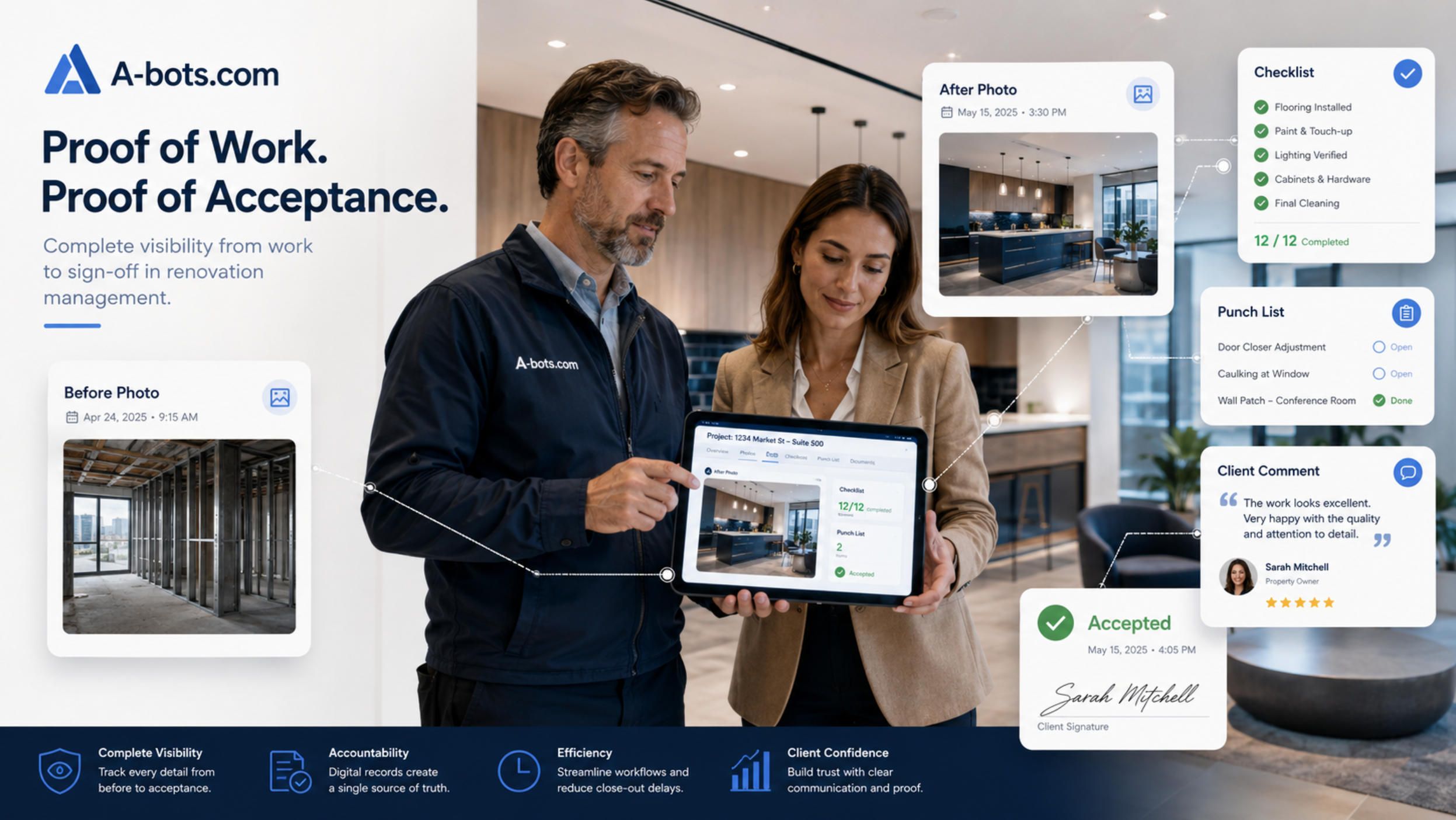
Each important task can have before, during, and after photos. Hidden works can require mandatory photo documentation before they are covered. Checklists can confirm that key steps were completed. The site manager can review the result before showing it to the owner. The owner can accept, comment, or request correction. Defects can become punch list items with responsible workers and deadlines.
This does not mean turning the renovation into a legalistic process. It means making acceptance less emotional and more precise.
If a wall is painted, the owner can comment on the visible issue and attach a photo. If a socket placement was approved earlier, the system can show the approval record. If a worker corrected a defect, the new photo can be linked to the previous issue. If a stage is accepted, both sides can see the record.
This creates a project memory. The app becomes a neutral place where the work speaks through evidence.
The Owner Portal Should Build Confidence, Not Anxiety
Transparency is not the same as exposing everything.
A renovation owner portal should be designed carefully. If the owner sees too little, they feel excluded. If they see too much, they may start micromanaging every small operational issue. The best approach is to show the right level of project truth.
The owner dashboard should focus on progress, budget, decisions, and exceptions. It should show what stage the project is in, what was completed recently, what is planned next, what requires owner approval, whether the budget changed, and whether any issue affects the schedule. Photo updates should be organized by room and stage, not dumped as a long media feed.
Budget transparency should also be structured. The owner does not need to inspect every internal margin calculation. But they should understand approved estimate, actual expenses, additional works, paid amounts, remaining balance, and material-related changes if those costs are shared. The exact level of visibility can be configurable depending on the business model: fixed price, cost-plus, open-book renovation, or hybrid.
This flexibility matters. Different renovation businesses sell trust differently. A premium design-build studio may use the app as part of a high-touch client experience. A property maintenance company may use it to show speed and accountability. A small contractor may use it to reduce disputes and make payment conversations easier.
MVP: What to Build First
A renovation management platform can become large, but the first version should focus on the workflow that creates the most immediate value.
A practical MVP should include project creation, user roles, stages and tasks, worker assignments, photo reports, material requests, budget tracking, change requests, owner approvals, issue tracking, notifications, and a basic admin panel. This is enough to replace scattered communication with a controlled project record.
The MVP should not try to automate everything from day one. It should first establish the core operational truth: what needs to be done, who is responsible, what changed, what was bought, what was approved, and what was completed.
After the MVP proves itself in real projects, the system can expand into more advanced functionality. This may include digital signatures, payment integration, accounting export, supplier catalogs, inventory management, time tracking, crew performance analytics, warranty requests, AI-assisted project summaries, automated client reports, and templates for different renovation types.
The best development path is not to guess every future feature. It is to design the architecture so that the system can grow without becoming messy.
A Possible System Architecture
A custom renovation app usually needs more than one application. The most effective product model is a connected system with mobile apps and a web-based control layer.
The owner may use a mobile app or a responsive client portal. The site manager may need both mobile and web access: mobile for site visits, web for planning, budgeting, documents, and reporting. Workers need a mobile-first interface. The company administrator needs a web panel for users, projects, templates, permissions, financial settings, and analytics.
The backend should manage projects, roles, files, notifications, approvals, status logic, audit history, and integration APIs. Since renovation projects generate many photos and documents, file storage must be designed properly from the beginning. Permissions are critical: the owner, worker, site manager, subcontractor, and company admin should not see the same information.
Offline capability may also matter. Some renovation sites have poor connectivity, especially in basements, older buildings, or during early construction stages. Workers should be able to capture photos, complete checklists, and update task statuses offline, then sync later.
Security and data integrity are also important. The app stores financial information, property photos, client data, supplier records, and sometimes private residential details. Access control, secure storage, backup logic, and audit trails should be treated as core requirements, not optional extras.
Why Custom Development Can Be Better Than Generic Software
There are already construction management platforms on the market, and many of them are powerful. They prove that the need is real. But they are not always ideal for a company that has a specific renovation model, local accounting requirements, custom client communication standards, multilingual teams, unique approval logic, or a narrow operational niche.
Generic software often forces a business to adapt its workflow to the platform. Custom software allows the platform to adapt to the business.
This difference matters especially in small renovation and repair operations. A company may need specific room-based task logic, a custom estimate format, local supplier integration, separate owner and tenant views, bilingual interfaces, cash and bank payment tracking, custom photo acceptance rules, special warranty workflows, or integration with an existing CRM. These requirements may look small individually, but together they define how the company actually works.
A custom app can also become part of the company’s brand. The owner does not feel like they were invited into someone else’s generic tool. They experience the renovation company’s own digital service environment. This can increase perceived professionalism, support premium pricing, and make the business easier to scale.
How A-bots.com Can Help
A-bots.com can help renovation companies, site managers, design-build studios, property service businesses, and small commercial fit-out teams turn this product idea into a detailed technical specification and then into a working system.
The first step is not coding. The first step is understanding the real workflow. Who creates the estimate? Who approves materials? Who can invite workers? What happens when a hidden problem is found? How are additional works priced? What does the owner see? How is work accepted? Which documents matter? Which data should be exported? Which parts of the process must work on mobile?
From there, A-bots.com can help define user roles, screen logic, project statuses, approval flows, data models, notification rules, file structure, admin panel requirements, and integration points. This becomes a clear technical specification that can guide development instead of leaving the product to vague assumptions.
Then the system can be developed as a custom mobile and web solution: owner portal, site manager dashboard, worker mobile app, backend, admin panel, file storage, notifications, API integrations, QA testing, and deployment support.
The result is not just an app. It is a renovation operating layer.
It helps the owner understand what is happening. It helps the site manager control the project. It helps workers execute clearly. It helps the company protect margin, document decisions, reduce disputes, and build a more professional service experience.
Renovation Needs a Shared Source of Truth
Small renovation projects do not need enterprise construction software copied at a smaller scale. They need a system designed for their own reality: close contact with the owner, frequent changes, material uncertainty, many small tasks, practical field execution, and a high need for trust.
The strongest renovation app is not the one with the longest feature list. It is the one that connects the few things that matter most: scope, money, materials, approvals, and proof of work.
When these elements are disconnected, the project becomes a chain of explanations. When they are connected, the project becomes a controlled workflow.
That is the opportunity for custom renovation management app development. It can turn apartment repairs, small shop fit-outs, office upgrades, and property improvement projects from scattered communication into a transparent, evidence-based, professionally managed process.
For businesses that want to scale renovation services without losing control, this kind of custom system is not just software. It is infrastructure for trust.
✅ Hashtags
#RenovationAppDevelopment
#ConstructionTech
#CustomMobileAppDevelopment
#RenovationManagement
#FieldServiceSoftware
#PropTech
#ConstructionManagementSoftware
#ProjectManagementApp
#DigitalTransformation
#MobileWorkflow
#ABotsCom
Other articles
Field Service ERP Apps: Mobile Workflows for Technicians Field service companies often lose profit not during the repair itself, but between disconnected steps: dispatch, parts availability, technician notes, customer approval, invoicing, and ERP updates. This article explains how a field service ERP app becomes the mobile operational layer between office systems and real-world service execution. It explores how custom apps connect technicians, dispatchers, customers, inventory, service history, proof of work, and billing into one controlled workflow. For HVAC, equipment repair, industrial maintenance, and after-sales service teams, the goal is not more software, but better service profitability control.
Qwen Robot Suite, Qwen-RobotManip, Qwen-RobotWorld, Qwen-RobotNav Alibaba’s Qwen Robot Suite signals a major transition from conversational AI to machines that can perceive, predict, navigate, and act in physical environments. This expert analysis examines the three-model architecture behind the platform: Qwen-RobotNav for configurable spatial navigation, Qwen-RobotWorld for generating possible physical futures, and Qwen-RobotManip for generalizable robot manipulation. The article also compares Alibaba’s approach with NVIDIA Cosmos and Isaac GR00T, Google Gemini Robotics, Physical Intelligence, and Figure Helix. Beyond model benchmarks, it explores the harder questions of physical reliability, enterprise integration, safety controls, human approval, and the application infrastructure required to turn embodied intelligence into accountable business workflows.
Equipment Rental App Development: One Connected Workflow An asset shown as available in rental software may still be awaiting collection, inspection, cleaning, repair, or transfer. This article explains why equipment rental app development must connect the entire operational lifecycle rather than simply provide a booking catalogue. It examines availability forecasting, driver and yard workflows, offline inspections, damage evidence, customer self-service, telematics, maintenance, and ERP integration. The article also explores when off-the-shelf rental software is sufficient and when a custom mobile execution layer becomes justified. Its central concept—Commercial Asset Truth—helps rental companies recover rentable days, reduce disputes, expose revenue leakage, and make more reliable commitments to customers.
B2B Ordering App Development for Distributors and Manufacturers A B2B ordering app is not just a digital storefront. For distributors and manufacturers, it should act as a controlled ordering layer that connects customer-specific catalogs, negotiated pricing, inventory reality, approval rules, ERP data, and repeat purchasing workflows. This article explains why many sales teams become manual order desks, how self-service can reduce phone and email orders without weakening customer relationships, and why quick reorder, pricing accuracy, stock validation, product data, and ERP integration matter more than a beautiful catalog. It also explores when custom development makes sense and how A-bots.com can help build account-specific ordering workflows.
Last-Mile Delivery App Development: Driver App, POD and WMS/ERP Integration A last-mile delivery app is not just a driver tracker or route map. For retailers, distributors, pharmacies, spare parts suppliers, courier networks, and local delivery fleets, it should become a delivery execution layer that connects warehouse readiness, route dispatch, driver actions, customer notifications, proof of delivery, exceptions, and WMS/ERP synchronization. This article explains why many delivery failures are created before the driver reaches the door, how weak POD creates disputes, why customer notifications must come from real operational events, and when custom development makes more sense than forcing a standard delivery platform into a complex workflow.
Top stories

Copyright © Alpha Systems LTD All rights reserved.
Made with ❤️ by A-BOTS