
Home
Services
About us
Blog
Contacts
Estimate project
EN

Field Service ERP Apps: How Technicians, Dispatchers, and Customers Become One Connected Workflow

Most field service companies do not lose money because their technicians are bad at repairs. They lose it in the quiet spaces between the repair: the call that was not logged properly, the part that existed in the ERP but not in the van, the dispatcher who guessed, the customer who waited without updates, the photo that stayed on someone’s phone, the invoice that went out three days late, and the repeat visit that nobody priced as a loss until the month was already closed.
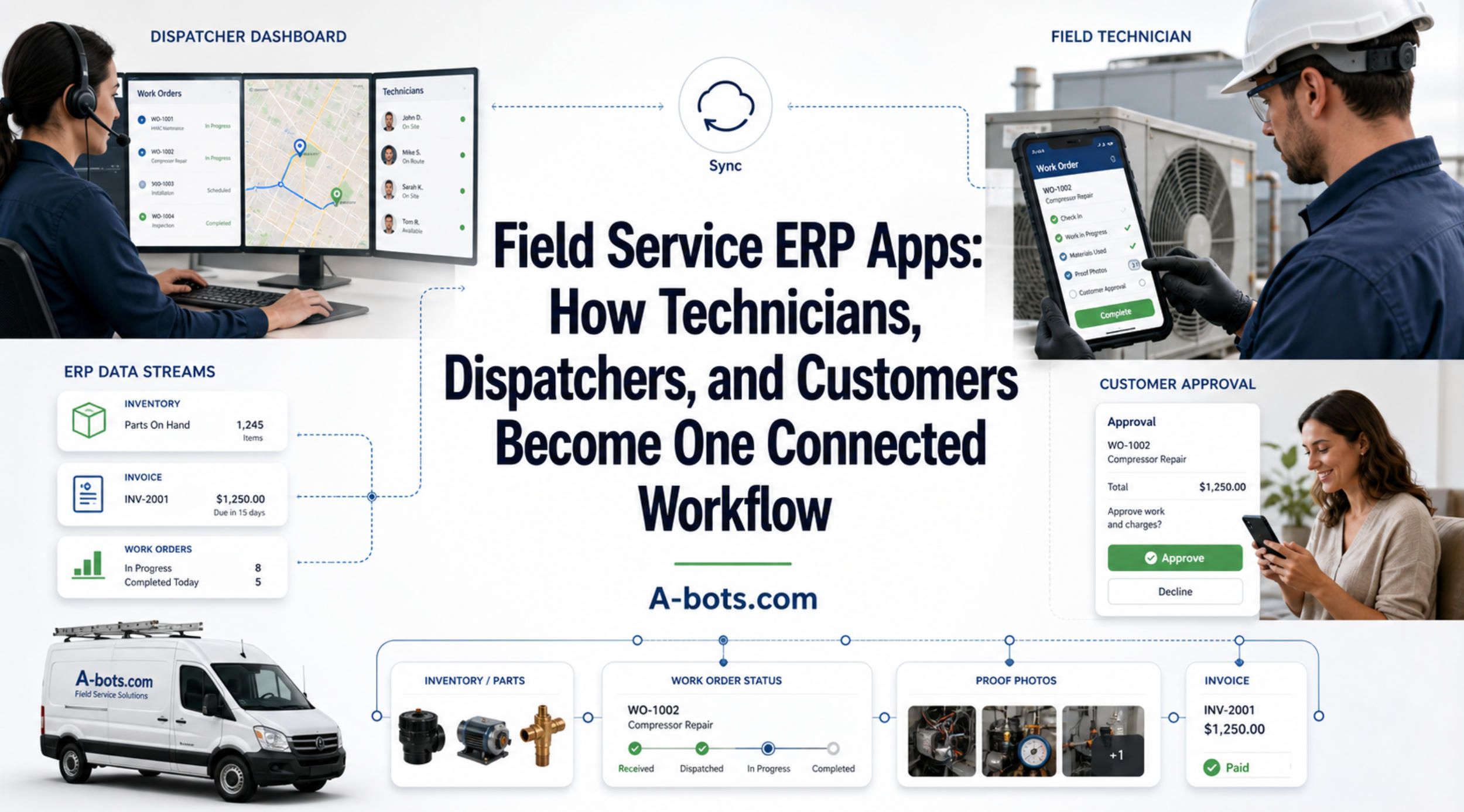
field-service-erp-apps-hero-cover.jpg

A service business can look busy and still be bleeding margin.

The vans move. Technicians answer calls. Dispatchers keep the calendar alive. Customers receive help. The ERP stores orders, invoices, inventory, and customer records. On paper, the system exists. In reality, the most expensive part of the operation happens outside the system: in the field, where work is accepted, delayed, diagnosed, improvised, documented, approved, and finally turned into revenue.

That is where a field service ERP app becomes more than a mobile interface. It becomes the operational layer between business planning and real-world execution.

For HVAC companies, equipment repair firms, facilities maintenance providers, machinery distributors, telecom service teams, medical equipment companies, energy contractors, and industrial maintenance organizations, field service is no longer just a department that “handles problems.” It is where customer trust is either protected or lost. It is where spare parts become revenue or dead stock. It is where service contracts become profitable relationships or slow administrative traps. It is where the company proves whether its ERP reflects reality or merely records it after the fact.

The uncomfortable truth is simple: ERP alone is not enough for field service.

ERP systems were built to structure the business. Field service work is messy by nature. It changes with weather, traffic, technician availability, asset condition, parts shortages, customer access, safety requirements, warranty rules, and the brutal little surprises that only appear when someone is already standing in front of the equipment. A field service ERP app does not replace the ERP. It gives the ERP hands, eyes, timing, and memory in the field.

The Real Problem Is Not Dispatch. It Is Fragmentation

Many companies first describe their field service problem as a scheduling issue.

“We need better dispatch.”
“We need to know where technicians are.”
“We need customers to receive updates.”
“We need less paperwork.”

All of that is true, but it is not the whole problem. Scheduling is only the visible symptom. The deeper issue is fragmentation.

A customer request may begin in a CRM, email inbox, phone call, website form, WhatsApp message, or customer portal. The dispatcher may create a work order manually. The technician may receive instructions by phone. The parts team may check inventory in ERP, but the van stock may not be updated. The technician may take photos but send them separately. The customer may sign a paper form. The office may enter job details later. Finance may wait before invoicing. Management may see performance reports only after enough delay that the information is no longer useful.

Every handoff introduces interpretation. Every interpretation creates risk.

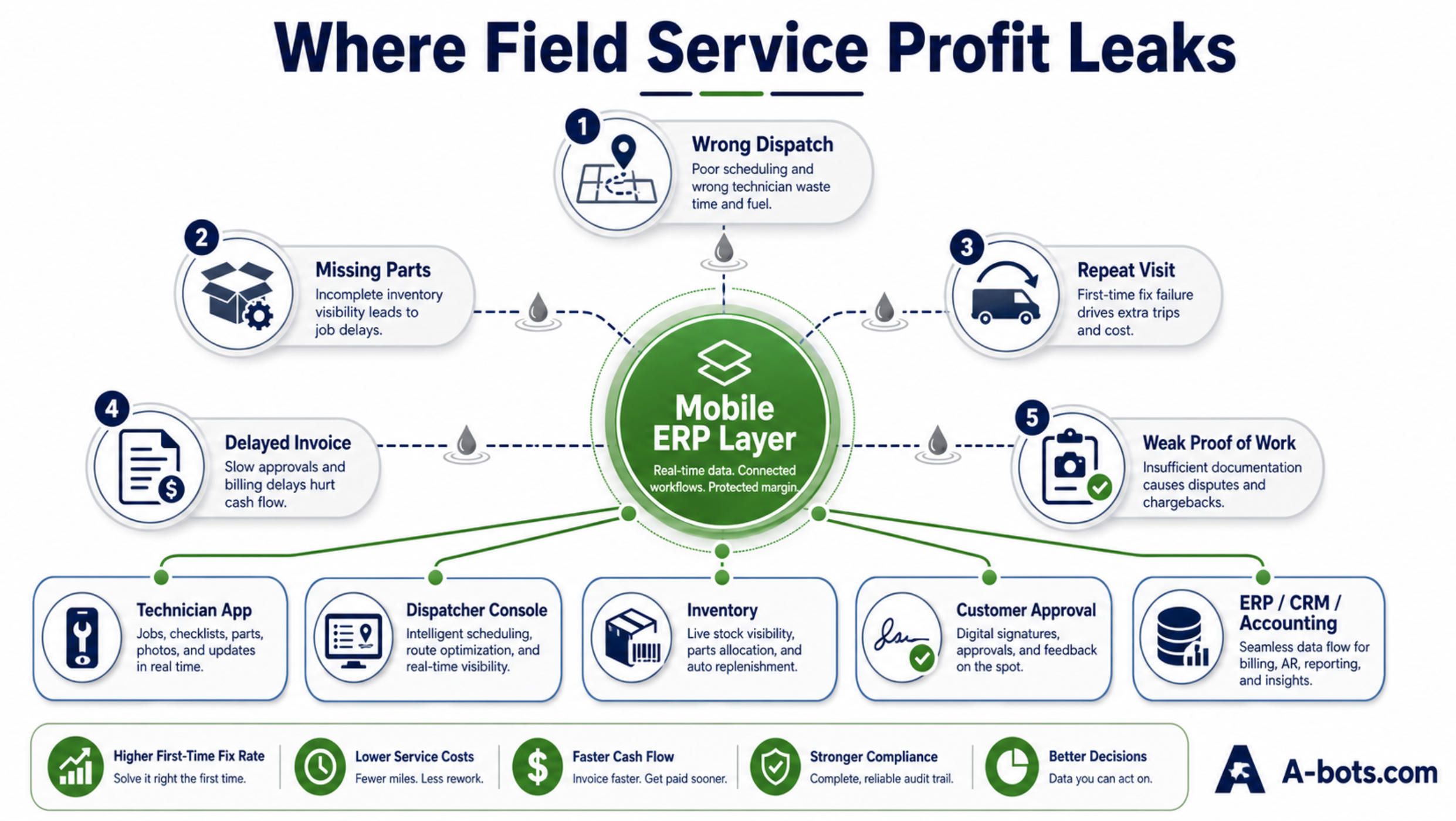
In field service, a small information delay becomes expensive very quickly. If the wrong technician is assigned, the first-time fix rate drops. If the right part is missing, the company pays for a second visit. If the asset history is incomplete, the technician diagnoses from memory instead of evidence. If the customer does not receive status updates, support receives calls that should never have happened. If the work proof is weak, billing and warranty disputes become harder. If the ERP is updated late, inventory, revenue, and service history are all slightly untrue.

One small gap is manageable. A hundred small gaps become a business model.

The market is moving in this direction because field operations are becoming too complex to run through disconnected tools. MarketsandMarkets estimates the global field service management market will grow from $5.10 billion in 2025 to $9.17 billion by 2030, driven by cloud adoption, AI, IoT, analytics, automated scheduling, predictive maintenance, and mobile-enabled platforms. (marketsandmarkets.com) This is not just software industry optimism. It reflects a practical shift: field service has become too valuable, too fast-moving, and too data-dependent to remain outside the digital core of the company.

The pressure is also human. Salesforce research found that 47% of field service appointments do not go as scheduled, while technicians waste more than seven hours per week on administrative tasks. The same research notes that 38% of technicians say scheduling is often mishandled. (Salesforce) That is nearly a full working day per technician per week spent on paperwork, searching, reporting, and recovering from process friction.

A field service ERP app should attack that friction directly.

Not with a decorative mobile dashboard. Not with another isolated app. Not with “digital transformation” as a slogan. The value appears when the app becomes the living workflow that connects the customer request, dispatcher decision, technician action, parts usage, service proof, ERP update, and invoice.
field-service-profit-leak-infographic.jpg

Why ERP Alone Fails at the Moment of Work

ERP is excellent at structured business truth.

It knows customers, contracts, stock, purchase orders, invoices, financial rules, assets, warranties, service agreements, employee records, and reporting logic. For many companies, ERP is the backbone of the organization.

But field service does not happen inside the backbone. It happens at the edge.

A technician arrives at a customer site and discovers that the asset model is different from the one in the order. The customer requests an additional inspection. A safety checklist is required before work begins. The technician needs to know whether the repair is under warranty. A part is used from van stock. Another part is missing. Photos must be captured before and after repair. A supervisor must approve extra work. The customer must sign. The technician loses connection in a basement, factory hall, rural site, or mechanical room. The dispatcher needs status. The office needs billable time. The ERP needs clean data.

Traditional ERP screens are not designed for that environment.

A field service ERP app translates business logic into field execution. It presents only what the technician needs at the moment of work: the right work order, customer details, asset history, safety steps, parts list, troubleshooting notes, photo capture, checklist, time log, customer signature, and next action. It must work when the connection is weak. It must reduce typing. It must prevent missing proof. It must guide the technician without treating an experienced specialist like a warehouse scanner.

This is where custom development becomes commercially important.

Generic field service software often assumes that every service business works roughly the same way. But a company repairing industrial machines does not operate like a residential HVAC contractor. A medical equipment service team does not have the same compliance burden as a solar maintenance crew. A machinery distributor with warranty rules, spare parts logic, and after-sales contracts has a different operating model from a facility maintenance provider using subcontractors across multiple regions.

The mobile layer must fit the business model.

For some companies, the priority is first-time fix rate. For others, it is SLA compliance. For others, it is controlling warranty leakage, tracking van stock, reducing repeat visits, increasing service contract profitability, or turning installed equipment into an aftermarket revenue platform. The same words may appear in every vendor demo: scheduling, dispatch, work orders, mobile app, reporting. But the actual workflow, data model, and integration logic decide whether the system creates value or becomes another screen employees tolerate.

A strong field service ERP app should answer practical questions before they become expensive:

Can the dispatcher see technician skills, location, availability, workload, and parts constraints before assigning the job?

Can the technician open the app and immediately understand the customer, asset, problem, service history, warranty status, required checklist, and expected outcome?

Can the app work offline and sync later without corrupting the job record?

Can parts used in the field update inventory, van stock, service history, and billing logic?

Can photos, notes, measurements, and customer signatures become structured proof instead of scattered files?

Can managers see whether a job was profitable, delayed, repeated, underbilled, or blocked by missing parts?

This is the difference between “mobile access to ERP” and a real field service operational layer.

Mobile access shows data. A field service ERP app changes how work moves.
field-service-erp-workflow-diagram.jpg

The Connected Workflow: From Request to Revenue

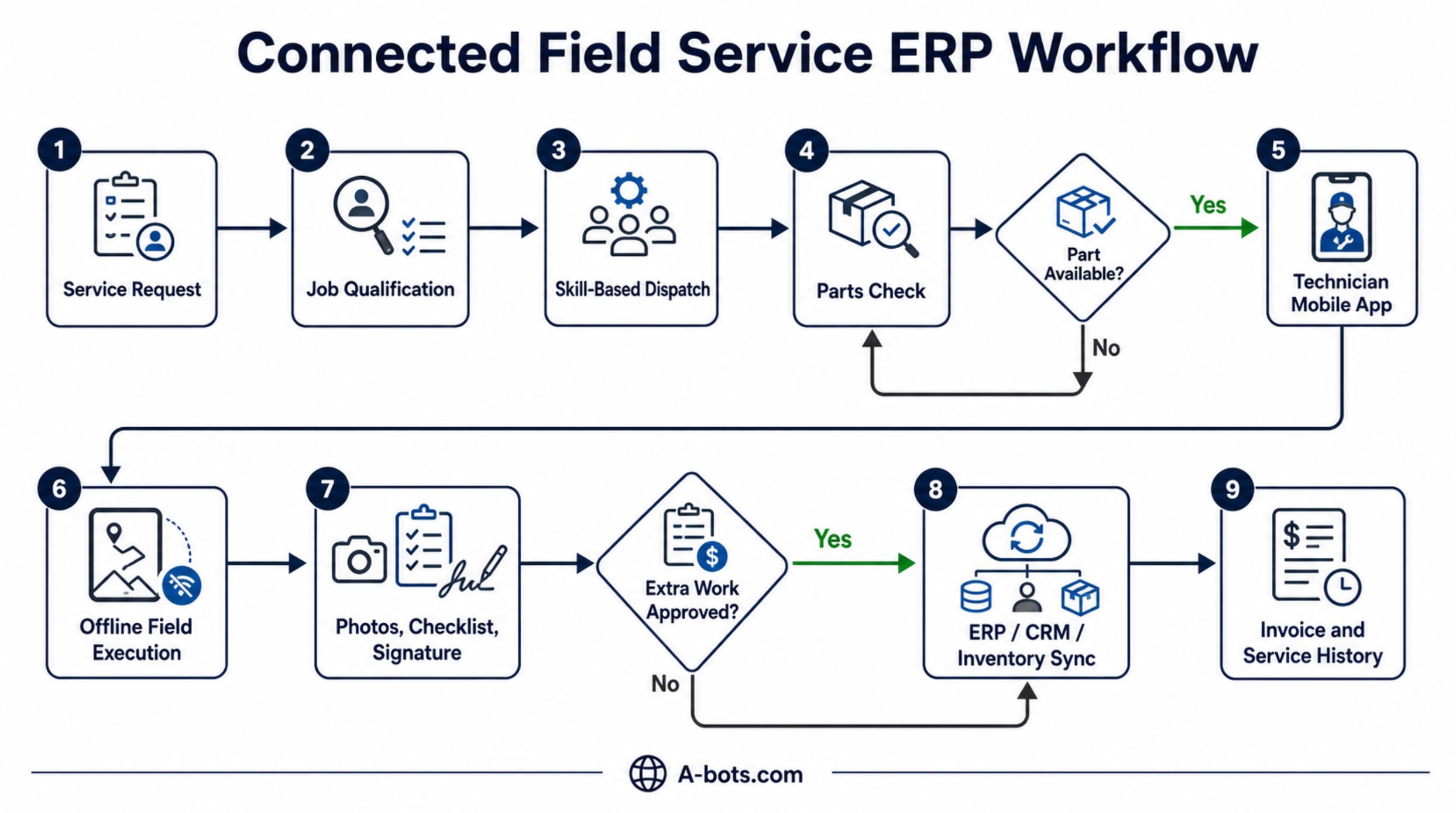
The best field service apps are not built around screens. They are built around the lifecycle of a job.

A service request enters the system. It may come from a customer portal, call center, CRM, IoT alert, recurring maintenance schedule, warranty claim, sales team, or internal maintenance plan. At that moment, the system should begin shaping the job: customer identity, asset, location, urgency, contract terms, SLA, required skill, likely parts, service history, safety requirements, and billing rules.

Then dispatch becomes more than calendar placement. The dispatcher is no longer simply asking, “Who is free?” The better question is, “Who can complete this job profitably on the first visit?”

That question changes everything.

The nearest technician may not have the certification. The most experienced technician may not have the part. The available technician may already be close to overtime. The cheapest assignment may create a repeat visit. The fastest assignment may break a higher-value SLA. A field service ERP app should expose those tradeoffs, not hide them behind a drag-and-drop calendar.

Once the job reaches the technician, the app becomes the field cockpit. It should show the work order, route, contact, asset history, previous visits, fault codes, parts, checklists, manuals, customer notes, and required proof. If the company services connected equipment, the app may also show telemetry, recent alerts, sensor readings, or predicted failure patterns.

This is where IoT and ERP-connected field service start to matter. Microsoft’s Connected Field Service architecture, for example, describes how IoT data can flow into Dynamics 365 Field Service so organizations can monitor connected equipment, detect faults, automate work order creation, and dispatch technicians when a device needs service. (Microsoft Learn) The business meaning is bigger than the technology: service can move from “customer reported a failure” to “the system saw a risk and created the right intervention.”

That transition changes customer experience.

Deloitte frames the future of field service as a shift from “break-fix” to “already fixed,” where sensing, analytics, AI, scheduling, and cloud systems help companies anticipate issues before customers call. Deloitte also notes that high-maturity field service organizations are far more likely to operate as profit centers and emphasize revenue generation. (Deloitte Digital) This is a crucial point for business owners: field service is not only a cost to control. It can become a revenue engine when the workflow is designed correctly.

After the technician completes the job, the work should not fall back into administrative fog.

The app should capture time, parts, labor type, photos, checklist results, measurements, recommendations, customer signature, and follow-up needs. Then it should sync that data into ERP, CRM, inventory, accounting, warranty, and service history. The invoice should not wait for someone to decode handwriting or chase missing photos. The next technician should not arrive blind. The warehouse should not discover missing stock a week later. Management should not wait until month-end to see which service categories are profitable.

A connected workflow turns service from a sequence of interruptions into a controlled business process.

The flow looks simple when written down:

Service request → qualification → dispatch → parts check → technician mobile app → field execution → proof of work → customer confirmation → ERP sync → invoice → service history → analytics.

But the value is hidden in the details.

Does the app understand planned and unplanned parts? Does it separate billable and non-billable time? Does it support warranty exceptions? Does it allow supervisor approval for extra work? Does it sync safely after offline work? Does it prevent incomplete job closure? Does it support different checklists by asset type? Does it connect customer communication with internal status? Does it show gross margin by job, technician, contract, asset type, or region?

Those details decide whether the company has software or control.

Service Profitability Control Is the Real Trigger

Most field service articles talk about productivity. Productivity matters, but it is not sharp enough.

The stronger business trigger is service profitability control.

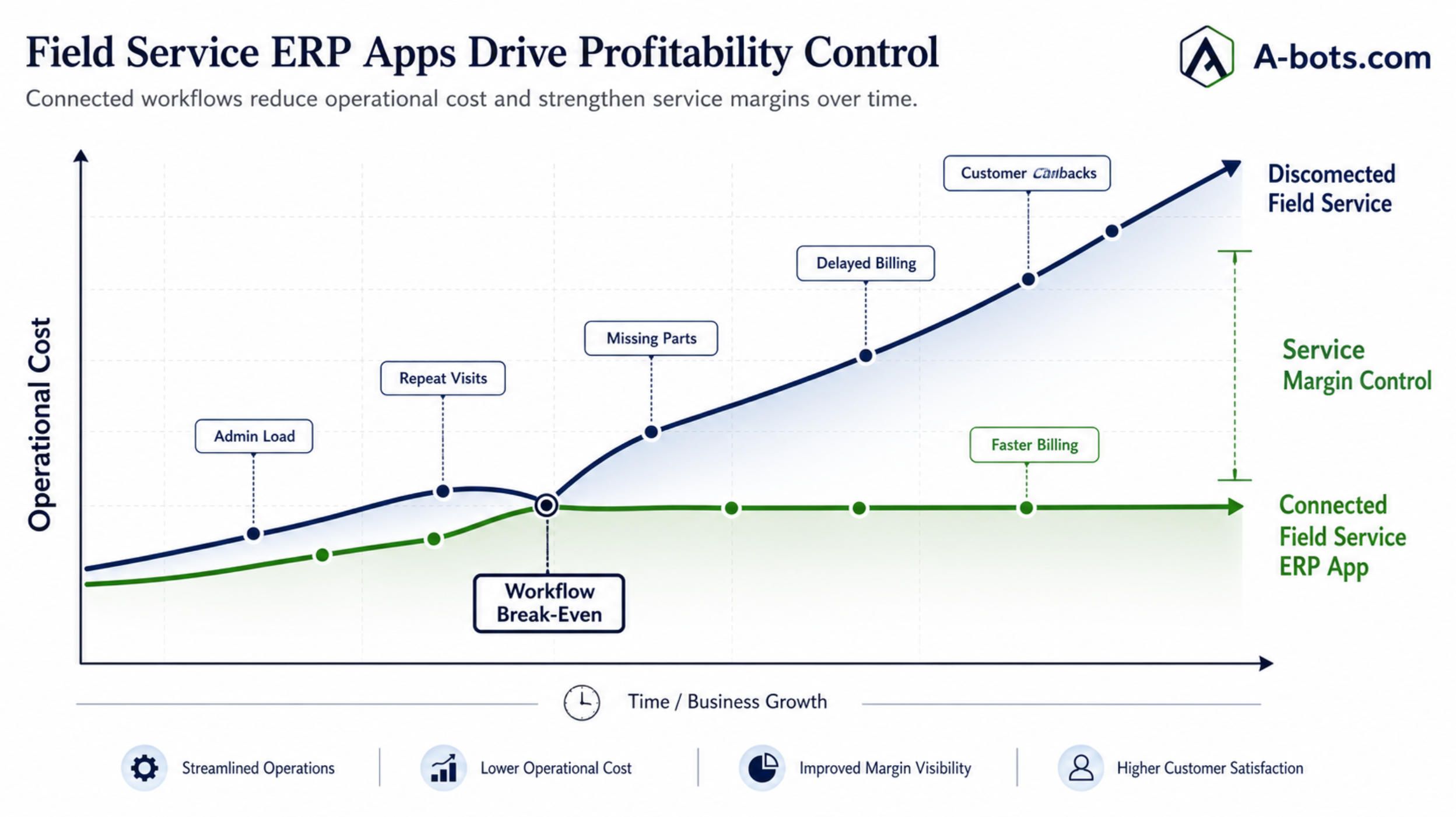
A service company can be fully booked and still lose money on jobs. A technician can be productive and still spend too much time on non-billable work. A dispatcher can fill the calendar and still create poor assignments. A customer can receive a completed repair while the company underbills parts, misses warranty recovery, delays invoicing, or fails to recommend preventive work.

Service profitability is not one metric. It is the result of many small operational truths arriving on time.

A field service ERP app helps make those truths visible. It can show whether a job required a second visit, whether parts were missing, whether the technician had to wait, whether the customer was not ready, whether the issue was warranty-related, whether the job exceeded estimated labor, whether an upsell opportunity existed, whether the asset has repeated failures, whether a contract is underpriced, and whether certain job types are structurally unprofitable.

This is where the article should be honest: an app does not magically fix a weak service business. It exposes the weak points faster.

That is exactly why good companies need it.

Without a connected field service layer, managers often see outcomes but not causes. Revenue is visible. Costs are partially visible. Complaints are visible. But the operational chain between them is blurred. Was the margin lost because of scheduling, diagnosis, parts, access, warranty rules, technician skill, travel time, customer delay, poor estimate, or missing documentation? If the company cannot answer that question, it cannot improve the business with precision.

A field service ERP app should make each job easier to understand as a business event.

Not just “completed.”
Completed on first visit.
Completed with planned parts.
Completed within SLA.
Completed with customer signature.
Completed with photos.
Completed with billable labor separated from warranty labor.
Completed with inventory updated.
Completed with invoice-ready data.
Completed with service history enriched.
Completed with margin visible.

That is the difference between operational activity and operational intelligence.

Salesforce’s research also points to another practical reason this matters: technicians are already overloaded by administrative work, and many believe AI can help them work more efficiently. (Salesforce) But AI will only help if the workflow is structured. If job data is messy, asset history is incomplete, parts usage is unreliable, and field notes are scattered, AI becomes a shiny layer over poor process. The foundation is still the field service data model.

That model should be designed deliberately.

For A-bots.com, this is where custom mobile app development becomes valuable. The goal is not to build a generic clone of ServiceTitan, Salesforce Field Service, SAP Field Service Management, or Dynamics 365 Field Service. The goal is to build the missing operational layer around the company’s real workflow: the way it assigns jobs, manages technicians, handles parts, works offline, prices service, documents proof, communicates with customers, and syncs with ERP.

Sometimes that means building a custom app on top of an existing ERP. Sometimes it means integrating with CRM, accounting, inventory, IoT platforms, and customer portals. Sometimes it means creating a lightweight mobile system for a mid-sized company that is not ready for a heavy enterprise FSM implementation. Sometimes it means replacing paper forms, spreadsheets, and messaging chaos with a controlled field execution app.

The commercial question is not, “Can we digitize field service?”

The better question is, “Where does our service margin disappear, and what workflow would stop it?”
field-service-profitability-control-graph.jpg

What a Custom Field Service ERP App Should Actually Include

A useful field service ERP app is not a random collection of features. It should be built around the roles that carry the workflow: dispatcher, technician, customer, manager, warehouse, finance, and sometimes equipment itself.

For the dispatcher, the app or web console should make planning decisions clearer. It should show jobs by urgency, SLA, location, technician skill, workload, parts availability, and customer priority. It should reduce phone calls and help the dispatcher see the consequences of each assignment. Dispatch is not just logistics; it is margin design.

For the technician, the mobile app should reduce uncertainty. A good technician does not need software that slows him down. He needs the right information at the right moment: where to go, what happened before, what asset is involved, what parts may be needed, what safety steps apply, what photos are required, what checklist must be completed, what the customer approved, and what to do if the job changes.

For the customer, the system should create confidence. Appointment confirmation, technician ETA, status updates, digital approval, service summary, photos, recommendations, and clear documentation all reduce anxiety. Customers rarely see the ERP. They judge the service company by communication, punctuality, transparency, and the feeling that someone is in control.

For management, the system should connect field activity to business performance. It should show first-time fix rate, repeat visits, SLA compliance, technician utilization, travel time, job margin, parts usage, warranty leakage, delayed invoicing, contract profitability, and recurring asset problems. These metrics should not appear as decorative dashboards. They should help managers change pricing, staffing, training, stock planning, contract terms, and preventive maintenance offers.

For finance and ERP, the app should deliver clean, structured, invoice-ready data. This may be the least glamorous part of the system, but it is one of the most important. Faster billing improves cash flow. Accurate parts usage protects inventory. Better work proof reduces disputes. Complete service history improves future diagnosis and customer retention.

The app should also respect the reality of field conditions. Offline mode is not optional for many industries. A technician may work in a basement, mechanical room, elevator shaft, rural facility, factory floor, hospital area, construction site, or metal-heavy industrial environment where connection is unreliable. If the app fails when the network fails, technicians will return to paper, photos, and messaging apps. Once that happens, the system loses trust.

Offline-first design means the technician can open assigned jobs, complete checklists, capture photos, log time, use parts, collect signatures, and close work even without stable internet. Sync should happen later with conflict handling, audit trails, and clear status. This is not a technical luxury. It is the difference between adoption and abandonment.

Security also matters because field service apps touch customer data, asset data, employee data, contracts, pricing, locations, photos, signatures, and sometimes regulated environments. Role-based access, device security, encrypted sync, audit logs, and careful API design are part of the product, not an afterthought.

The best field service ERP apps feel simple to users because the complexity has been solved in architecture.

The Industries That Should Care First

Not every business needs a custom field service ERP app immediately. But some companies reach the pain threshold faster than others.

HVAC and refrigeration companies feel the pressure because emergency work, seasonal spikes, parts availability, and technician scheduling collide constantly. Equipment repair companies feel it because asset history, diagnostics, warranties, and spare parts determine first-time fix rates. Industrial maintenance providers feel it because downtime is expensive and documentation matters. Facilities maintenance teams feel it because they coordinate many locations, subcontractors, approvals, and recurring tasks.

Machinery distributors and manufacturers with after-sales service may have the strongest strategic case. For them, field service is not just repair. It is the long tail of customer value after the original sale: installation, warranty, preventive maintenance, spare parts, upgrades, inspections, training, and replacement planning. A connected field service ERP app can turn installed equipment into a living service network.

That is also where IoT becomes meaningful. Sensors, fault codes, usage data, remote diagnostics, and predictive alerts can feed the service workflow. But again, the technology only matters if it reaches the technician, dispatcher, inventory system, customer record, and billing logic in a usable way.

A sensor alert that does not create a good work order is just noise.

A predictive model that does not know technician capacity is incomplete.

A mobile app that does not update ERP is another silo.

A customer portal that does not connect to dispatch is a prettier inbox.

The real advantage comes from connection.

Build the App Around the Moment Money Is Won or Lost

A field service ERP app should be designed around one central question: what must be true at the moment of work for this job to be completed profitably, safely, and credibly?

That question is much better than asking which features the app should include.

The answer will vary by company. One business may need strict checklists and compliance proof. Another may need van stock control. Another may need AI-assisted dispatch. Another may need customer approvals before extra work. Another may need offline work orders. Another may need ERP integration with invoices and spare parts. Another may need asset history and predictive maintenance. Another may need all of it, but in phases.

This is why custom development should begin with workflow discovery, not screen design.

A-bots.com can approach this kind of project by mapping the current service process from request to invoice, identifying where delays and margin leaks occur, and designing the mobile layer around those pressure points. The first release does not have to solve every future ambition. It should solve the most expensive operational breaks first.

A practical first version might include work orders, dispatch status, technician mobile execution, offline checklists, photos, parts used, customer signature, and ERP sync. The next layer might add route optimization, customer notifications, service history analytics, inventory forecasting, contract profitability, IoT alerts, or AI-assisted troubleshooting.

The key is to avoid building software that looks complete but does not change the business.

A field service ERP app succeeds when technicians actually use it, dispatchers trust it, customers feel informed, finance receives cleaner data, managers see service margin earlier, and ERP becomes closer to operational truth.

That is the whole point.

Not more screens.
Not more software.
Not another platform subscription for its own sake.

The purpose is to make field service visible, coordinated, accountable, and profitable while the work is still happening.

Because by the time the month is closed, the lost margin has already done its quiet little work.

✅ Hashtags

#FieldServiceERP
#MobileERP
#FieldServiceManagement
#CustomAppDevelopment
#TechnicianApp
#ERPIntegration
#ServiceOperations
#ABotsCom

Other articles

Precision Field Monitoring: Climate FieldView & CropX Review Reviews two leading tools for precision crop and field monitoring. The first half is a detailed, hands-on review of Climate FieldView, the Bayer data platform built around live planting maps, imagery, and variable-rate prescriptions, and CropX, the soil-intelligence system whose in-ground sensors report moisture, temperature, and conductivity by depth. It weighs features, mobile apps, pricing, and real user complaints for each. The second half maps the wider technology stack, the connectivity and integration gaps in off-the-shelf products, and where custom development or independent QA testing makes sense. It closes with how A-Bots.com builds tailored field-monitoring apps, IoT integrations, and tests existing platforms.

Precision Livestock Farming: Halter & CowManager Review Technical review of two precision livestock farming systems built on opposite design choices. Halter is a solar GPS collar that not only tracks cattle but steers them with directional audio, vibration, and a last-resort pulse, using satellite and LoRaWAN links and filtered GPS. CowManager is an ear sensor that fuses ear temperature with accelerometer behavior classification to flag illness, heat, and transition risk days early. The review weighs how each senses, decides, transmits, and acts, with real limits. The second half goes deeper into sensing modalities, rumen boluses, machine-learning trade-offs, and connectivity, then shows where A-Bots.com builds custom apps, firmware, and QA testing.

FMIS Review: John Deere Operations Center & Agworld Review of two farm management platforms built on opposite philosophies. John Deere Operations Center is a telematics-anchored hub: JDLink machine data, Work Planner, a REST and OAuth2 API across 150-plus partners, and dealer remote support, with the trade-offs of a single-vendor ecosystem. Agworld is a collaboration platform built on a shared, farmer-owned dataset, with standout offline-first mobile apps and integrated agronomy and financials. The review weighs how each ingests, stores, and shares data. The second half goes deep into the interoperability stack that decides whether data can move: ISOBUS, ISOXML, and AgGateway ADAPT, plus where A-Bots.com builds custom FMIS and QA testing.

Custom Agritech Development & QA Testing: Build vs Buy The capstone of a four-part agritech series. Across reviews of FieldView, CropX, Halter, CowManager, John Deere Operations Center, and Agworld, the same walls kept appearing: vendor lock-in, per-unit pricing that punishes scale, weak offline behavior, the integration tax of ISOBUS and ADAPT, and data nobody fully owns. This article turns those gaps into a build-versus-buy framework by operation scale, then shows the full stack A-Bots.com builds — device firmware, offline-first apps, interoperability layers, owned analytics — and the independent QA testing that hardens existing platforms. Custom agritech development, whole project or single module, plus testing of what you already run.

Custom Field Service App Development for HVAC, Equipment Repair, and Maintenance Companies Field service companies often do not lose money because they lack software. They lose it between disconnected systems: customer requests, dispatch, technician execution, parts availability, asset history, service proof, and back-office workflows. This article explains when off-the-shelf field service management software stops fitting HVAC, equipment repair, and maintenance companies, and why a custom mobile app can become the operational layer that connects the field with ERP, CRM, inventory, accounting, and customer communication. It also explores offline-first technician workflows, dispatcher visibility, parts logic, AI-assisted service operations, and the build-vs-buy decision.

Top stories

  • food delivery app development

    food ordering startups

    custom food ordering app

    food delivery startups

    Food Delivery and Food Ordering Mobile App Development

    A-Bots.com offers custom food delivery and food ordering mobile app development for startups and restaurants. From UI/UX to testing, we build scalable apps with real-time tracking, secure payments, and AI personalization.

  • apple watch for seniors

    iOS app development company

    apple watch healthcare apps

    watchOS app development

    senior apple watch app

    Apple Watch for Seniors: Custom Apps and Elder-Care Solutions

    Explore how Apple Watch for seniors transforms elder care. Learn how custom watchOS and iOS app development improves safety, health, and independence.

  • unitree G1 programming

    custom software for unitree G1

    humanoid robot

    unitree G1 control

    unitree G1 SDK

    Custom Unitree G1 Programming and Unitree G1 SDK App Development

    Bespoke Unitree G1 programming, SDK integrations and app development. A-Bots.com creates custom robotics software for advanced humanoid solutions.

  • drones show app development company

    app development for swarm of drones

    software development for drones show

    IoT app development company

    Swarm of Drones and Drones Show Software Development Company

    A-Bots.com is a drones show app development company delivering app development for swarm of drones: orchestration servers, ArduPilot Mission Planner workflows, operator-grade mobile apps, safety-first timing, and scalable IoT integrations.

  • farmer app development company

    agritech app development company

    bespoke agriculture application development

    agriculture app development company

    bespoke agro apps

    Farmer App Development Company - Smart Farming Apps and Integrations

    A-Bots.com - farmer app development company for offline-first smart farming apps. We integrate John Deere, FieldView & Trimble to deliver the best farmer apps and compliant farming applications in the US, Canada and EU.

  • counter-drone software

    drone detection and tracking

    LiDAR drone tracking

    AI counter drone (C-UAV)

    Counter-Drone (C-UAV) Visual Tracking and Trajectory Prediction

    Field-ready counter-drone perception: sensors, RGB-T fusion, edge AI, tracking, and short-horizon prediction - delivered as a production stack by A-Bots.com.

  • pet care application development

    custom pet-care app

    pet health app

    veterinary app integration

    litter box analytics

    Custom Pet Care App Development

    A-Bots.com is a mobile app development company delivering custom pet care app development with consent-led identity, behavior AI, offline-first routines, and seamless integrations with vets, insurers, microchips, and shelters.

  • agriculture mobile application developmen

    ISOBUS mobile integration

    smart farming mobile app

    precision farming app

    Real-Time Agronomic Insights through IoT-Driven Mobile Analytics

    Learn how edge-AI, cloud pipelines and mobile UX transform raw farm telemetry into real-time, actionable maps—powered by A-Bots.com’s agriculture mobile application development expertise.

  • ge predix platform

    industrial iot platform

    custom iot app development

    industrial iot solutions

    industrial edge analytics

    predictive maintenance software

    GE Predix Platform and Industrial IoT App Development

    Discover how GE Predix Platform and custom apps from A-Bots.com enable real-time analytics, asset performance management, and scalable industrial IoT solutions.

  • industrial iot solutions

    industrial iot development

    industrial edge computing

    iot app development

    Industrial IoT Solutions at Scale: Secure Edge-to-Cloud with A-Bots.com

    Discover how A-Bots.com engineers secure, zero-trust industrial IoT solutions— from rugged edge gateways to cloud analytics— unlocking real-time efficiency, uptime and compliance.

  • eBike App Development Company

    custom ebike app development

    ebike IoT development

    ebike OEM app solution

    ebike mobile app

    Sensor-Fusion eBike App Development Company

    Unlock next-gen riding experiences with A-Bots.com: a sensor-centric eBike app development company delivering adaptive pedal-assist, predictive maintenance and cloud dashboards for global OEMs.

  • pet care app development company

    pet hotel CRM

    pet hotel IoT

    pet hotel app

    Pet Hotel App Development

    Discover how A-Bots.com, a leading pet care app development company, builds full-stack mobile and CRM solutions that automate booking, feeding, video, and revenue for modern pet hotels.

  • DoorDash drone delivery

    Wing drone partnership

    drone delivery service

    build drone delivery app

    drone delivery software development

    Explore Wing’s and DoorDash drone delivery

    From sub-15-minute drops to FAA-grade safety, we unpack DoorDash’s drone playbook—and show why software, not rotors, will decide who owns the sky.

  • drone mapping software

    adaptive sensor-fusion mapping

    custom drone mapping development

    edge AI drone processing

    Drone Mapping and Sensor Fusion

    Explore today’s photogrammetry - LiDAR landscape and the new Adaptive Sensor-Fusion Mapping method- see how A-Bots.com turns flight data into live, gap-free maps.

  • Otter AI transcription

    Otter voice meeting notes

    Otter audio to text

    Otter voice to text

    voice to text AI

    Otter.ai Transcription and Voice Notes

    Deep guide to Otter.ai transcription, voice meeting notes, and audio to text. Best practices, automation, integration, and how A-Bots.com can build your custom AI.

  • How to use Wiz AI

    Wiz AI voice campaign

    Wiz AI CRM integration

    Smart trigger chatbot Wiz AI

    Wiz AI Chat Bot: Hands-On Guide to Voice Automation

    Master the Wiz AI chat bot: from setup to smart triggers, multilingual flows, and human-sounding voice UX. Expert guide for CX teams and product owners.

  • Tome AI Review

    Enterprise AI

    CRM

    Tome AI Deep Dive Review

    Explore Tome AI’s architecture, workflows and EU-ready compliance. Learn how generative decks cut prep time, boost sales velocity and where A-Bots.com adds AI chatbot value.

  • Wiz.ai

    Voice Conversational AI

    Voice AI

    Inside Wiz.ai: Voice-First Conversational AI in SEA

    Explore Wiz.ai’s rise from Singapore startup to regional heavyweight, its voice-first tech stack, KPIs, and lessons shaping next-gen conversational AI.

  • TheLevel.AI

    CX-Intelligence Platforms

    Bespoke conversation-intelligence stacks

    Level AI

    Contact Center AI

    Beyond Level AI: How A-Bots.com Builds Custom CX-Intelligence Platforms

    Unlock Level AI’s secrets and see how A-Bots.com engineers bespoke conversation-intelligence stacks that slash QA costs, meet tight compliance rules, and elevate customer experience.

  • Offline AI Assistant

    AI App Development

    On Device LLM

    AI Without Internet

    Offline AI Assistant Guide - Build On-Device LLMs with A-Bots

    Discover why offline AI assistants beat cloud chatbots on privacy, latency and cost—and how A-Bots.com ships a 4 GB Llama-3 app to stores in 12 weeks.

  • Drone Mapping Software

    UAV Mapping Software

    Mapping Software For Drones

    Pix4Dmapper (Pix4D)

    DroneDeploy (DroneDeploy Inc.)

    DJI Terra (DJI Enterprise)

    Agisoft Metashape 1.9 (Agisoft)

    Bentley ContextCapture (Bentley Systems)

    Propeller Pioneer (Propeller Aero)

    Esri Site Scan (Esri)

    Drone Mapping Software (UAV Mapping Software): 2025 Guide

    Discover the definitive 2025 playbook for deploying drone mapping software & UAV mapping software at enterprise scale—covering mission planning, QA workflows, compliance and data governance.

  • App for DJI

    Custom app for Dji drones

    Mapping Solutions

    Custom Flight Control

    app development for dji drone

    App for DJI Drone: Custom Flight Control and Mapping Solutions

    Discover how a tailor‑made app for DJI drone turns Mini 4 Pro, Mavic 3 Enterprise and Matrice 350 RTK flights into automated, real‑time, BVLOS‑ready data workflows.

  • Chips Promo App

    Snacks Promo App

    Mobile App Development

    AR Marketing

    Snack‑to‑Stardom App: Gamified Promo for Chips and Snacks

    Learn how A‑Bots.com's gamified app turns snack fans into streamers with AR quests, guaranteed prizes and live engagement—boosting sales and first‑party data.

  • Mobile Apps for Baby Monitor

    Cry Detection

    Sleep Analytics

    Parent Tech

    AI Baby Monitor

    Custom Mobile Apps for AI Baby Monitors | Cry Detection, Sleep Analytics and Peace-of-Mind

    Turn your AI baby monitor into a trusted sleep-wellness platform. A-Bots.com builds custom mobile apps with real-time cry detection, sleep analytics, and HIPAA-ready cloud security—giving parents peace of mind and brands recurring revenue.

  • wine app

    Mobile App for Wine Cabinets

    custom wine fridge app

    Custom Mobile App Development for Smart Wine Cabinets: Elevate Your Connected Wine Experience

    Discover how custom mobile apps transform smart wine cabinets into premium, connected experiences for collectors, restaurants, and luxury brands.

  • agriculture mobile application

    farmers mobile app

    smart phone apps in agriculture

    Custom Agriculture App Development for Farmers

    Build a mobile app for your farm with A-Bots.com. Custom tools for crop, livestock, and equipment management — developed by and for modern farmers.

  • IoT

    Smart Home

    technology

    Internet of Things and the Smart Home

    Internet of Things (IoT) and the Smart Home: The Future is Here

  • IOT

    IIoT

    IAM

    AIoT

    AgriTech

    Today, the Internet of Things (IoT) is actively developing, and many solutions are already being used in various industries.

    Today, the Internet of Things (IoT) is actively developing, and many solutions are already being used in various industries.

  • IOT

    Smart Homes

    Industrial IoT

    Security and Privacy

    Healthcare and Medicine

    The Future of the Internet of Things (IoT)

    The Future of the Internet of Things (IoT)

  • IoT

    Future

    Internet of Things

    A Brief History IoT

    A Brief History of the Internet of Things (IoT)

  • Future Prospects

    IoT

    drones

    IoT and Modern Drones: Synergy of Technologies

    IoT and Modern Drones: Synergy of Technologies

  • Drones

    Artificial Intelligence

    technologi

    Inventions that Enabled the Creation of Modern Drones

    Inventions that Enabled the Creation of Modern Drones

  • Water Drones

    Drones

    Technological Advancements

    Water Drones: New Horizons for Researchers

    Water Drones: New Horizons for Researchers

  • IoT

    IoT in Agriculture

    Applying IoT in Agriculture: Smart Farming Systems for Increased Yield and Sustainability

    Explore the transformative impact of IoT in agriculture with our article on 'Applying IoT in Agriculture: Smart Farming Systems for Increased Yield and Sustainability.' Discover how smart farming technologies are revolutionizing resource management, enhancing crop yields, and fostering sustainable practices for a greener future.

  • Bing

    Advertising

    How to set up contextual advertising in Bing

    Unlock the secrets of effective digital marketing with our comprehensive guide on setting up contextual advertising in Bing. Learn step-by-step strategies to optimize your campaigns, reach a diverse audience, and elevate your online presence beyond traditional platforms.

  • mobile application

    app market

    What is the best way to choose a mobile application?

    Unlock the secrets to navigating the mobile app jungle with our insightful guide, "What is the Best Way to Choose a Mobile Application?" Explore expert tips on defining needs, evaluating security, and optimizing user experience to make informed choices in the ever-expanding world of mobile applications.

  • Mobile app

    Mobile app development company

    Mobile app development company in France

    Elevate your digital presence with our top-tier mobile app development services in France, where innovation meets expertise to bring your ideas to life on every mobile device.

  • Bounce Rate

    Mobile Optimization

    The Narrative of Swift Bounces

    What is bounce rate, what is a good bounce rate—and how to reduce yours

    Uncover the nuances of bounce rate, discover the benchmarks for a good rate, and learn effective strategies to trim down yours in this comprehensive guide on optimizing user engagement in the digital realm.

  • IoT

    technologies

    The Development of Internet of Things (IoT): Prospects and Achievements

    The Development of Internet of Things (IoT): Prospects and Achievements

  • Bots

    Smart Contracts

    Busines

    Bots and Smart Contracts: Revolutionizing Business

    Modern businesses constantly face challenges and opportunities presented by new technologies. Two such innovative tools that are gaining increasing attention are bots and smart contracts. Bots, or software robots, and blockchain-based smart contracts offer unique opportunities for automating business processes, optimizing operations, and improving customer interactions. In this article, we will explore how the use of bots and smart contracts can revolutionize the modern business landscape.

  • No-Code

    No-Code solutions

    IT industry

    No-Code Solutions: A Breakthrough in the IT World

    No-Code Solutions: A Breakthrough in the IT World In recent years, information technology (IT) has continued to evolve, offering new and innovative ways to create applications and software. One key trend that has gained significant popularity is the use of No-Code solutions. The No-Code approach enables individuals without technical expertise to create functional and user-friendly applications using ready-made tools and components. In this article, we will explore the modern No-Code solutions currently available in the IT field.

  • Support

    Department Assistants

    Bot

    Boosting Customer Satisfaction with Bot Support Department Assistants

    In today's fast-paced digital world, businesses strive to deliver exceptional customer support experiences. One emerging solution to streamline customer service operations and enhance user satisfaction is the use of bot support department assistants.

  • IoT

    healthcare

    transportation

    manufacturing

    Smart home

    IoT have changed our world

    The Internet of Things (IoT) is a technology that connects physical devices with smartphones, PCs, and other devices over the Internet. This allows devices to collect, process and exchange data without the need for human intervention. New technological solutions built on IoT have changed our world, making our life easier and better in various areas. One of the important changes that the IoT has brought to our world is the healthcare industry. IoT devices are used in medical devices such as heart rate monitors, insulin pumps, and other medical devices. This allows patients to take control of their health, prevent disease, and provide faster and more accurate diagnosis and treatment. Another important area where the IoT has changed our world is transportation. IoT technologies are being used in cars to improve road safety. Systems such as automatic braking and collision alert help prevent accidents. In addition, IoT is also being used to optimize the flow of traffic, manage vehicles, and create smart cities. IoT solutions are also of great importance to the industry. In the field of manufacturing, IoT is used for data collection and analysis, quality control and efficiency improvement. Thanks to the IoT, manufacturing processes have become more automated and intelligent, resulting in increased productivity, reduced costs and improved product quality. Finally, the IoT has also changed our daily lives. Smart homes equipped with IoT devices allow people to control and manage their homes using mobile apps. Devices such as smart thermostats and security systems, vacuum cleaners and others help to increase the level of comfort

  • tourism

    Mobile applications for tourism

    app

    Mobile applications in tourism

    Mobile applications have become an essential tool for travelers to plan their trips, make reservations, and explore destinations. In the tourism industry, mobile applications are increasingly being used to improve the travel experience and provide personalized services to travelers. Mobile applications for tourism offer a range of features, including destination information, booking and reservation services, interactive maps, travel guides, and reviews of hotels, restaurants, and attractions. These apps are designed to cater to the needs of different types of travelers, from budget backpackers to luxury tourists. One of the most significant benefits of mobile applications for tourism is that they enable travelers to access information and services quickly and conveniently. For example, travelers can use mobile apps to find flights, hotels, and activities that suit their preferences and budget. They can also access real-time information on weather, traffic, and local events, allowing them to plan their itinerary and make adjustments on the fly. Mobile applications for tourism also provide a more personalized experience for travelers. Many apps use algorithms to recommend activities, restaurants, and attractions based on the traveler's interests and previous activities. This feature is particularly useful for travelers who are unfamiliar with a destination and want to explore it in a way that matches their preferences. Another benefit of mobile applications for tourism is that they can help travelers save money. Many apps offer discounts, deals, and loyalty programs that allow travelers to save on flights, hotels, and activities. This feature is especially beneficial for budget travelers who are looking to get the most value for their money. Mobile applications for tourism also provide a platform for travelers to share their experiences and recommendations with others. Many apps allow travelers to write reviews, rate attractions, and share photos and videos of their trips. This user-generated content is a valuable resource for other travelers who are planning their trips and looking for recommendations. Despite the benefits of mobile applications for tourism, there are some challenges that need to be addressed. One of the most significant challenges is ensuring the security and privacy of travelers' data. Travelers need to be confident that their personal and financial information is safe when using mobile apps. In conclusion, mobile applications have become an essential tool for travelers, and their use in the tourism industry is growing rapidly. With their ability to provide personalized services, real-time information, and cost-saving options, mobile apps are changing the way travelers plan and experience their trips. As technology continues to advance, we can expect to see even more innovative and useful mobile applications for tourism in the future.

  • Mobile applications

    logistics

    logistics processes

    mobile app

    Mobile applications in logistics

    In today's world, the use of mobile applications in logistics is becoming increasingly common. Mobile applications provide companies with new opportunities to manage and optimize logistics processes, increase productivity, and improve customer service. In this article, we will discuss the benefits of mobile applications in logistics and how they can help your company. Optimizing Logistics Processes: Mobile applications allow logistics companies to manage their processes more efficiently. They can be used to track shipments, manage inventory, manage transportation, and manage orders. Mobile applications also allow on-site employees to quickly receive information about shipments and orders, improving communication between departments and reducing time spent on completing tasks. Increasing Productivity: Mobile applications can also help increase employee productivity. They can be used to automate routine tasks, such as filling out reports and checking inventory. This allows employees to focus on more important tasks, such as processing orders and serving customers. Improving Customer Service: Mobile applications can also help improve the quality of customer service. They allow customers to track the status of their orders and receive information about delivery. This improves transparency and reliability in the delivery process, leading to increased customer satisfaction and repeat business. Conclusion: Mobile applications are becoming increasingly important for logistics companies. They allow you to optimize logistics processes, increase employee productivity, and improve the quality of customer service. If you're not already using mobile applications in your logistics company, we recommend that you pay attention to them and start experimenting with their use. They have the potential to revolutionize the way you manage your logistics operations and provide better service to your customers.

  • Mobile applications

    businesses

    mobile applications in business

    mobile app

    Mobile applications on businesses

    Mobile applications have become an integral part of our lives and have an impact on businesses. They allow companies to be closer to their customers by providing them with access to information and services anytime, anywhere. One of the key applications of mobile applications in business is the implementation of mobile commerce. Applications allow customers to easily and quickly place orders, pay for goods and services, and track their delivery. This improves customer convenience and increases sales opportunities.

  • business partner

    IT company

    IT solutions

    IT companies are becoming an increasingly important business partner

    IT companies are becoming an increasingly important business partner, so it is important to know how to build an effective partnership with an IT company. 1. Define your business goals. Before starting cooperation with an IT company, it is important to define your business goals and understand how IT solutions can help you achieve them. 2. Choose a trusted partner. Finding a reliable and experienced IT partner can take a lot of time, but it is essential for a successful collaboration. Pay attention to customer reviews and projects that the company has completed. 3. Create an overall work plan. Once you have chosen an IT company, it is important to create an overall work plan to ensure effective communication and meeting deadlines.

  • Augmented reality

    AR

    visualization

    business

    Augmented Reality

    Augmented Reality (AR) can be used for various types of businesses. It can be used to improve education and training, provide better customer service, improve production and service efficiency, increase sales and marketing, and more. In particular, AR promotes information visualization, allowing users to visually see the connection between the virtual and real world and gain a deeper understanding of the situation. Augmented reality can be used to improve learning and training based on information visualization and provide a more interactive experience. For example, in medicine, AR can be used to educate students and doctors by helping them visualize and understand anatomy and disease. In business, the use of AR can improve production and service efficiency. For example, the use of AR can help instruct and educate employees in manufacturing, helping them learn new processes and solve problems faster and more efficiently. AR can also be used in marketing and sales. For example, the use of AR can help consumers visualize and experience products before purchasing them.

  • Minimum Viable Product

    MVP

    development

    mobile app

    Minimum Viable Product

    A Minimum Viable Product (MVP) is a development approach where a new product is launched with a limited set of features that are sufficient to satisfy early adopters. The MVP is used to validate the product's core assumptions and gather feedback from the market. This feedback can then be used to guide further development and make informed decisions about which features to add or remove. For a mobile app, an MVP can be a stripped-down version of the final product that includes only the most essential features. This approach allows developers to test the app's core functionality and gather feedback from users before investing a lot of time and resources into building out the full app. An MVP for a mobile app should include the core functionality that is necessary for the app to provide value to the user. This might include key features such as user registration, search functionality, or the ability to view and interact with content. It should also have a good UI/UX that are easy to understand and use. By launching an MVP, developers can quickly gauge user interest and feedback to make data-driven decisions about which features to prioritize in the full version of the app. Additionally, MVP approach can allow quicker time to market and start to gather user engagement. There are several benefits to using the MVP approach for a mobile app for a company: 1 Validate assumptions: By launching an MVP, companies can validate their assumptions about what features and functionality will be most valuable to their target market. Gathering user feedback during the MVP phase can help a company make informed decisions about which features to prioritize in the full version of the app. 2 Faster time to market: Developing an MVP allows a company to launch their app quickly and start gathering user engagement and feedback sooner, rather than spending months or even years developing a full-featured app. This can give a company a competitive advantage in the market. 3 Reduced development costs: By focusing on the most essential features, an MVP can be developed with a smaller budget and with less time than a full version of the app. This can help a company save money and resources. 4 Minimize the risk: MVP allows to test the market and customer interest before spending a large amount of resources on the app. It can help to minimize risk of a failure by testing the idea and gathering feedback before moving forward with a full-featured version. 5 Better understanding of user needs: Building MVP can also help a company to understand the customer's real needs, behaviors and preferences, with this knowledge the company can create a much more effective and efficient final product. Overall, the MVP approach can provide a cost-effective way for a company to validate their product idea, gather user feedback, and make informed decisions about the development of their mobile app.

  • IoT

    AI

    Internet of Things

    Artificial Intelligence

    IoT (Internet of Things) and AI (Artificial Intelligence)

    IoT (Internet of Things) and AI (Artificial Intelligence) are two technologies that are actively developing at present and have enormous potential. Both technologies can work together to improve the operation of various systems and devices, provide more efficient resource management and provide new opportunities for business and society. IoT allows devices to exchange data and interact with each other through the internet. This opens up a multitude of possibilities for improving efficiency and automating various systems. With IoT, it is possible to track the condition of equipment, manage energy consumption, monitor inventory levels and much more. AI, on the other hand, allows for the processing of large amounts of data and decision-making based on that data. This makes it very useful for analyzing data obtained from IoT devices. For example, AI can analyze data on the operation of equipment and predict potential failures, which can prevent unexpected downtime and reduce maintenance costs. AI can also be used to improve the efficiency of energy, transportation, healthcare and other systems. In addition, IoT and AI can be used together to create smart cities. For example, using IoT devices, data can be collected on the environment and the behavior of people in the city. This data can be analyzed using AI to optimize the operation of the city's infrastructure, improve the transportation system, increase energy efficiency, etc. IoT and AI can also be used to improve safety in the city, for example, through the use of AI-analyzed video surveillance systems. In general, IoT and AI are two technologies that can work together to improve the operation of various systems and devices, as well as create new opportunities for business and society. In the future, and especially in 2023, the use of IoT and AI is expected to increase significantly, bringing even more benefits and possibilities.

Estimate project

Keep up with the times and automate your business processes with bots.

Estimate project

Copyright © Alpha Systems LTD All rights reserved.
Made with ❤️ by A-BOTS

EN