Home
Services
About us
Blog
Contacts
Equipment Rental App Development: Availability, Delivery, Inspections, Damage Claims, and Customer Portal in One Workflow
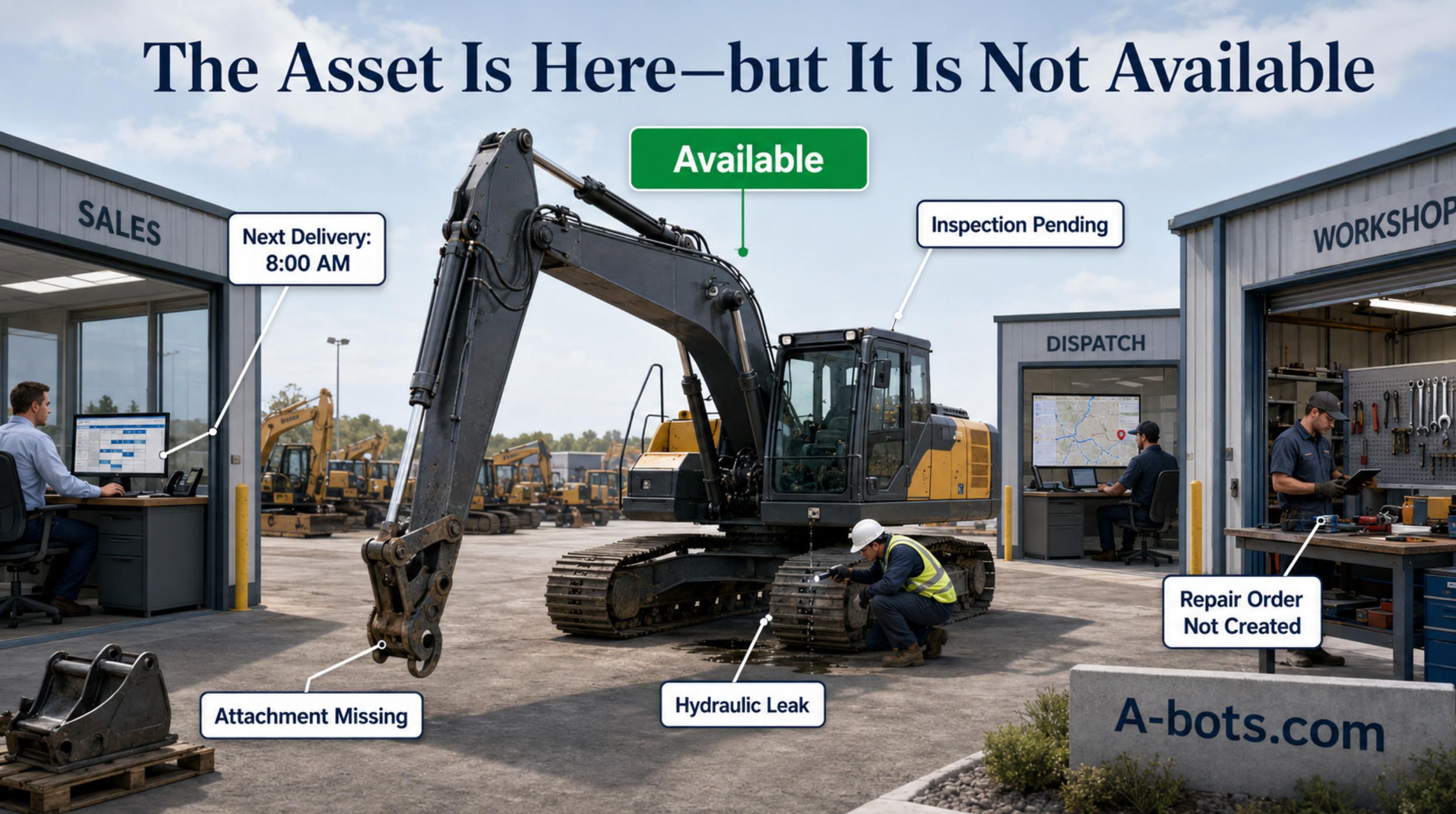
The excavator is standing in the yard. Sales can see it. The booking system can reserve it. A customer has already been promised delivery tomorrow morning. Yet the machine is not available. It returned after hours, nobody completed the incoming inspection, and a hydraulic leak was discovered only when the driver started loading it. The rental company owns the asset, knows its location, and has it marked as available—and still cannot rent it. This is the central problem an equipment rental app must solve: not showing where equipment is, but establishing whether it is commercially, technically, and operationally ready for its next job.
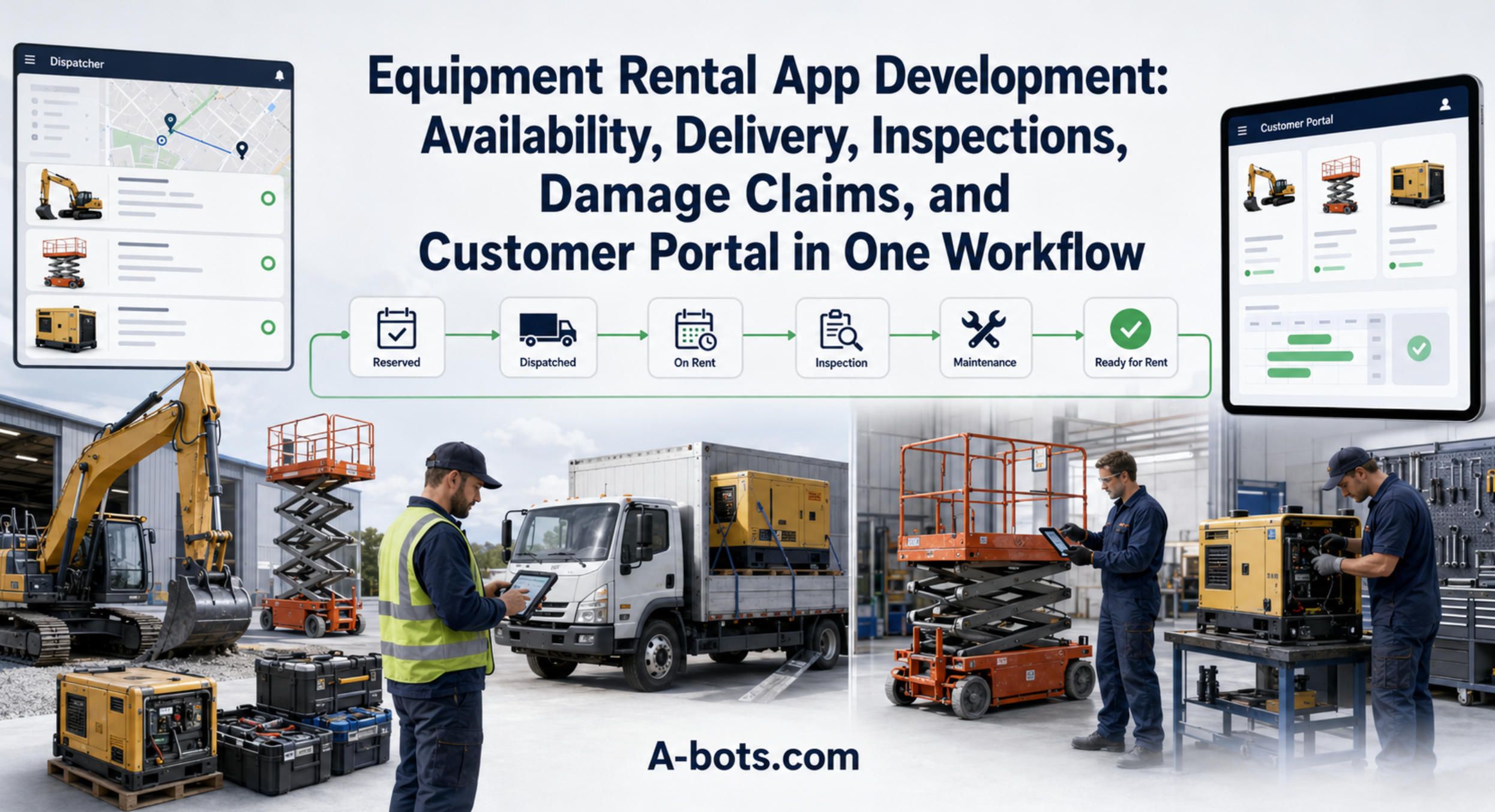
The equipment rental industry does not suffer from a lack of software. There are established rental management platforms, accounting systems, telematics portals, route-planning tools, inspection products, spreadsheets, and countless WhatsApp conversations holding the business together.
The problem is that these systems often describe different versions of the same asset.
The rental system says the unit is due back at 4:00 p.m. The customer requested an extension by email. The dispatcher knows that collection has moved to tomorrow. The driver has the revised address in a text message. The telematics portal shows that the machine is still operating. The workshop has no information about a reported fault. Meanwhile, the sales team sees an available unit and confirms another order.
Every individual system may be working as designed. The workflow is still broken.
This is why equipment rental app development should not begin with a feature list. It should begin with a more difficult question:
What must be true before the company can confidently promise a specific asset to the next customer?
The answer leads far beyond online booking. It involves availability forecasting, asset allocation, delivery, collection, inspections, damage evidence, maintenance, branch transfers, contract events, customer communication, and financial reconciliation. A useful rental application connects these events into one controlled asset lifecycle.
The Rental Market Is Growing, but Operational Waste Is Becoming More Expensive
According to the American Rental Association’s May 2026 forecast, combined U.S. construction and industrial equipment and general tool rental revenue is projected to increase by 3.6% in 2026, reaching $83.5 billion. The outlook remains positive, but it also reflects a market in which operators cannot rely on exceptional growth to conceal inefficient processes. (constructionbusinessowner.com)
When demand grows rapidly, a rental company can sometimes compensate for weak operations by purchasing more equipment, adding staff, or accepting costly branch transfers. As growth moderates and capital remains expensive, the economics change. Profit must increasingly come from making the existing fleet more productive.
That does not mean maximizing utilization at any cost. A fleet operating close to full capacity can still be unprofitable if equipment returns late, inspections are delayed, delivery costs are uncontrolled, damage cannot be recovered, and emergency substitutions consume the margin.
The more useful objective is profitable availability: having the right equipment, in the right condition and configuration, ready at a time and location that the company can reliably promise.
This shifts the digital conversation away from “Do we have a mobile app?” toward operational questions:
- How many rentable days disappear between return and the next booking?
- How often does the company promise equipment that is not genuinely ready?
- How much damage is absorbed because evidence is incomplete?
- How much usage occurs outside the agreed contract?
- How many calls are required to coordinate one delivery, extension, breakdown, or collection?
These are not software metrics. They are margin questions that software can help answer.
Availability Is Not a Status. It Is a Prediction
Many rental systems represent availability as if it were a binary property: available or unavailable. Real operations are less obedient.
An asset may be physically present but reserved for another customer. It may be on the wash pad, waiting for fuel, missing an attachment, blocked by a safety defect, awaiting a replacement part, or scheduled for transfer to another branch. A machine can also be shown as out on rent even though it has been collected and is already undergoing inspection.
This makes availability a time-dependent prediction:
A specific asset of the required class and configuration will be technically ready, legally compliant, commercially assignable, and logistically deliverable at the promised place and time.
Producing that prediction requires more than counting inventory. The application must understand current contracts, future reservations, expected returns, extension requests, collection schedules, inspection duration, maintenance restrictions, transport capacity, branch location, accessories, certifications, and substitute units.
Consider a scissor lift due back on Monday afternoon and booked again for Tuesday morning. On a calendar, the schedule appears valid. Operationally, it may be impossible. The unit still has to be collected, transported, unloaded, inspected, charged, cleaned, and prepared. If damage is found, the next rental may fail before the workshop has even opened a repair order.
A conventional booking calendar sees the end of one contract and the beginning of another. A mature rental workflow sees the uncertain process between them.
That difference is where many expensive promises are made.
The Invisible Business Between Two Rental Contracts
A rental contract has clear commercial boundaries. The asset lifecycle does not.
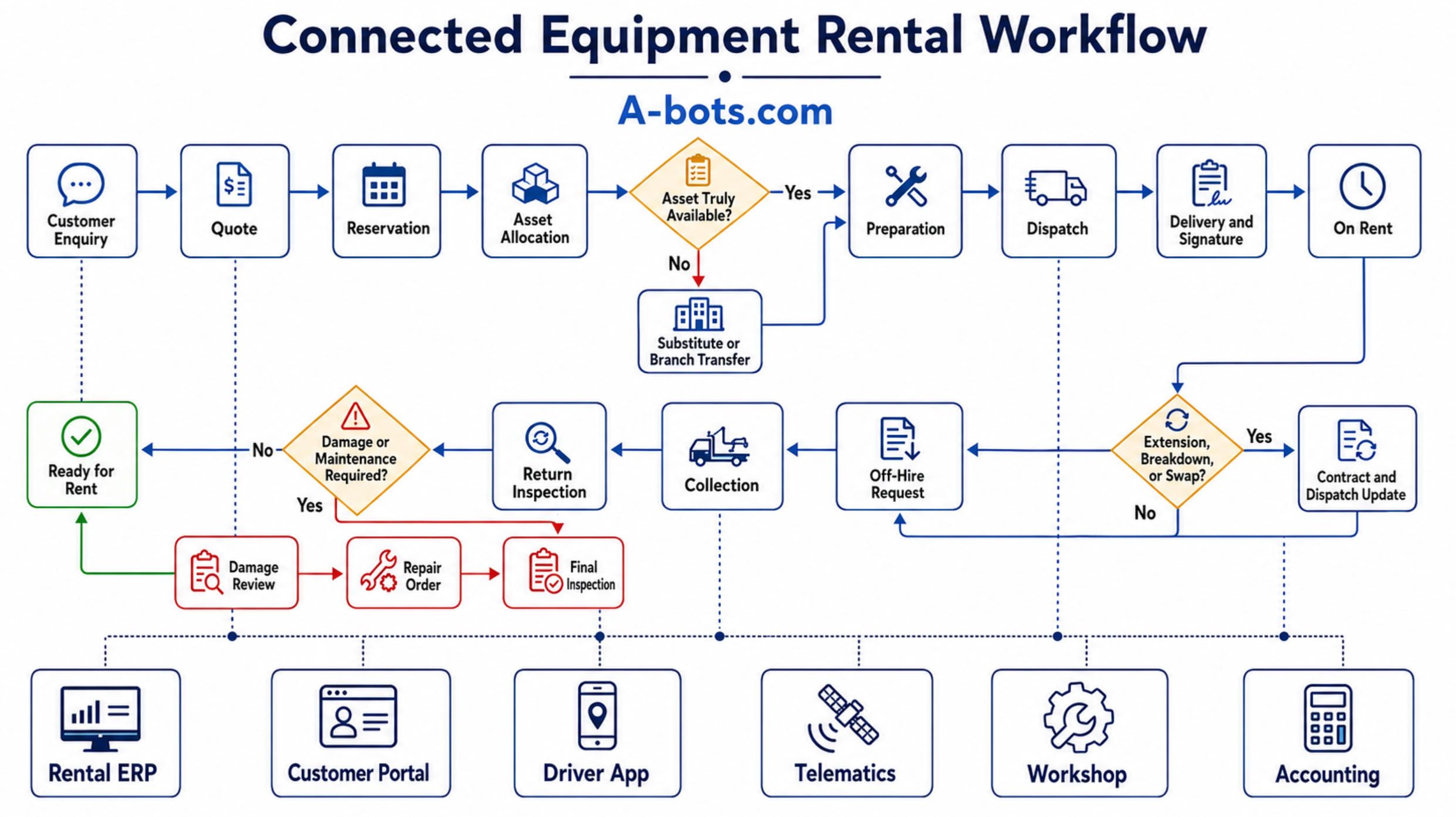
Between an enquiry and the next invoice, equipment passes through a sequence of operational states:
Enquiry → Quote → Reservation → Asset Allocation → Preparation → Dispatch → Delivery → On Rent → Extension, Swap, or Breakdown → Off-Hire Request → Collection → Return → Inspection → Damage Review → Maintenance → Ready for Rent
The application’s purpose is not merely to display these states. It must control how an asset moves between them.
For example, a returned generator should not become ready for rent merely because a yard employee scanned it through the gate. Readiness may require an incoming inspection, fuel measurement, load testing, cleaning, cable verification, and confirmation that no repair order remains open.
Similarly, an aerial work platform should not be released if a required inspection has not been recorded, a safety-critical fault is unresolved, or a certificate has expired. A tool kit should not be marked complete until every serialized or quantity-tracked component has been scanned.
This is a state-management problem. Each transition should have rules, required evidence, ownership, and an auditable timestamp.
A company that records only the current status loses the history needed to understand delays. If the database now says “Ready,” management cannot determine whether the asset spent two hours or three days waiting for inspection. It cannot see whether the delay occurred in transport, the yard, damage approval, parts procurement, or final quality control.
A properly designed application retains the event trail:
Asset + Contract + Event + Previous State + New State + User + Time + Location + Evidence
This event model creates something more valuable than another dashboard. It creates a defensible operational history.
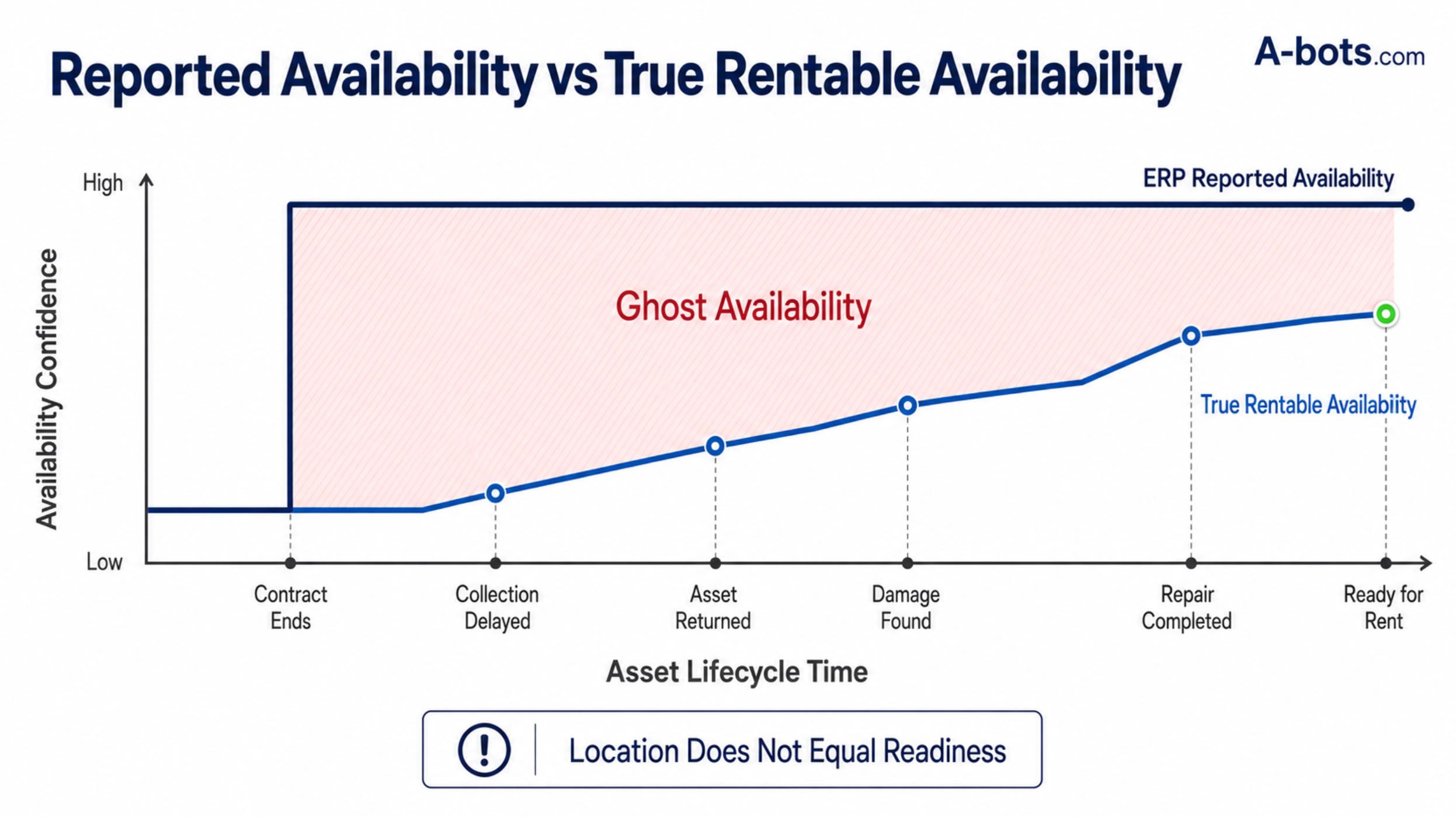
Ghost Availability: When the System Promises an Asset That Operations Cannot Deliver
One of the most damaging rental problems is ghost availability: inventory that appears rentable in software but cannot fulfil the promised order.
Ghost availability is rarely caused by one dramatic failure. It emerges from small delays and disconnected decisions.
A customer keeps a machine for another day, but the extension remains in an email. A driver cannot complete the collection, but the dispatch plan is not synchronized with the rental system. A returned unit requires repair, but the workshop records the defect on paper. An attachment is left at the customer’s site, while the base machine is checked back in. A branch transfer is discussed by phone but not reflected in future allocation.
The sales team is then placed in an impossible position. It is expected to sell confidently using data that does not represent reality.
The cost appears later as an emergency response: sourcing a substitute unit, moving equipment between branches, paying overtime, delaying delivery, discounting the order, or subrenting from a competitor. These costs are often recorded separately, so the original availability failure remains invisible.
A stronger application does not simply show more data. It calculates an availability confidence based on the unresolved conditions around the asset.
A machine due back but not yet collected should carry a different level of certainty from one already inspected and ready in the yard. An asset waiting for a commonly stocked consumable is different from one awaiting a backordered hydraulic component. A transfer that has been scheduled but not dispatched should not be treated as completed inventory.
This allows sales to make informed commitments instead of optimistic guesses.
Turnaround Time Is a Revenue Metric
For many rental businesses, the most neglected period is the interval between physical return and commercial readiness.
Suppose a machine returns at 5:30 p.m. on Monday. It is inspected late Tuesday afternoon. Damage approval is requested Wednesday morning. The workshop receives authorization on Thursday, discovers that a required part was never ordered, and completes the repair the following Monday.
The repair itself may require only two technician hours. The asset nevertheless loses almost a week of rentability.
Traditional reporting may classify the entire period as “maintenance.” That description is too crude to guide improvement. The delay actually consists of inspection latency, approval latency, parts latency, repair time, and final release.
An equipment rental app should expose those intervals separately. It should notify the responsible role when an asset remains in a transitional state beyond its permitted time. The manager should not have to discover on Friday that a high-demand machine has been waiting for inspection since Tuesday.
This is also why the return workflow should start before equipment reaches the yard. When a customer submits an off-hire request, the system can begin planning collection. When the driver records visible damage at the customer’s site, the workshop can prepare before the asset arrives. When telematics provides current engine hours, the system can identify an approaching service requirement in advance.
The objective is not to push staff faster. It is to remove waiting time caused by missing information and ambiguous ownership.
Delivery Is Part of Inventory Control
Rental delivery is often managed as a transport function separate from inventory. Operationally, the two cannot be separated.
An asset is not successfully rented when it leaves the yard. It is successfully rented when the correct equipment, attachments, documents, and condition evidence reach the correct site and are accepted by an authorized person.
A driver application must therefore do more than provide navigation. It should guide the handover:
- confirm the asset and all accessories by scan;
- present delivery-specific instructions and site restrictions;
- record arrival, location, condition, meter readings, and fuel;
- collect photographs and a signature;
- document refusal, absence, access problems, or partial delivery;
- operate offline when the site has poor connectivity.
The return journey requires similar control. A collection task should identify what must come back, not merely where the driver should go. If a machine was rented with two buckets, a charger, cables, barriers, or a trailer, the driver needs a verifiable collection manifest.
Without this connection, equipment can become technically “returned” while commercially valuable components remain on site. The rental company then discovers the shortage only when preparing the next order.
The same logic applies to multi-location operations. A unit may belong to one branch, be returned to another, and already be promised to a third. The application must distinguish physical location, owning location, commercial allocation, and next destination. Treating them as one field creates misleading availability.
Inspections Must Produce Evidence, Not Paperwork
A generic digital checklist is only a modest improvement over paper. A useful inspection workflow adapts to the asset, rental stage, employee role, and observed condition.
The outgoing inspection establishes the condition at handover. The incoming inspection identifies change. A maintenance inspection evaluates technical readiness. A safety inspection may require a different employee, checklist, or authorization. Event rental inventory may be counted and photographed in groups, while heavy equipment may require serial numbers, operating hours, fluid levels, tire condition, attachments, and detailed visual documentation.
InTempo’s equipment inspection product, for example, emphasizes configurable checklists by equipment category and storing condition photographs directly with the equipment record. The reason is operationally sound: the relevant inspection procedure for an excavator is not the same as for a generator, forklift, trailer, pump, or lighting kit. (Condition Reports & ...)
The application should also respond intelligently to inspection answers. A negative response must not disappear into a PDF that nobody reads.
If the inspector records a leaking hose, the system may need to:
- classify the defect as safety-critical or non-critical;
- block the asset from allocation;
- create a repair request with photographs;
- notify the workshop;
- estimate the impact on future reservations;
- identify possible substitutes;
- require final approval before release.
The checklist becomes valuable only when it drives the next decision.
Damage Claims Depend on a Chain of Custody
Damage recovery is one of the clearest examples of how fragmented information turns into lost margin.
A customer disputes a repair charge. The rental company has several photographs, but one has no timestamp, another cannot be tied to the correct unit, and the outgoing inspection is a paper form without comparable images. The driver remembers seeing the damage, but the handover signature contains no condition note.
At that point, the discussion is no longer about what probably happened. It is about what the company can demonstrate.
A defensible damage record should connect:
- the serialized asset and rental contract;
- outgoing and incoming inspections;
- time and GPS location;
- the employee performing each inspection;
- comparable photographs or video;
- meter, fuel, and usage data;
- customer acknowledgement;
- repair estimate and approval history;
- correspondence and final financial decision.
Record360 describes this as a chain of custody: a documented sequence that allows both sides to verify equipment condition before and after the rental period. (record360.com)
This does not mean every scratch should automatically become an invoice. The workflow must distinguish normal wear, pre-existing damage, misuse, accidental damage, cleaning, missing components, fuel deficiency, and mechanical failure unrelated to the customer.
Human review remains essential. The application’s role is to assemble consistent evidence and prevent the decision from being made through scattered photos, memory, and email.
A well-designed process can also preserve the customer relationship. Instead of receiving an unexplained charge weeks later, the customer can see the relevant inspection comparison, description, estimate, and agreement terms in the portal. Transparency can de-escalate a dispute before it becomes a collection problem.
Telematics Becomes Valuable When It Changes a Business Event
Equipment rental companies increasingly receive machine data from OEM portals and third-party telematics platforms. Yet owning telematics data is not the same as using it operationally.
A map showing where a machine is located can help recover a misplaced asset. But the greater value appears when telemetry changes a rental decision.
Operating hours can trigger preventive service. Unexpected weekend activity can be compared with contract terms. Movement after an off-hire request can reveal continued use. A machine leaving an approved geofence can generate a security exception. Battery state can affect whether an electric unit is ready for dispatch. Fault codes can alert the workshop before the customer calls.
Trackunit’s utilization tools, for example, connect asset activity with utilization reporting and can identify use outside the expected contract period. That makes telematics relevant not only to fleet visibility but also to revenue recovery. (trackunit.com)
Mixed fleets create an integration challenge because different manufacturers expose different portals, identifiers, update frequencies, and data fields. ISO 15143-3, commonly associated with the AEMP telematics standard, defines a communication schema for transferring mobile machinery status data from a telematics provider to external applications. (aemp.org)
The standard provides a useful foundation, but it does not eliminate integration work. A custom platform still needs to reconcile OEM identifiers with the rental company’s asset master, normalize data, handle missing readings, manage different refresh rates, and decide which events matter to the business.
The important architectural principle is simple:
Telematics should not remain a separate screen that managers occasionally check. It should feed the rental workflow.
The Customer Portal Is an Operational Interface, Not Just an Online Store
Many equipment rental companies assume that digital self-service means putting a public booking catalogue on the website. That may work for standardized tools and short-term consumer rentals. B2B rental is more complex.
A contractor may have negotiated pricing, credit limits, authorized buyers, project codes, purchase-order requirements, insurance documents, approved delivery sites, and internal approval rules. The customer may need to extend one machine, off-hire another, report a breakdown, download an inspection certificate, and dispute an invoice—all without placing a new order.
A useful customer portal should therefore reflect the relationship, not merely the catalogue.
The customer should be able to see active rentals, equipment by site, upcoming deliveries, contract documents, invoices, certificates, and service history. Authorized users should be able to request an extension, schedule collection, report a fault, upload evidence, or repeat a previous order.
Point of Rental’s customer-facing tools illustrate this direction by providing access to contracts, hire items, invoices, inspection certificates, off-hire requests, and breakdown reporting. (Point of Rental GB)
Self-service is not about forcing the customer to perform administrative work. It is about eliminating the ambiguity of unstructured communication.
An off-hire request submitted through the portal has a customer, contract, asset, site, requested time, and audit trail. The same request made by phone must be interpreted, entered, confirmed, and potentially disputed later.
The portal also protects the rental team from repetitive enquiries. Customers no longer need to call for a copy of an invoice, ask whether a driver is on the way, or request the same certificate again. Staff can focus on exceptions and commercial decisions rather than document retrieval.
Three Interfaces, One Operational System
An equipment rental workflow should not be compressed into one universal application. A driver at a construction site, a dispatcher in the office, a technician in the workshop, and a customer approving a delivery do not need the same interface.
The system may therefore present three connected working environments.
The first is a mobile application for drivers, yard employees, inspectors, and service technicians. It supports scanning, task execution, delivery, collection, signatures, photographs, checklists, meter readings, fault reporting, and offline work.
The second is an operations console for rental coordinators, dispatchers, fleet managers, and workshop supervisors. It focuses on availability confidence, reservations, allocation conflicts, routes, inspection queues, repair restrictions, branch transfers, and operational exceptions.
The third is the customer portal, where customers manage orders, rentals, documents, breakdowns, extensions, collections, and account-specific information.
These interfaces must share one event model. Otherwise, the company simply replaces disconnected paper processes with disconnected digital products.
When a customer requests collection, dispatch should immediately see the task. When the driver collects the machine, operations should see its actual status. When inspection reveals damage, the asset should become unavailable, the workshop should receive the issue, and future reservations should be reassessed. When the damage decision is approved, the ERP should receive the correct financial event.
The value lies in the continuity.
Why a Custom App Should Not Automatically Replace the Rental ERP
A custom development company could easily argue that existing rental software is outdated and should be replaced. In many cases, that would be expensive, risky, and unnecessary.
Established rental platforms already manage difficult functions such as contracts, rates, recurring billing, deposits, taxes, customer accounts, purchase orders, and financial integrations. Rebuilding all of this to obtain a better inspection screen would be a poor allocation of budget.
The more pragmatic architecture is often a custom mobile execution layer around the existing system of record.
The rental ERP can remain responsible for customers, contracts, rates, invoices, and accounting. The custom application can manage the workflows that happen at the operational edge:
- asset-specific inspections and evidence;
- driver and yard execution;
- offline site work;
- customer-specific self-service;
- unusual approval rules;
- complex kits and attachments;
- partner and subcontractor workflows;
- telematics-driven events;
- legacy-system integration.
This approach also changes the purpose of integration. The application is not simply reading ERP data and displaying it on a phone. It is improving the reliability of the data returned to the ERP.
A contract may say that an asset has been returned. The mobile workflow proves when and where it was collected, what condition it was in, which components came back, whether it passed inspection, and when it became rentable again.
The ERP remains the financial record. The execution layer makes that record operationally credible.
When Off-the-Shelf Rental Software Is Enough
Custom development is not the correct answer for every rental company.
A business with one location, a standardized fleet, conventional pricing, straightforward inspections, and no unusual integrations will usually gain more from implementing a mature rental platform properly. Custom software adds design, testing, support, security, integration, and change-management responsibilities.
The argument for custom development becomes stronger when employees have created a parallel operating system around the standard product.
Warning signs include duplicate entry in spreadsheets, dispatch through phone calls, condition photos in personal messaging accounts, repeated manual exports, customer-specific processes that staff must remember, unsupported offline work, and telematics data that cannot influence contracts or maintenance.
Another strong signal appears when the company’s competitive advantage is hidden inside the workaround. Perhaps it can provide unusually fast equipment swaps, manage complex project kits, coordinate partner-owned assets, support specialized compliance, or serve major accounts with unique approval structures. If the standard system forces those processes into generic fields, the software is constraining the business model.
The decision is therefore not “buy versus build” in the abstract. It is:
Which capabilities are commodities that should be purchased, and which workflows are valuable enough to own?
A-bots.com approaches equipment rental app development from this integration-first position. The objective is not to recreate accounting or rental management functions that already work. It is to design the missing mobile and customer-facing layer around the real operating process.
Offline-First Is an Operational Requirement
Rental applications are used in precisely the environments where reliable connectivity cannot be assumed: large yards, metal buildings, underground areas, remote sites, temporary projects, and partially developed locations.
A mobile web form that fails when connectivity drops can produce a dangerous illusion of digitization. Employees complete the inspection, take photographs, and collect a signature, only to discover that the submission never reached the server.
Offline-first design requires more than caching a screen. The application must store tasks and reference data locally, preserve media, record actions securely, and synchronize them later without duplicating events or overwriting newer information.
Conflict rules must be designed deliberately. What happens if the office reallocates an asset while the driver is offline? What if two employees inspect the same unit? What if a customer signs a delivery and the contract is modified before synchronization? Which actions may proceed offline, and which require server confirmation?
These are business-policy questions disguised as technical details.
A dependable application makes synchronization visible. Employees should know which tasks are confirmed, which are pending, and which require attention. “No error message” is not sufficient evidence that operational data has been saved.
Security Must Follow the Asset and the Contract
Rental applications contain commercially sensitive and sometimes legally important information: customer pricing, site addresses, signatures, identification records, payment status, equipment locations, access instructions, damage evidence, and contract documents.
Permissions cannot be limited to a simple distinction between administrator and user.
A driver may need to see the delivery address and relevant site contact but not the customer’s credit history. A technician may update a repair record without changing rental rates. A branch manager may access only assigned locations. A customer project manager may see all equipment on one project, while an individual site supervisor sees only a specific site.
The system should also preserve an audit trail for consequential actions:
- who changed an asset’s availability;
- who approved a substitution;
- who accepted a damage decision;
- who altered an inspection after submission;
- who changed the commercial off-hire time;
- who released equipment after repair.
Photographs and signatures require controlled storage and retention policies. Integration credentials must not be embedded in the mobile application. Lost devices need revocable access. Offline data should be encrypted and minimized.
Security is not an appendix to the project. It is part of making operational evidence trustworthy.
Measuring ROI Without Inventing a Miracle
The business case for an equipment rental app should not depend on vague promises of “digital transformation.” It can be constructed from measurable operational changes.
The first group concerns availability:
- turnaround time from return to Ready for Rent;
- inspection latency;
- maintenance-blocked days;
- ghost availability incidents;
- revenue per genuinely available asset-day.
The second concerns transaction leakage: unbilled usage, uncharged fuel, missing accessories, damage recovery, disputed signatures, failed delivery attempts, and unnecessary branch transfers.
The third concerns administrative effort: calls per delivery, time spent locating documents, duplicate data entry, manual reconciliation, invoice delay, and time required to prepare a damage case.
A simple ROI model can start with recovered rentable time.
If a fleet has 500 revenue-generating assets and the new workflow returns an average of only half a rentable day per asset each year, the company recovers 250 asset-days. Multiplying those days by realistic contribution margin—not headline rental rate—provides a defensible benefit estimate.
Damage recovery should be treated similarly. The company should not assume that every detected defect becomes revenue. It can compare the historical share of eligible damage successfully recovered with the rate after standardized inspections and evidence capture.
Transport savings can be calculated from avoided emergency transfers, repeated collections, incomplete loads, and failed deliveries. Administrative savings should use actual employee time rather than optimistic percentages.
The model becomes credible precisely because it does not pretend that software removes every loss.
A Focused MVP Is Better Than a Digital Replica of the Entire Company
An equipment rental business can contain hundreds of rules accumulated over decades. Attempting to encode all of them in the first release usually produces a long project and a confusing product.
A more effective minimum viable product can focus on the highest-friction lifecycle:
Dispatch → Delivery → On-Hire Evidence → Collection → Return Inspection → Damage Review → Ready for Rent
The first release may include task lists, asset scanning, configurable checklists, photographs, signatures, geolocation, meter readings, offline synchronization, availability blocking, an event history, and ERP integration.
This is narrow enough to implement and broad enough to prove business value. It connects the field with the asset record and addresses several expensive gaps at once.
The next phase can add the customer portal, branch transfers, advanced dispatching, workshop workflows, telematics, automated billing events, and deeper analytics. AI should arrive only after the underlying events and evidence are consistent.
This sequence matters. Artificial intelligence cannot reliably identify abnormal damage, predict repair duration, or forecast availability when the company does not have clean asset histories and trustworthy timestamps.
Where AI Can Help—and Where It Should Not Decide
AI can become valuable inside a controlled rental workflow.
Computer vision may compare incoming and outgoing photographs, highlight possible new damage, read hour meters, detect missing components, or identify poor-quality inspection images. Predictive models may estimate return delays, repair duration, demand by branch, or the probability that an allocated unit will not be ready.
Language models can summarize inspection notes, prepare a damage-report draft, classify customer messages, or help operations search an asset’s event history.
Optimization models may recommend substitutions, branch transfers, delivery sequences, or inspection priorities.
However, AI should not independently declare equipment safe, charge a customer for damage, or alter a contract without governed approval. These decisions combine evidence with technical judgment, policy, and commercial context.
The useful pattern is human-in-the-loop automation:
- AI identifies an anomaly or prepares a recommendation.
- The application presents the supporting evidence.
- An authorized employee reviews the decision.
- The final action and reasoning are recorded.
AI becomes a practical assistant rather than an unaccountable authority.
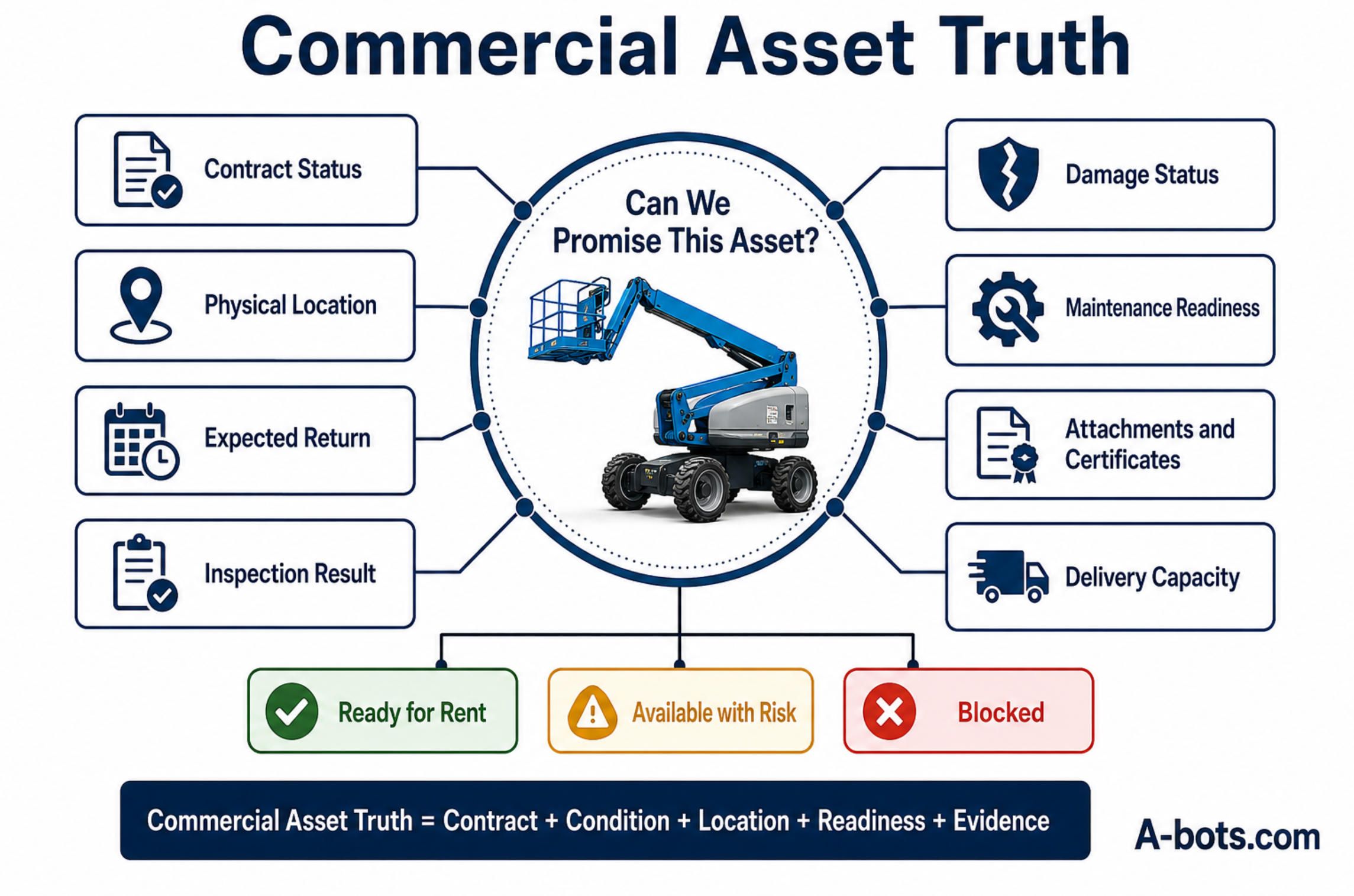
The Real Product Is Commercial Asset Truth
A rental company can own an ERP, a GPS platform, a workshop system, a customer portal, and a driver app—and still lack a reliable answer to the most important question:
Can we promise this asset?
The answer requires more than location. It requires the contract, expected return, physical condition, attachments, compliance status, transport plan, maintenance state, and credible time to readiness.
This consolidated view can be called Commercial Asset Truth: a shared, evidence-backed understanding of whether an asset is earning, waiting, moving, damaged, being repaired, or genuinely ready for its next rental.
It is not created by adding another dashboard. It is created by connecting the decisions and physical actions that change the asset’s state.
That is the proper purpose of equipment rental app development.
The application should not begin as a digital catalogue or an attempt to reproduce the entire ERP on a smaller screen. It should begin at the points where the current process loses certainty: the handover, the collection, the inspection, the damage decision, the workshop release, and the next promise to a customer.
When those moments become connected, the business gains more than operational convenience. It can reduce ghost availability, recover rentable days, defend legitimate damage claims, expose unbilled use, coordinate multiple locations, and give customers self-service without surrendering process control.
The machine standing in the yard is no longer assumed to be available.
The company can prove when it is ready to earn again.
✅ Hashtags
#EquipmentRental
#RentalSoftware
#FleetManagement
#MobileAppDevelopment
#AssetManagement
#RentalTechnology
#DigitalTransformation
Other articles
FMIS Review: John Deere Operations Center & Agworld Review of two farm management platforms built on opposite philosophies. John Deere Operations Center is a telematics-anchored hub: JDLink machine data, Work Planner, a REST and OAuth2 API across 150-plus partners, and dealer remote support, with the trade-offs of a single-vendor ecosystem. Agworld is a collaboration platform built on a shared, farmer-owned dataset, with standout offline-first mobile apps and integrated agronomy and financials. The review weighs how each ingests, stores, and shares data. The second half goes deep into the interoperability stack that decides whether data can move: ISOBUS, ISOXML, and AgGateway ADAPT, plus where A-Bots.com builds custom FMIS and QA testing.
Custom Agritech Development & QA Testing: Build vs Buy The capstone of a four-part agritech series. Across reviews of FieldView, CropX, Halter, CowManager, John Deere Operations Center, and Agworld, the same walls kept appearing: vendor lock-in, per-unit pricing that punishes scale, weak offline behavior, the integration tax of ISOBUS and ADAPT, and data nobody fully owns. This article turns those gaps into a build-versus-buy framework by operation scale, then shows the full stack A-Bots.com builds — device firmware, offline-first apps, interoperability layers, owned analytics — and the independent QA testing that hardens existing platforms. Custom agritech development, whole project or single module, plus testing of what you already run.
Custom Field Service App Development for HVAC, Equipment Repair, and Maintenance Companies Field service companies often do not lose money because they lack software. They lose it between disconnected systems: customer requests, dispatch, technician execution, parts availability, asset history, service proof, and back-office workflows. This article explains when off-the-shelf field service management software stops fitting HVAC, equipment repair, and maintenance companies, and why a custom mobile app can become the operational layer that connects the field with ERP, CRM, inventory, accounting, and customer communication. It also explores offline-first technician workflows, dispatcher visibility, parts logic, AI-assisted service operations, and the build-vs-buy decision.
Field Service ERP Apps: Mobile Workflows for Technicians Field service companies often lose profit not during the repair itself, but between disconnected steps: dispatch, parts availability, technician notes, customer approval, invoicing, and ERP updates. This article explains how a field service ERP app becomes the mobile operational layer between office systems and real-world service execution. It explores how custom apps connect technicians, dispatchers, customers, inventory, service history, proof of work, and billing into one controlled workflow. For HVAC, equipment repair, industrial maintenance, and after-sales service teams, the goal is not more software, but better service profitability control.
Qwen Robot Suite, Qwen-RobotManip, Qwen-RobotWorld, Qwen-RobotNav Alibaba’s Qwen Robot Suite signals a major transition from conversational AI to machines that can perceive, predict, navigate, and act in physical environments. This expert analysis examines the three-model architecture behind the platform: Qwen-RobotNav for configurable spatial navigation, Qwen-RobotWorld for generating possible physical futures, and Qwen-RobotManip for generalizable robot manipulation. The article also compares Alibaba’s approach with NVIDIA Cosmos and Isaac GR00T, Google Gemini Robotics, Physical Intelligence, and Figure Helix. Beyond model benchmarks, it explores the harder questions of physical reliability, enterprise integration, safety controls, human approval, and the application infrastructure required to turn embodied intelligence into accountable business workflows.
Top stories

Copyright © Alpha Systems LTD All rights reserved.
Made with ❤️ by A-BOTS