
Home
Services
About us
Blog
Contacts
OpenClaw Complete Guide 2026: Installation, Configuration, Databases, Use Cases, and Troubleshooting
If you have been following the open-source AI space in early 2026, you have almost certainly heard about OpenClaw. With over 200,000 GitHub stars in just a few weeks, OpenClaw became the fastest-growing open-source project in GitHub history. But the hype around OpenClaw is only half the story. The real question is practical: how do you actually install OpenClaw, configure it, connect databases, and use it for real-world automation without breaking everything along the way?
This guide answers exactly that. Whether you want to deploy OpenClaw on a virtual machine, a dedicated server, or your personal computer, we walk through every step — from prerequisites to production-grade configuration. We cover the most common OpenClaw errors and how to fix them, explain which databases OpenClaw supports and how to connect them, and break down the most valuable use cases that make OpenClaw worth the effort. The goal is to give you a single reference document so thorough that you can go from zero to a fully operational OpenClaw instance without switching between fifteen browser tabs.
At A-Bots.com, we have been building custom mobile applications, chatbot integrations, and IoT solutions for over 70 clients across diverse industries. Our development team has hands-on experience with agentic AI frameworks, real-time messaging architectures, and the kind of complex system integrations that OpenClaw demands. If you need a custom OpenClaw-powered mobile app, a branded AI assistant built on top of the OpenClaw gateway, or professional QA testing for your existing OpenClaw deployment, A-Bots.com delivers production-ready solutions from concept to launch. We specialize in React Native, Node.js, Python, and Django — the exact stack that makes OpenClaw projects succeed.
A-Bots.com also provides end-to-end QA and testing services for AI-powered applications. If your organization is considering deploying OpenClaw but needs to verify security, performance, and reliability before going live, our QA engineers can run comprehensive audits covering everything from API key management to memory persistence under load. With over five years of long-term client partnerships, we understand that deploying an autonomous AI agent is not a one-time event — it requires ongoing monitoring, skill auditing, and infrastructure optimization that A-Bots.com is uniquely positioned to deliver.
"I told my OpenClaw to organize my files. It reorganized my entire life instead. Now my socks are sorted by RGB values." — Anonymous developer on Discord
What Is OpenClaw and Why Does It Matter
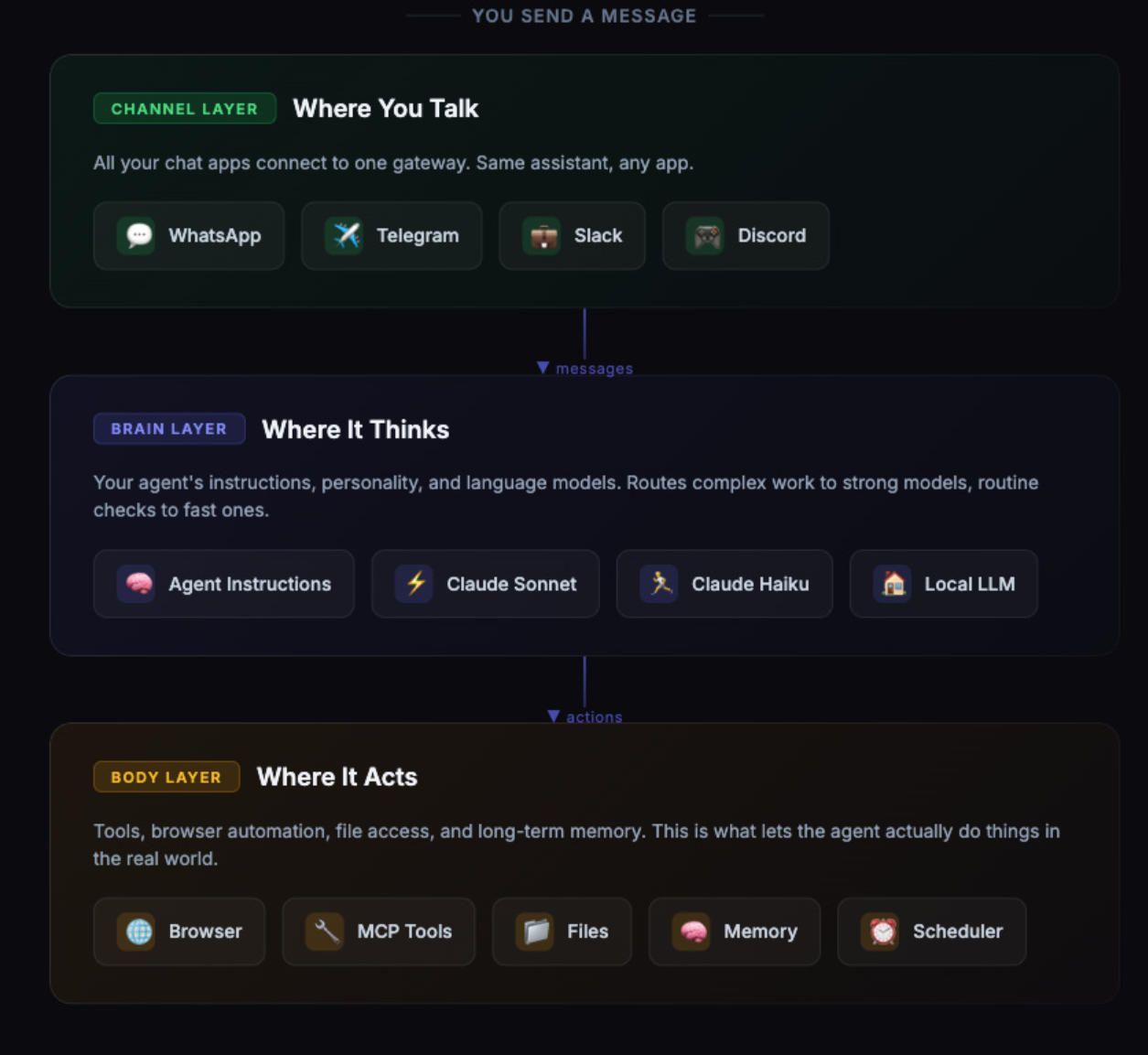
OpenClaw is an open-source autonomous AI agent created by Austrian developer Peter Steinberger. Originally published in November 2025 under the name Clawdbot, the project went through two rebranding cycles — first to Moltbot, then to OpenClaw — following trademark discussions with Anthropic. The core concept behind OpenClaw is straightforward: it is a personal AI assistant that runs on your own hardware, connects to the messaging platforms you already use (WhatsApp, Telegram, Slack, Discord, Signal, iMessage, Microsoft Teams), and can actually execute tasks on your behalf — not just answer questions.
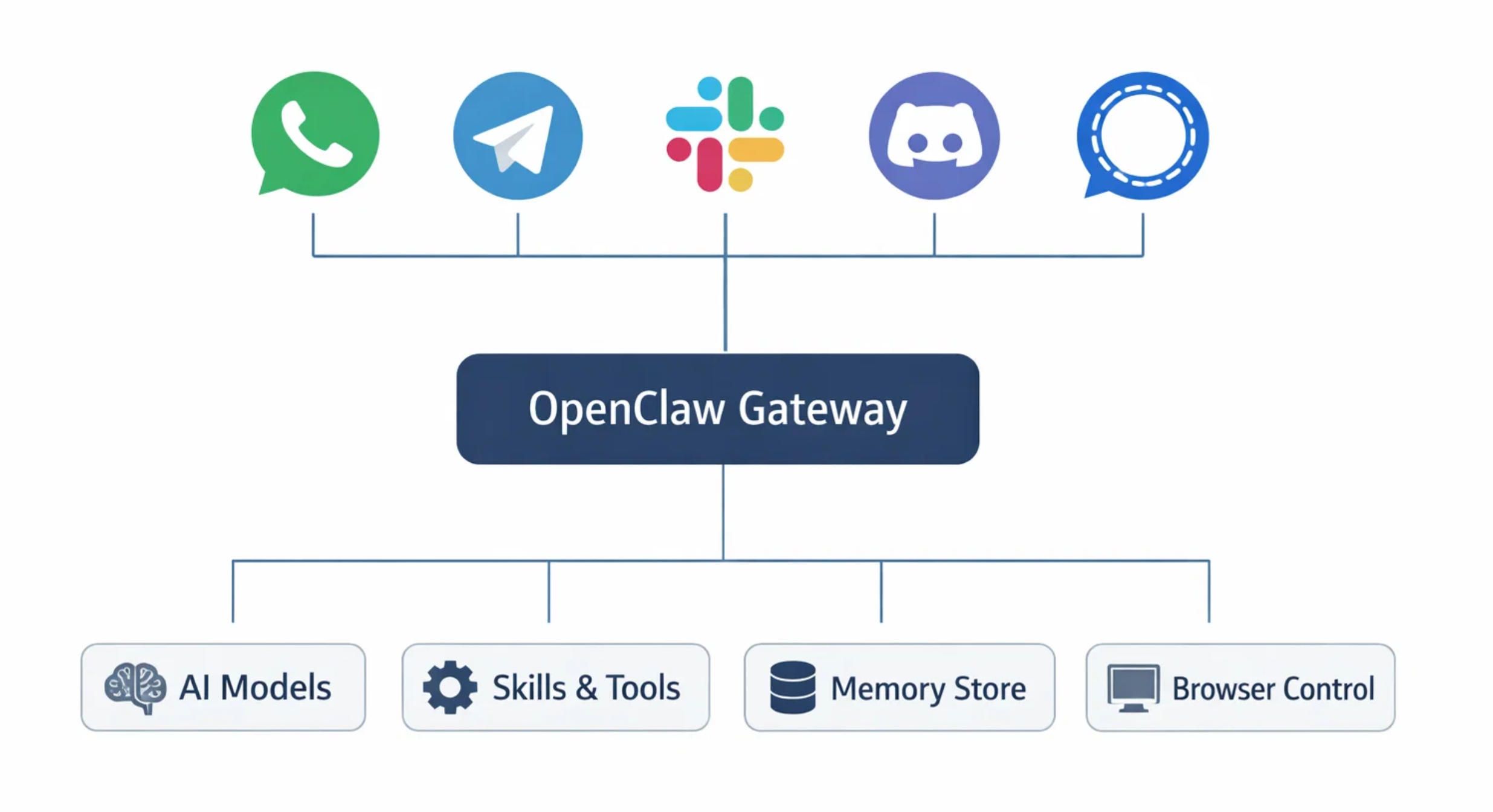
What separates OpenClaw from conventional chatbots is autonomy. OpenClaw can run shell commands, control your browser via CDP (Chrome DevTools Protocol), read and write files, manage calendars, send emails, and automate complex workflows. It stores memory locally as Markdown files, so your data stays on your machine. The OpenClaw architecture splits into two parts: the Brain (the reasoning engine that handles LLM API calls and orchestration) and the Hands (the execution environment that runs skills, manages files, and interfaces with external services).
The OpenClaw Gateway is the control plane — a WebSocket server running on port 18789 that routes messages between your chat channels, the AI model, and any connected tools or skills. OpenClaw supports multiple AI providers including Anthropic Claude, OpenAI GPT models, Google Gemini, DeepSeek, and even local models via Ollama. The ecosystem includes ClawHub, a community skill registry hosting over 13,700 skills as of late February 2026, covering everything from Google Ads management to grocery list automation.
Understanding how OpenClaw works at the architectural level is essential before you attempt installation. The Gateway is the single process that must stay running for your OpenClaw instance to function. It manages WebSocket connections, routes messages to the appropriate AI model, loads skills into context, and maintains session state. If the Gateway crashes or loses its connection to your LLM provider, your OpenClaw agent goes silent until the issue is resolved.
System Requirements for OpenClaw
Before you install OpenClaw, make sure your system meets the minimum requirements. OpenClaw is not particularly resource-hungry, but skipping hardware checks is the most common reason first-time installations fail.
You need Node.js version 20 or higher. This is a hard requirement — OpenClaw will not start on older versions. Check your current version with node --version and install or update using nvm (Node Version Manager) if needed. You also need npm, which comes bundled with Node.js. On Linux, you will additionally need curl and git installed.
For RAM, allocate at least 4 GB if you are running OpenClaw on a VPS. If your server has less than 2 GB of RAM, you should configure a 4 GB swap file to prevent the build process from running out of memory. The build step compiles TypeScript, bundles the web UI, and prepares the skill registry cache, which can be memory-intensive. For comfortable operation with memory search enabled and multiple skills loaded, 8 GB of RAM is recommended.
Storage requirements are modest — the OpenClaw installation itself takes about 500 MB including node modules. However, if you enable local embedding models for memory search, plan for an additional 2 GB for the GGUF model files. Memory logs, session transcripts, and skill data will accumulate over time, so allocating 10-20 GB of total disk space is a safe baseline.
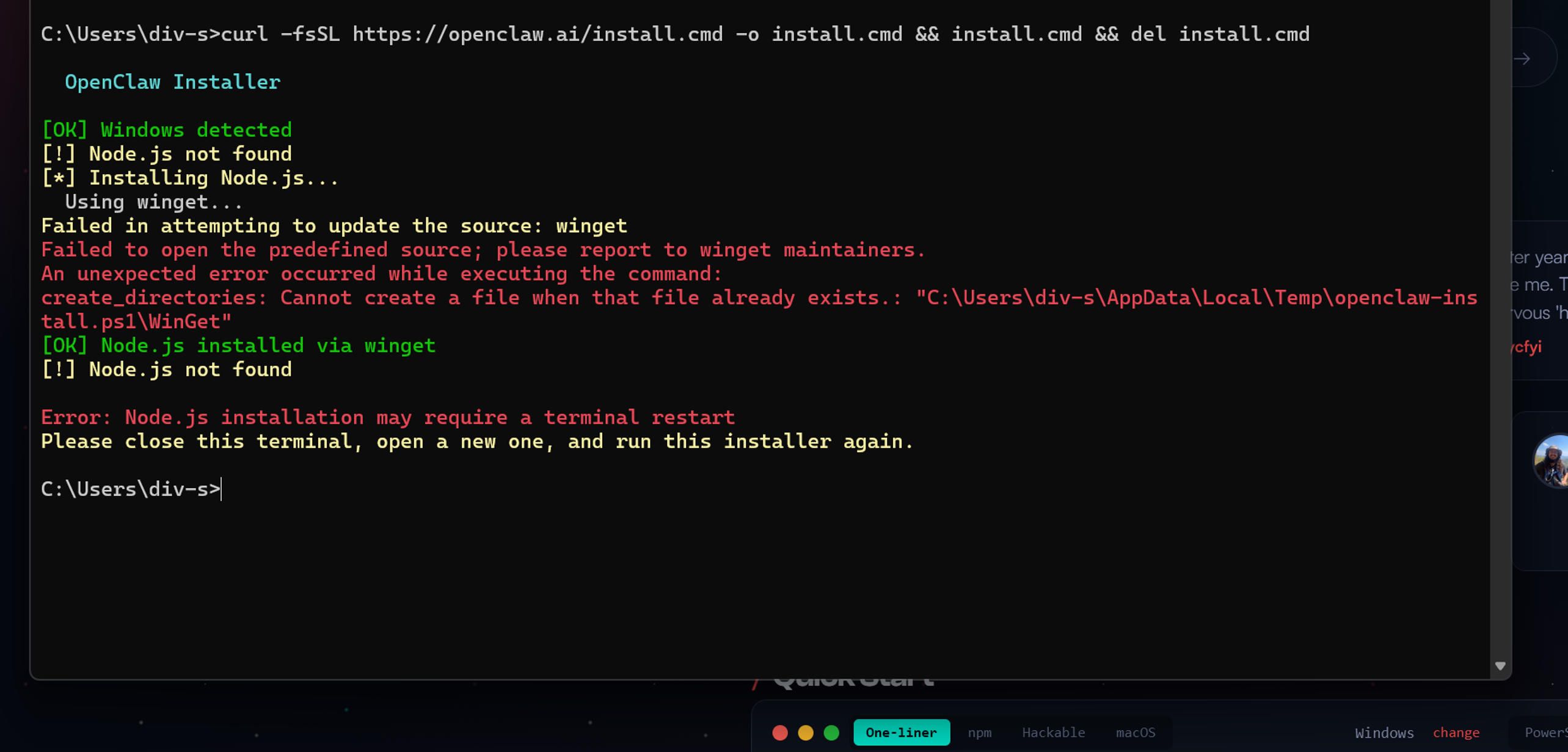
OpenClaw runs on macOS, Linux (Ubuntu 22.04 and above recommended), and Windows via WSL2. Native Windows support is limited, and the OpenClaw team strongly recommends WSL2 for any Windows-based deployment. If you are deploying on a cloud provider, DigitalOcean offers a 1-Click OpenClaw deploy image that includes all dependencies pre-installed.
Installing OpenClaw on a Virtual Machine
Deploying OpenClaw on a virtual machine is the most popular approach for users who want a dedicated, always-on instance without tying up their personal computer. This section covers installation on an Ubuntu 24.04 VM, which is the most common deployment target.
Start by updating your system and installing the essential dependencies:
sudo apt update && sudo apt upgrade -y
sudo apt install -y curl git build-essential python3 python3-pip
Next, install Node.js 22 (the recommended LTS version for OpenClaw in 2026) using nvm:
curl -o- https://raw.githubusercontent.com/nvm-sh/nvm/v0.39.0/install.sh | bash
source ~/.bashrc
nvm install 22
nvm use 22
nvm alias default 22
Verify the installation with node --version — you should see v22.x.x. Now install OpenClaw using the quick install script:
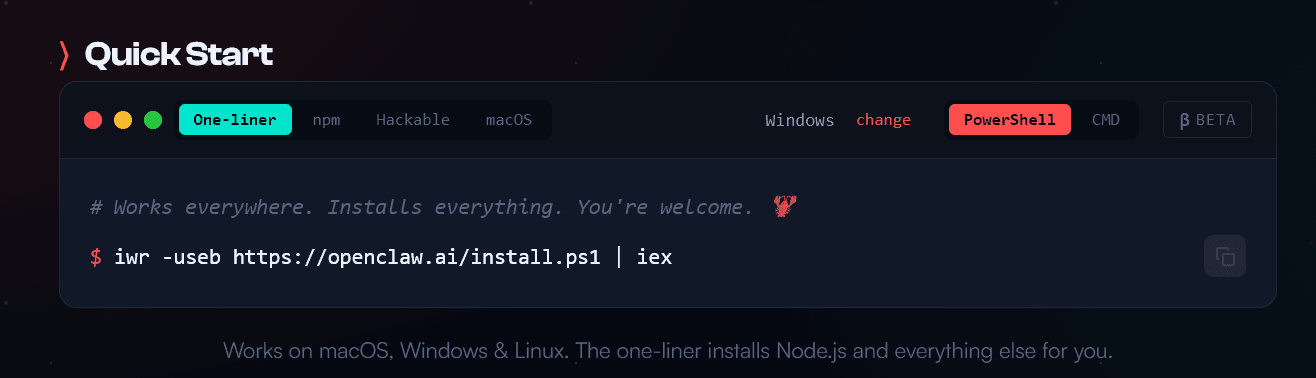
curl -fsSL https://openclaw.ai/install.sh | bash
This script clones the OpenClaw repository to ~/.openclaw/, runs npm install, builds the project, and creates a default configuration file at ~/.openclaw/config.yaml. When the script finishes, you will see a success message with next steps.
Alternatively, if you prefer full control over each step, clone the repository manually:
git clone https://github.com/openclaw/openclaw.git ~/.openclaw
cd ~/.openclaw
npm install
npm run build
openclaw config init
After installation, verify everything is working:
openclaw --version
openclaw doctor
The openclaw doctor command runs a comprehensive health check that validates your Node.js version, configuration file syntax, network connectivity, and port availability. If any issues are detected, the output includes specific fix instructions.
Now run the onboarding wizard:
openclaw onboard
The wizard walks you through selecting an AI provider (Anthropic, OpenAI, Google, or a local model), entering your API key, choosing a messaging channel (Telegram, Discord, WhatsApp, or WebChat), and configuring basic personality settings for your OpenClaw agent.
"Setting up OpenClaw is like assembling IKEA furniture. The instructions look simple until you realize you missed step three and now the whole thing is upside down." — A patient sysadmin
To keep OpenClaw running as a background service that survives reboots, install it as a systemd service:
openclaw gateway start --install-daemon
This registers OpenClaw as a systemd service on Linux (or launchd on macOS). You can then manage it with standard systemctl commands:
sudo systemctl status openclaw
sudo systemctl restart openclaw
journalctl -u openclaw -f
Installing OpenClaw on a Dedicated Server
Installing OpenClaw on a dedicated server follows the same steps as the VM installation, with a few additional considerations for security and performance. On a dedicated server, you have direct hardware access, which means you can take advantage of GPU acceleration for local embedding models and allocate more resources to the OpenClaw Gateway.
If your server has an NVIDIA GPU and you want to use local models for memory search embeddings, install CUDA:
wget https://developer.download.nvidia.com/compute/cuda/repos/ubuntu2204/x86_64/cuda-keyring_1.0-1_all.deb
sudo dpkg -i cuda-keyring_1.0-1_all.deb
sudo apt update
sudo apt install cuda
For server deployments that face the public internet, you must configure a reverse proxy. Never expose the OpenClaw Gateway directly. Use Nginx as a reverse proxy with SSL:
sudo apt install -y nginx certbot python3-certbot-nginx
Create an Nginx configuration for your OpenClaw instance:
server {
listen 80;
server_name your-openclaw-domain.com;
location / {
    proxy\_pass http://127.0.0.1:3000;
    proxy\_http\_version 1.1;
    proxy\_set\_header Upgrade $http\_upgrade;
    proxy\_set\_header Connection "upgrade";
    proxy\_set\_header Host $host;
    proxy\_set\_header X-Real-IP $remote\_addr;
    proxy\_set\_header X-Forwarded-For $proxy\_add\_x\_forwarded\_for;
    proxy\_set\_header X-Forwarded-Proto $scheme;
}
}
Then secure it with SSL:
sudo certbot --nginx -d your-openclaw-domain.com
Configure your firewall to only allow necessary ports:
sudo ufw default deny incoming
sudo ufw default allow outgoing
sudo ufw allow OpenSSH
sudo ufw allow 80
sudo ufw allow 443
sudo ufw enable
The OpenClaw internal port (typically 3000 for the web UI or 18789 for the Gateway WebSocket) should not be publicly accessible. Your reverse proxy handles external traffic and forwards it securely to the local OpenClaw process.
Installing OpenClaw on Your Personal Computer
Running OpenClaw on your personal computer — typically a Mac Mini, a MacBook, or a Linux desktop — is the most hands-on approach. Many users in the OpenClaw community run their instances on Mac Mini devices that stay powered on 24/7, effectively turning them into personal AI servers.
The installation steps are the same as described above: install Node.js 22 via nvm, run the quick install script or clone manually, and run the onboarding wizard. The key difference is that on a personal computer, you probably want OpenClaw to start automatically when you log in rather than running as a system-level daemon.
On macOS, the --install-daemon flag registers a launchd agent that starts OpenClaw at login. On Linux desktops, you can add an autostart entry or use the systemd user service:
systemctl --user enable openclaw
systemctl --user start openclaw
If you are running OpenClaw on a laptop that you carry around, be aware that the Gateway stops when the machine sleeps. This means your OpenClaw agent will miss messages received while the computer is closed. For users who need 24/7 availability, a VM or dedicated server deployment is the better choice.
One advantage of running OpenClaw locally is direct access to your filesystem, browser, and desktop applications. OpenClaw can control a dedicated Chrome or Chromium instance via CDP, take screenshots, fill out forms, and navigate websites on your behalf. This browser control feature works best on local installations where OpenClaw has direct access to a display server.

Connecting Databases to OpenClaw
OpenClaw's default storage backend is SQLite — specifically, it uses SQLite for its memory index and stores all persistent data (conversation history, user preferences, learned patterns) as local Markdown files with a SQLite-based search index. Understanding how OpenClaw handles data storage is critical for production deployments.
SQLite: The Default Backend
When you install OpenClaw, it automatically creates a SQLite database at ~/.openclaw/memory/main.sqlite. This database stores vector embeddings for semantic search over your memory files. OpenClaw uses the sqlite-vec extension (when available) to accelerate vector similarity searches.
The SQLite backend works well for single-user deployments with moderate memory volumes. However, it has known limitations: the database can become locked when multiple processes try to access it simultaneously (the SQLITE_BUSY error), memory sync can fail after updates, and the search index occasionally becomes corrupted after version upgrades.
To check the health of your SQLite database:
ls -lh ~/.openclaw/memory/main.sqlite
openclaw memory search "test query"
If the database is corrupted or producing inconsistent results, the safest fix is to delete it and let OpenClaw rebuild the index from your Markdown files:
rm ~/.openclaw/memory/main.sqlite
openclaw gateway restart
MySQL Integration
For production deployments that need more robust database support, you can configure OpenClaw to use MySQL. Install MySQL and create a dedicated database:
sudo apt install -y mysql-server
sudo mysql_secure_installation
Then create the OpenClaw database and user:
CREATE DATABASE openclaw CHARACTER SET utf8mb4 COLLATE utf8mb4_unicode_ci;
CREATE USER 'openclaw_user'@'localhost' IDENTIFIED BY 'STRONG_PASSWORD_HERE';
GRANT ALL PRIVILEGES ON openclaw.* TO 'openclaw_user'@'localhost';
FLUSH PRIVILEGES;
Add the database configuration to your OpenClaw .env file:
DB_TYPE=mysql
DB_HOST=127.0.0.1
DB_PORT=3306
DB_NAME=openclaw
DB_USER=openclaw_user
DB_PASSWORD=STRONG_PASSWORD_HERE
PostgreSQL with pgvector
The most advanced database option for OpenClaw is PostgreSQL with the pgvector extension. This combination provides native vector similarity search, BM25 full-text search via tsvector, and the reliability of a production-grade relational database. A community proof-of-concept has demonstrated indexing over 1,100 documents with search latency under 200 milliseconds.
Install PostgreSQL and pgvector:
sudo apt install -y postgresql postgresql-contrib
sudo -u postgres psql -c "CREATE EXTENSION IF NOT EXISTS vector;"
Create the OpenClaw schema:
CREATE DATABASE openclaw;
\c openclaw
CREATE EXTENSION IF NOT EXISTS vector;
CREATE TABLE openclaw_memory_documents (
id SERIAL PRIMARY KEY,
collection TEXT NOT NULL,
doc_path TEXT NOT NULL,
doc_hash TEXT NOT NULL,
content TEXT,
embedding vector(512),
tsv tsvector GENERATED ALWAYS AS (to_tsvector('english', coalesce(content, ''))) STORED,
active BOOLEAN DEFAULT true,
created_at TIMESTAMPTZ DEFAULT now(),
updated_at TIMESTAMPTZ DEFAULT now(),
UNIQUE(collection, doc_path)
);
CREATE INDEX ON openclaw_memory_documents USING ivfflat (embedding vector_cosine_ops);
CREATE INDEX ON openclaw_memory_documents USING gin (tsv);
This setup eliminates the fragile subprocess chain that the default QMD sidecar introduces (OpenClaw → shell → QMD CLI → SQLite → GGUF models) and enables multi-instance deployments where multiple OpenClaw agents share a single memory database.
QMD: The Hybrid Search Sidecar
QMD (Query Markup Documents) is a local search engine created by Tobi Lütke (of Shopify) that OpenClaw can use as an alternative memory backend. QMD combines BM25 full-text search, vector semantic search, and LLM re-ranking — all running locally with no API keys required.
To enable QMD:
bun install -g https://github.com/tobi/qmd
On macOS, you also need SQLite with extension support:
brew install sqlite
Then set your OpenClaw config:
memory:
backend: "qmd"
QMD downloads three small GGUF models (totaling about 2 GB) on first use for embedding, re-ranking, and query expansion. The trade-off is higher RAM usage compared to the default SQLite backend, but significantly better search accuracy for large memory stores.
"My OpenClaw has better memory than me. It remembered a conversation from three weeks ago while I can't remember what I had for breakfast. I'm not sure if that's a feature or an existential crisis." — OpenClaw user on Reddit
OpenClaw Use Cases: What You Can Actually Build
The OpenClaw ecosystem has exploded with real-world use cases. Here are the most valuable categories, each representing opportunities where A-Bots.com can deliver custom mobile and web solutions.
Personal Productivity Assistant
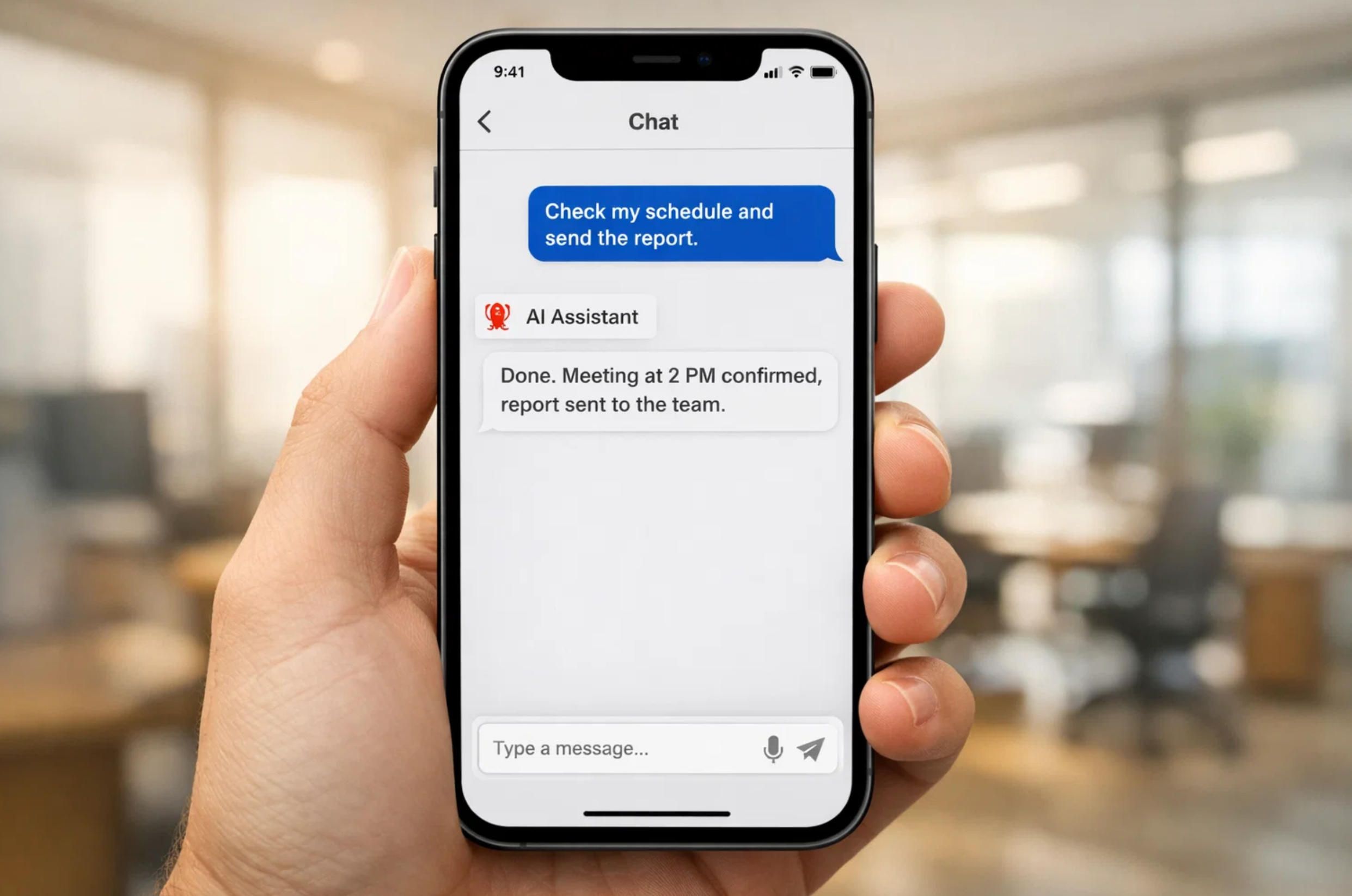
The most common OpenClaw deployment is as a personal productivity hub. Users configure their OpenClaw agent to manage calendars across Apple Calendar, Google Calendar, and Notion, handle email triage via Gmail or Outlook, maintain shared shopping lists from WhatsApp messages, and send daily morning briefings with weather, schedule, and news summaries. One user reported that their OpenClaw agent automatically created a meal plan for the entire year, generated weekly shopping lists sorted by store and aisle, and sent morning reminders about dinner preparation.
Developer and DevOps Workflows
OpenClaw shines as a development assistant. It can automate debugging sessions, manage GitHub pull requests, run CI/CD pipelines, and orchestrate multiple coding agents (like Claude Code or Codex) from a single Telegram message. Developers use OpenClaw to kick off test suites, capture errors through Sentry webhooks, automatically create fix branches, and open pull requests — all while they sleep. The skill ecosystem includes integrations for Jira, Linear, GitHub, GitLab, and virtually every project management tool.
Browser Automation and Web Scraping
OpenClaw includes built-in browser control via CDP. It can log into websites, fill out forms, scrape data, take screenshots, and navigate complex web flows. One widely-shared example involved an OpenClaw agent that negotiated a $4,200 discount on a car purchase by communicating with multiple dealerships over email and iMessage — autonomously, overnight.
Smart Home and IoT Integration
With skills for Alexa, Home Assistant, and various IoT platforms, OpenClaw can function as a centralized smart home controller. Users have deployed it to manage lighting, monitor energy consumption via iotawatt, and respond to sensor data. This is an area where A-Bots.com's extensive IoT experience — including projects like the Shark Clean robot vacuum controller app — provides direct, relevant expertise for building custom OpenClaw integrations.
Content Creation and SEO
OpenClaw can automate content pipelines: research topics via web search, draft articles, generate social media posts in the user's voice, create images using Gemini or DALL-E skills, and publish to platforms. One user reported that their OpenClaw instance was running weekly fully automated SEO analyses without any manual intervention.
Custom Mobile App Integration
This is where A-Bots.com adds the most value. OpenClaw's Gateway exposes a WebSocket API that mobile applications can connect to directly. Building a custom React Native or native iOS/Android app that interfaces with an OpenClaw backend gives you a branded AI assistant with full control over the user experience, security model, and feature set. Instead of relying on generic messaging platforms, you get a purpose-built mobile application tailored to your business needs — with push notifications, custom UI, biometric authentication, and offline capabilities that generic chat apps cannot provide.
A-Bots.com has delivered similar architectures for clients across healthcare, retail, and logistics. Our experience with real-time messaging systems (WebSocket, MQTT, long polling), cross-platform mobile development (React Native, Swift, Kotlin), and backend orchestration (Node.js, Django) maps directly onto the OpenClaw technology stack.
Common OpenClaw Errors and How to Fix Them
Every OpenClaw installation will encounter errors at some point. Here are the most common issues and their solutions, documented from real GitHub issues and community reports.
Gateway Not Responding or "0 Tokens Used"
This means the Gateway daemon has stopped or your API authentication has failed. First, restart the Gateway:
openclaw gateway restart
Then verify your API keys are set correctly:
openclaw config get api-key
For Anthropic, keys start with sk-ant-. For OpenAI, keys start with sk-. Make sure there are no extra spaces or quotes in your configuration. If the key is correct but the Gateway still reports zero tokens, check that your API subscription is active and has sufficient credits.
"RPC Probe: Failed"
Port 18789 is blocked or already in use by another process. Find the conflicting process:
sudo lsof -i :18789
Kill the conflicting process or change the OpenClaw Gateway port in your configuration. This error also occurs when a previous OpenClaw instance did not shut down cleanly — restarting the server or manually killing the orphaned Node.js process resolves it.
EACCES Permission Errors
Never run npm with sudo. If you encounter EACCES errors during installation or package updates, fix your npm permissions:
mkdir -p ~/.npm-global
npm config set prefix '~/.npm-global'
echo 'export PATH="$HOME/.npm-global/bin:$PATH"' >> ~/.bashrc
source ~/.bashrc
Then reinstall OpenClaw:
npm install -g openclaw@latest
SQLITE_BUSY: Database Is Locked
This occurs when multiple processes try to write to the SQLite memory database simultaneously. Stop OpenClaw, remove any stale lock files, and restart:
openclaw gateway stop
ls -la ~/.openclaw/*.lock
rm ~/.openclaw/*.lock
openclaw gateway start
If this error recurs frequently, consider migrating to PostgreSQL for your memory backend.
Memory Sync Failures: "Database Is Not Open"
This regression appeared in OpenClaw v2026.2.1 when running on Node.js 24. The SQLite connection gets garbage-collected before the sync step completes. The fix is to downgrade to Node.js 22 (the recommended LTS version) or wait for the patched OpenClaw release:
nvm install 22
nvm use 22
openclaw gateway restart
Memory Files Not Found (ENOENT Errors)
If OpenClaw cannot find MEMORY.md or daily memory files in ~/.openclaw/workspace/memory/, the files may not have been created during initial setup. Create them manually:
mkdir -p ~/.openclaw/workspace/memory
touch ~/.openclaw/workspace/MEMORY.md
touch ~/.openclaw/workspace/memory/$(date +%Y-%m-%d).md
Then restart OpenClaw to trigger memory indexing.
Build Out of Memory
On systems with less than 2 GB RAM, the build step may crash with a heap allocation error. Increase the Node.js heap size before building:
export NODE_OPTIONS="--max-old-space-size=4096"
npm run build
For persistent deployments, add this export to your shell profile.
Rate Limit Exceeded
If your AI provider returns rate limit errors, configure retry logic in your OpenClaw configuration:
{
"model": {
"rateLimiting": {
"retryOnRateLimit": true,
"maxRetries": 3,
"retryDelay": 5000,
"maxRequestsPerMinute": 30
}
}
}
For heavy usage, consider upgrading your API tier, using model failover (configuring a secondary model that OpenClaw switches to when the primary model is rate-limited), or switching to a local model via Ollama.
YAML Configuration Syntax Errors
OpenClaw uses YAML for its configuration file, and YAML is notoriously sensitive to formatting. The most common mistakes are using tabs instead of spaces (always use 2 spaces), missing colons after keys, and unquoted special characters. Validate your configuration with:
openclaw config validate
If validation fails, you can reset to defaults with openclaw config reset --confirm and reconfigure from scratch.
"YAML configuration is proof that programmers enjoy suffering. Two spaces instead of a tab and your entire OpenClaw deployment collapses like a house of cards in a hurricane." — Every DevOps engineer ever
OpenClaw Security Considerations
OpenClaw is a powerful tool, but power comes with risk. Security researchers at Cisco found that some third-party OpenClaw skills on ClawHub performed data exfiltration and prompt injection without user awareness. Of over 3,000 skills analyzed in early 2026, approximately 10.8% were identified as malicious. NSFOCUS, a global cybersecurity firm, published a comprehensive attack surface analysis warning that the OpenClaw project's GitHub repository had a backlog of over 6,700 issues, many of them security-related.
For any production OpenClaw deployment, follow these security practices. Fork and audit every skill before installing it — read the source code, all of it. Set hard API spending limits at your provider level, not just in the OpenClaw config. Gate all irreversible actions behind human approval: payments, deletions, sending emails, anything that affects external systems. Use exec.ask: "on" in your config to require explicit consent before the agent executes write or exec commands. Never expose the OpenClaw Control UI or Gateway to the public internet without authentication. Use Tailscale Serve/Funnel or SSH tunnels with token-based authentication for remote access.
A-Bots.com provides professional security auditing for OpenClaw deployments. Our QA and security engineers can review your configuration, audit installed skills, test for prompt injection vulnerabilities, verify API key isolation, and ensure that your OpenClaw instance meets your organization's security requirements before it goes live.
OpenClaw Memory Architecture: How It Actually Works
Understanding the OpenClaw memory system is critical for getting consistent, reliable behavior from your agent. OpenClaw uses a file-first architecture where all persistent data is stored as Markdown files on your local disk.
The memory system has two primary components: MEMORY.md, which stores long-term curated facts about the user and their preferences, and daily log files in memory/YYYY-MM-DD.md, which capture session transcripts and raw context from each day's interactions.
When you ask your OpenClaw agent a question that requires context from a previous conversation, the system performs a semantic search over these files. The search process chunks the Markdown files into ~400 token segments with 80-token overlap, generates vector embeddings for each chunk, and retrieves the most similar chunks to inject into the current context window.
OpenClaw supports three search backends: default SQLite vector search (works out of the box but weak on exact tokens), SQLite hybrid search with BM25 keyword matching (a good middle ground that requires no additional installation), and QMD with LLM re-ranking (the most accurate option, requiring a separate sidecar process).
To enable hybrid search on SQLite without installing anything extra:
memorySearch:
query:
hybrid:
enabled: true
vectorWeight: 0.7
textWeight: 0.3
candidateMultiplier: 4
A known limitation of the OpenClaw memory system is that it stores text chunks but cannot reason about relationships between facts. If you tell your OpenClaw agent on Monday that Alice manages the auth team, and on Wednesday ask who handles auth permissions, the agent may retrieve both memories but fail to connect them. For complex enterprise use cases, consider adding the Cognee knowledge graph plugin, which builds entity-relationship graphs from your OpenClaw memory files and provides structured traversal instead of similarity-only retrieval.
OpenClaw Skills: Extending Functionality
OpenClaw skills are modular instruction bundles stored as SKILL.md files. Each skill has YAML frontmatter describing its name, version, and requirements, followed by step-by-step instructions that get loaded into the agent's context at runtime.
Install skills from ClawHub:
clawhub install skill-name
clawhub list
clawhub update --all
OpenClaw skills use a three-tier precedence: workspace skills override managed skills, which override bundled skills. This means you can customize any skill's behavior by placing a modified version in your workspace ./skills directory.
Building a custom skill requires only a folder and a Markdown file:
---
name: My Custom Skill
description: Explain what this skill does in one sentence
version: 1.0.0
requirements:
- python3
---
## Instructions
When the user asks to [trigger phrase], do the following:
1. [First step with precise instructions]
2. [Second step]
3. Confirm completion with a brief summary.
## Rules
- Never proceed without confirming the action first.
- If a required input is missing, ask for it before starting.
Treat your SKILL.md like a recipe for a very literal cook. The LLM follows what it reads, so ambiguous instructions produce inconsistent behavior. Be specific about triggers, steps, and edge cases.
For enterprise deployments, A-Bots.com develops custom OpenClaw skills tailored to specific business workflows. Whether you need a skill that integrates with your proprietary CRM, automates regulatory compliance checks, or manages inventory through a custom API, our development team builds and tests skills to production standards — with security auditing, version control, and documentation included.
Deploying OpenClaw with Docker
For users who prefer containerized deployments, OpenClaw supports Docker out of the box. Clone the repository and run the setup script:
git clone https://github.com/openclaw/openclaw.git
cd openclaw
docker build -t openclaw .
docker-compose up -d
Docker mounts two volumes: ~/.openclaw for configuration and credentials, and ~/openclaw/workspace as the agent's sandbox. If you encounter permission errors, fix ownership on the host:
sudo chown -R 1000:1000 ~/.openclaw ~/openclaw/workspace
For production Docker deployments, add a monitoring stack:
docker-compose -f monitoring/docker-compose.yml up -d
This starts a Grafana dashboard accessible at http://localhost:3000 where you can monitor Gateway health, API token usage, memory search latency, and skill execution metrics.
OpenClaw Backup and Maintenance
Running an OpenClaw instance 24/7 means you need a backup strategy. Your critical data lives in two locations: the configuration directory (~/.openclaw/) and the workspace directory (~/.openclaw/workspace/).
Create regular backups:
tar czf "openclaw-backup-$(date +%Y%m%d).tar.gz" ~/.openclaw/
For automated daily backups, add a cron job:
0 3 * * * tar czf "/backups/openclaw_$(date +\%Y\%m\%d_\%H\%M\%S).tar.gz" ~/.openclaw/ 2>/dev/null
To update OpenClaw to the latest version:
openclaw update
Or manually:
cd ~/.openclaw
git pull origin main
npm install
npm run build
openclaw gateway restart
Always back up your configuration before updating. Major version updates can introduce breaking changes in the config format or memory backend that require manual migration.
Why Custom Development Beats DIY for Production OpenClaw
OpenClaw is a powerful open-source foundation, but deploying it in a production business environment requires engineering expertise beyond what a setup guide can provide. Security hardening, custom skill development, mobile app integration, multi-tenant architecture, automated testing, and ongoing maintenance all require professional development resources.
A-Bots.com transforms OpenClaw from a developer experiment into a business-grade product. Our team builds custom mobile applications that interface directly with the OpenClaw Gateway, delivering branded AI assistant experiences on iOS and Android. We develop custom skills that integrate with your existing business systems, implement enterprise security policies, and provide ongoing QA testing to ensure your OpenClaw deployment remains stable, secure, and performant as the platform evolves.
With over 70 completed projects spanning mobile applications, IoT solutions, chatbot development, and complex system integrations, A-Bots.com brings the exact combination of skills that OpenClaw projects demand. Our clients trust us with long-term partnerships because we deliver not just working code, but production-ready systems with the documentation, testing, and support infrastructure that businesses need.
If you are evaluating OpenClaw for your organization, contact A-Bots.com at info@a-bots.com for a free technical consultation. We can assess your use case, recommend the optimal deployment architecture, and provide a detailed estimate for building the custom solution your business needs.
Conclusion
OpenClaw represents a genuine shift in how people interact with AI — from passive question-answering to autonomous task execution. The open-source nature, local-first architecture, and massive skill ecosystem make it the most flexible personal AI agent framework available in 2026. But flexibility comes with complexity, and complexity demands expertise.
This guide has covered everything from basic installation on virtual machines, servers, and personal computers to advanced topics like PostgreSQL database integration, memory architecture optimization, Docker deployment, and security hardening. The OpenClaw community is growing rapidly, with new skills, bug fixes, and features arriving weekly.
Whether you deploy OpenClaw yourself using this guide or partner with A-Bots.com for a custom production deployment, the key is to start small, test thoroughly, expand deliberately, and never stop learning. The future of personal AI is running on your hardware, speaking through your messaging apps, and executing tasks while you sleep. OpenClaw is leading that future, and now you have the knowledge to be part of it.
✅ Hashtags
#OpenClaw
#OpenClawGuide
#OpenClawInstallation
#AIAgent
#OpenSourceAI
#OpenClawSetup
#PersonalAIAssistant
#OpenClawTutorial
Other articles
Samsung Bespoke AI WF53BB8700AT vs LG WM6700HBA: Samsung Bespoke AI WF53BB8700AT and LG WM6700HBA are two leading smart front-load washers competing for dominance in the rapidly growing connected laundry market. This expert comparison examines their AI wash systems, drum capacity, speed cycles, automatic detergent dispensing, companion mobile apps, noise performance, energy efficiency, warranty coverage, and long-term reliability backed by real service call data. The article also explores how companion apps like SmartThings and ThinQ are reshaping the appliance industry and how A-Bots.com helps manufacturers build custom IoT mobile applications for connected home devices.
App Controlled Thermostat Smart thermostats have moved far beyond simple temperature control. Today, an app controlled thermostat learns your schedule, detects when you leave home, and adjusts the climate automatically — all managed through a smartphone. This article explores how smart smartphone thermostats work, what leading brands like Honeywell and ecobee have built, where consumer products fall short for businesses, and why hotels, property developers, and commercial facilities are investing in custom thermostat app solutions. Whether you need a new IoT application built from scratch or professional QA testing for an existing system, A-Bots.com delivers expert mobile development tailored to your business requirements.
ecobee3 Lite Smart Thermostat: Full Review of Features, Installation, and Energy Savings The ecobee3 lite smart thermostat combines accessible pricing with genuine intelligence — ENERGY STAR-certified energy savings of up to 23% per year, five eco+ optimization features, and seamless integration with Apple HomeKit, Amazon Alexa, and Google Assistant. This guide covers everything from installation nuances and C-wire compatibility to the mechanics of Time of Use pricing, occupancy detection, and SmartSensor-based multi-room control. You will also find current smart thermostat market data, an honest look at device limitations, and an overview of what it takes to build a custom HVAC application at this level of sophistication.
Smart Thermostat Honeywell: Full Lineup Review Honeywell Home controls a significant share of the smart thermostat market — but understanding what their devices actually do requires looking past the feature list. This article reviews the full current lineup, from the Matter-certified $79.99 X2S to the professionally integrated T10 Pro, with a detailed breakdown of how Smart Response, geofencing, room sensor logic, and utility demand response work mechanically. It also covers the real limitations users encounter — app fragmentation, C-wire dependency, no self-learning schedule — and explains what is technically required to build a custom HVAC mobile application for use cases that mass-market thermostats cannot serve.
App Controlled Space Heater - 7 Smart Models Reviewed Smart space heaters are no longer judged only by watts and oscillation - the mobile app is the real control surface. This review compares 7 app-controlled models by what actually matters in daily use: onboarding speed, scheduling logic, stability on 2.4 GHz Wi-Fi, safety notifications, and what the app cannot do (including the Dyson HP07 heating-control limitation in the US). You will also see how ecosystem choices (Smart Life - Tuya vs proprietary apps) change long-term reliability, plus a hard safety lesson from the Govee H7130 recall tied to wireless-control features. If your product needs this level of app rigor, A-Bots.com builds custom IoT mobile experiences.
Top stories

Copyright © Alpha Systems LTD All rights reserved.
Made with ❤️ by A-BOTS