
Home
Services
About us
Blog
Contacts
Custom Field Service App Development for HVAC, Equipment Repair, and Maintenance Companies: When Off-the-Shelf FSM No Longer Fits
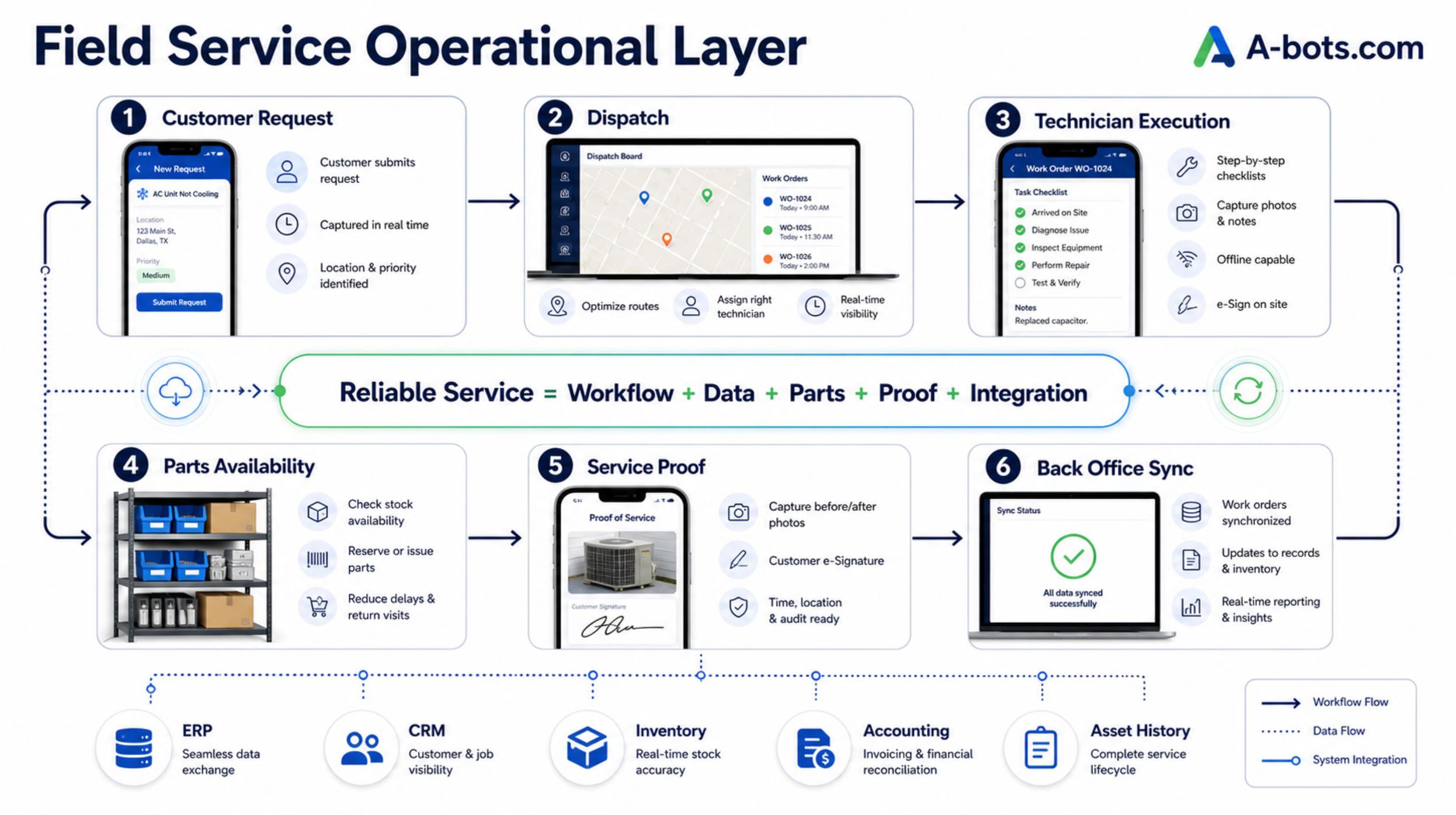
The main idea is simple: a custom field service app is not a digital clipboard. It is the operational layer that connects the customer request, technician execution, parts availability, asset history, service proof, and back-office system into one accountable workflow.
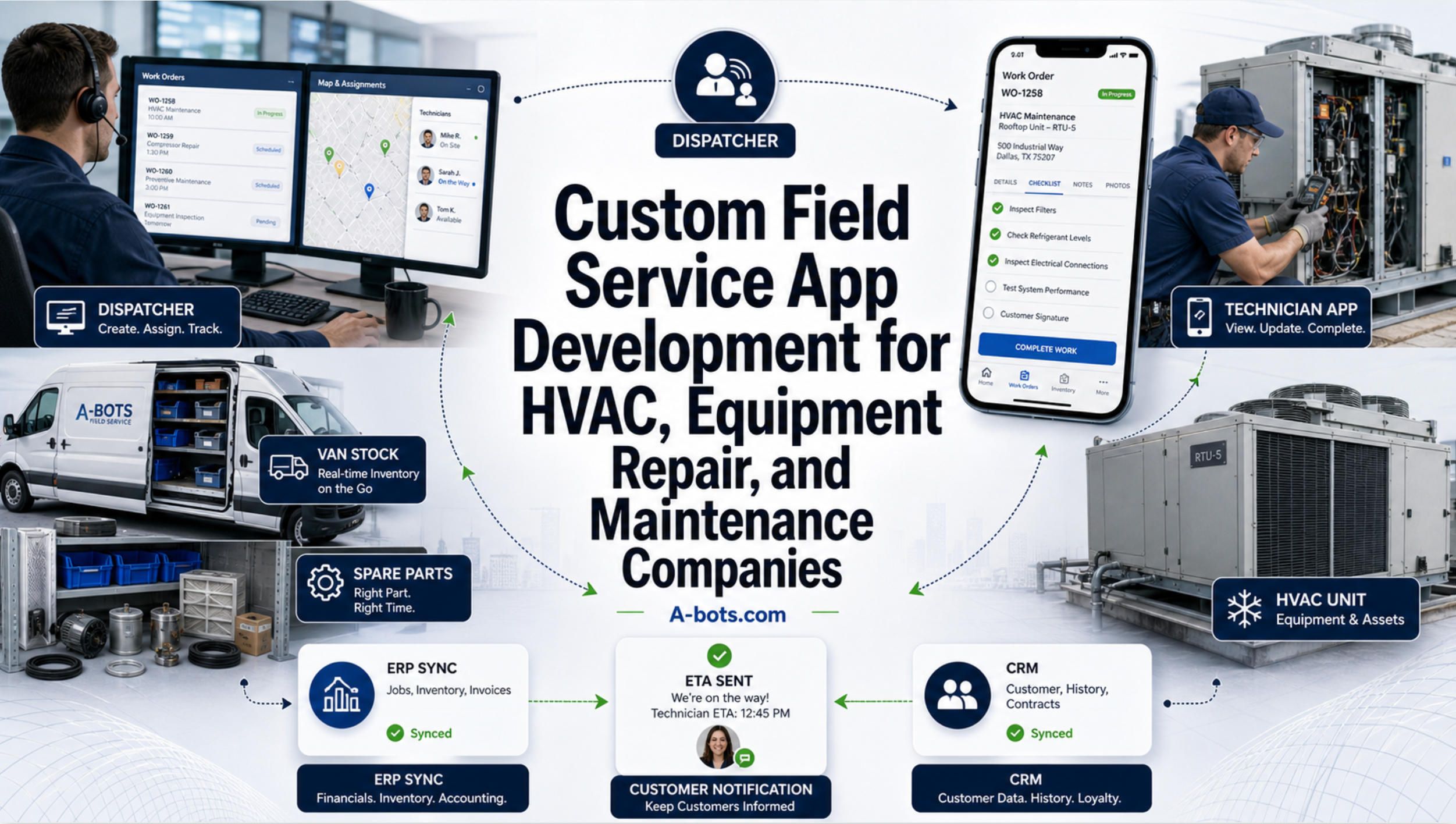
A service company usually does not break in one dramatic moment. It breaks quietly, between the phone call and the work order, between the technician’s van and the warehouse shelf, between the customer’s “when will you arrive?” and the dispatcher’s fifth open tab. It breaks when the best technician spends the evening rewriting notes instead of solving the next job. It breaks when a missing part turns a profitable visit into a second truck roll. It breaks when the business technically has software, but the real operation still lives in messages, spreadsheets, memory, and small acts of daily improvisation.
That is why the question is no longer whether a field service company needs software. Most serious HVAC, equipment repair, facility maintenance, telecom, industrial service, and installation businesses already use some combination of scheduling tools, accounting systems, CRM, inventory software, shared drives, mobile forms, and messaging apps. The real question is sharper: does the system actually fit the way the company makes money, protects margin, serves customers, and coordinates field work?
For many growing service companies, the answer becomes uncomfortable. Off-the-shelf field service management software can be very useful at the beginning. It can replace paper job sheets, centralize dispatching, send reminders, create invoices, and give managers a cleaner view of the day. But as the operation becomes more specific, the generic workflow starts to show its limits. The business does not need “an app” in the consumer sense. It needs a controlled field execution system that matches its contracts, equipment types, technician skills, service regions, safety requirements, parts logic, warranty rules, and back-office reality.
That is the point where custom field service app development becomes a strategic decision rather than a technical indulgence.
Field service is no longer a simple scheduling problem
For years, many companies treated field service as a calendar problem: assign the technician, send the address, close the job, invoice the customer. That model worked when service operations were smaller, assets were simpler, and customers tolerated slower communication.
In 2026, the field service environment is different. Customers expect accurate arrival windows, real-time updates, digital proof of work, transparent pricing, and fast resolution. Technicians are expected to handle more complex equipment, document every step, follow safety rules, manage parts, communicate with customers, and keep records clean enough for warranty, billing, and compliance. Dispatchers are expected to optimize routes, protect SLAs, handle emergency calls, reduce overtime, and keep customers calm when the schedule changes.
The market data reflects this shift. Mordor Intelligence estimates the field service management market at about $6.26 billion in 2026, with growth projected toward $9.87 billion by 2031. Fortune Business Insights projects similar momentum, estimating growth from $6.14 billion in 2026 to $13.79 billion by 2034.
But market size is not the real story. The real story is operational pressure.
Salesforce reports that 66% of field service technicians experience burnout monthly, and 81% work overtime at least once a month just to handle administrative tasks. This is the kind of statistic that should make service leaders pause. If skilled technicians are scarce, expensive, and central to customer trust, then every hour they spend fighting paperwork, duplicate entry, missing information, or disconnected tools is not just inconvenience. It is lost capacity.
In HVAC specifically, the U.S. Bureau of Labor Statistics projects employment for heating, air conditioning, and refrigeration mechanics and installers to grow 8% from 2024 to 2034, much faster than the average for all occupations, with about 40,100 openings per year on average. That means service demand is rising while qualified labor remains difficult to expand quickly. The practical response is not only to hire more people. It is to remove wasted motion from the people already in the field.
The hidden cost of “good enough” field service software
A company can have field service software and still run an inefficient operation. This happens more often than executives like to admit.
The software may schedule jobs, but the dispatcher still checks technician availability manually. It may store customer records, but equipment history remains incomplete. It may create work orders, but technicians still call the office for part numbers. It may support mobile forms, but offline work fails in basements, plants, rural areas, rooftops, or buildings with poor connectivity. It may integrate with accounting, but inventory, warranty, and CRM data still move through exports, manual corrections, or someone’s inbox.
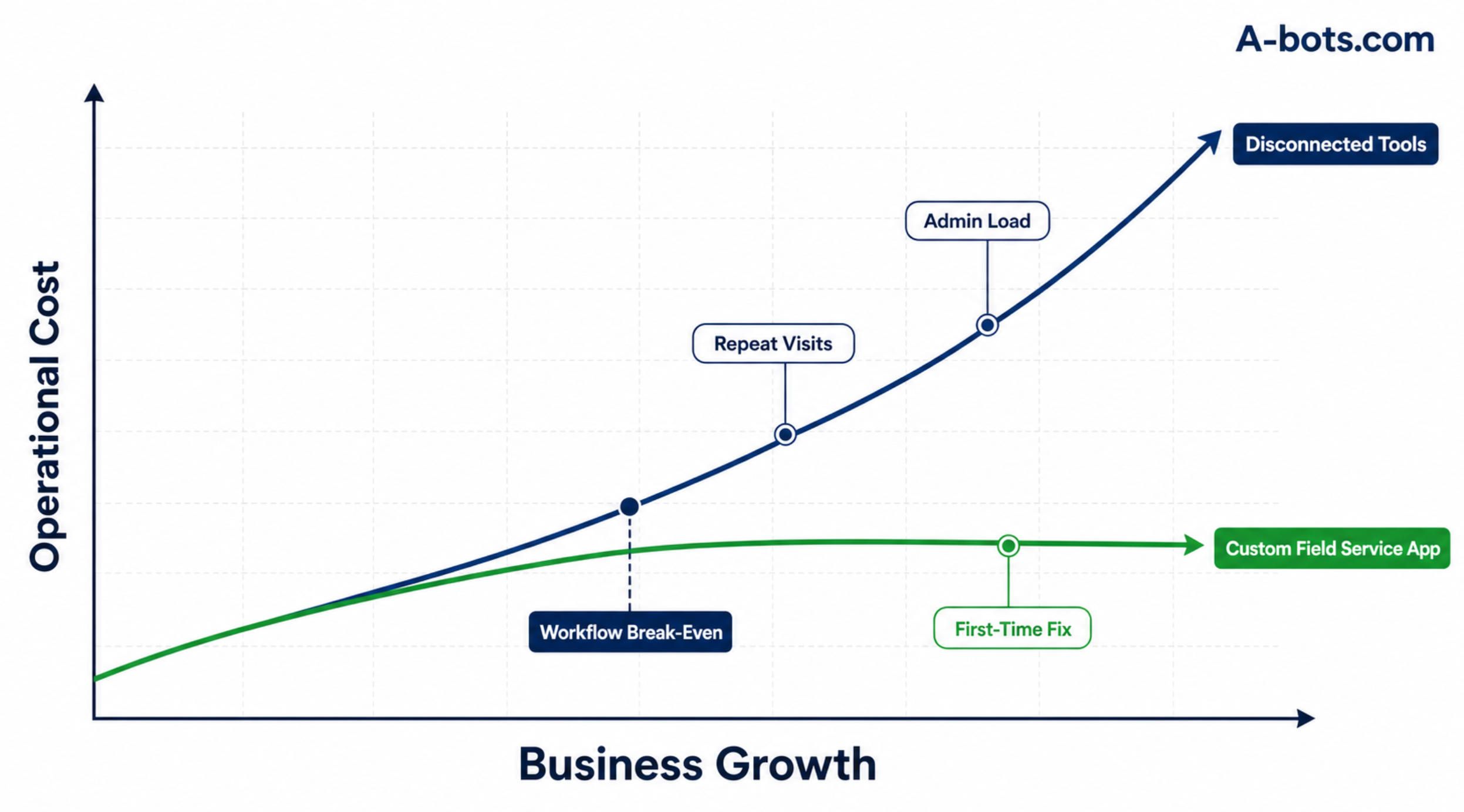
This is where the “good enough” system becomes expensive. Not because the subscription price is high, but because it fails to eliminate the operational gaps that create repeat visits, delayed billing, customer complaints, and dispatcher overload.
A second visit caused by a missing part is not only a scheduling inconvenience. It consumes vehicle time, technician time, fuel, customer patience, and management attention. A service report written from memory at the end of the day is not only an administrative delay. It weakens warranty evidence, invoice accuracy, and the company’s ability to learn from previous jobs. A customer who does not know when the technician will arrive is not only mildly annoyed. He may call the office repeatedly, leave a bad review, or choose a competitor next time.
Off-the-shelf FSM platforms often solve the visible part of the problem: replacing paper with screens. Custom field service app development should solve the deeper problem: turning field execution into a connected, measurable workflow.
That distinction matters.
A digital form is not the same as a service system. A mobile work order is not the same as technician enablement. A dispatch calendar is not the same as operational control. A custom app is valuable only when it reduces friction at the exact points where the company currently loses time, money, or trust.
Why off-the-shelf FSM starts to fail as operations mature
There is nothing wrong with off-the-shelf field service management software. For many small companies, it is the right first move. Tools like Jobber, ServiceTitan, Salesforce Field Service, Microsoft Dynamics 365 Field Service, ServiceNow FSM, IFS, and other platforms exist because field service has common patterns.
The issue is that mature service companies rarely remain generic.
An HVAC contractor may need seasonal maintenance plans, emergency call prioritization, refrigerant tracking, replacement estimates, recurring contracts, and technician-specific certification logic. An equipment repair company may need serial-number-level asset history, compatibility rules for parts, warranty exclusions, component rebuild history, and customer-specific approval flows. A facility maintenance provider may need multi-site service agreements, subcontractor coordination, compliance checklists, safety evidence, and SLA escalation. An industrial maintenance team may need offline workflows, plant access rules, machine downtime classification, and integration with EAM or ERP systems.
Generic systems can sometimes be configured to cover these needs. But configuration has limits. When the team starts building workarounds around the software, the software is no longer the operating system. It becomes one more tool in a fragmented stack.
A good sign that the company has outgrown its current setup is the return of informal systems. If dispatchers still rely on side spreadsheets, technicians still send photos through messaging apps, managers still ask for status updates manually, and accounting still waits for someone to clean up job data, the company does not have a connected field service workflow. It has partial digitization.
This is where custom development becomes less about uniqueness and more about fit. The goal is not to build everything from scratch for pride. The goal is to design the missing operational layer between the systems the company already uses.
The field technician app should be built around the moment of work
The technician is not sitting at a desk with a large monitor, quiet time, and stable internet. The technician is in a van, on a roof, in a mechanical room, in a customer’s home, near running equipment, under time pressure, often with gloves, tools, noise, weather, and a customer waiting.
That reality should shape the app.
A serious technician mobile app must reduce thinking load, not add another administrative burden. The interface should answer immediate questions: where am I going, what is the problem, what equipment is involved, what happened last time, what parts may be needed, what safety steps apply, what evidence must be captured, and what can I close before leaving the site?
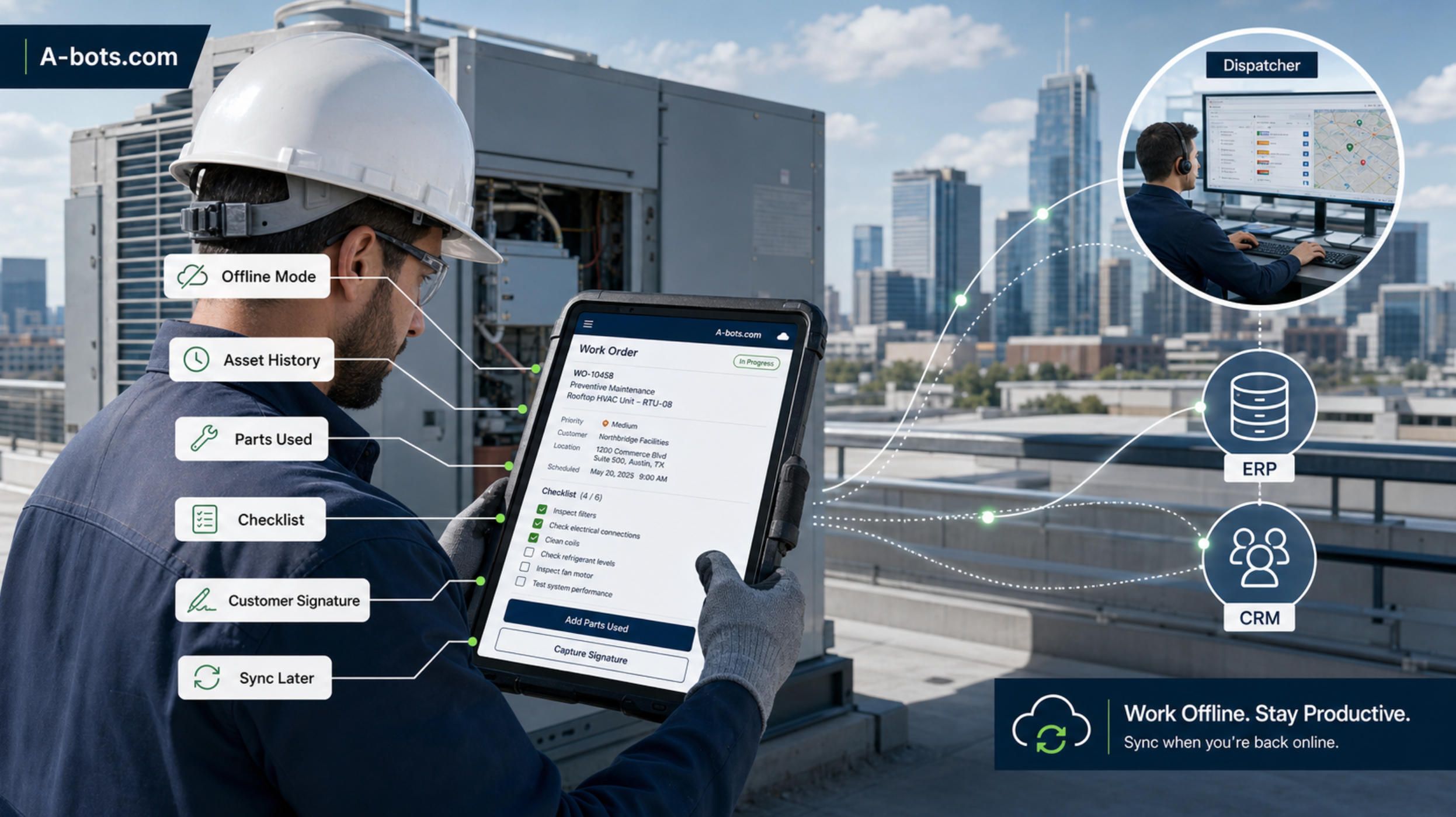
For HVAC and equipment repair companies, the most useful technician app usually includes:
- Work orders with job priority, customer details, equipment history, location notes, photos, and previous service records.
- Step-by-step checklists for inspections, diagnostics, preventive maintenance, safety requirements, and job completion.
- Parts usage, van stock visibility, barcode scanning, replacement requests, customer signatures, time tracking, and photo-based proof of work.
- Offline mode with reliable sync when connectivity returns.
Offline capability deserves special attention. ServiceNow’s own field service mobile documentation describes the ability to plan, work on, and complete tasks without internet access, with data syncing later. That is not a luxury feature. In field service, offline-first design can be the difference between a usable tool and a tool technicians quietly avoid.
The app should also respect the fact that not every technician has the same experience level. A senior technician may need speed and flexibility. A junior technician may need guided diagnostics, required photos, knowledge base links, and escalation options. A subcontractor may need a narrower workflow with limited data access. A supervisor may need quality review and exception handling.
This is where custom mobile app development can outperform generic configuration. The workflow can be designed around the company’s real field roles, not a universal average user.
Dispatch is where margin is protected or destroyed
Dispatching is often described as scheduling, but in a serious service company it is closer to live operations control.
A dispatcher is balancing technician skills, travel time, SLA deadlines, emergency calls, customer availability, part availability, job duration, overtime risk, and route efficiency. In a small company, one experienced person may hold much of this logic in his or her head. In a growing company, that model becomes fragile.
If the dispatcher assigns the wrong technician, first-time fix rate suffers. If the job is scheduled before the required part is available, the company creates a repeat visit. If emergency calls are inserted manually without visibility into downstream consequences, the whole day becomes unstable. If customer communication is not automated, the dispatcher becomes a call center.
A custom field service app should not merely show jobs on a calendar. It should help dispatchers make better operational decisions.
That can include skill-based assignment, map-based route visibility, SLA risk indicators, emergency rescheduling, technician status, van stock awareness, customer availability windows, and alerts when a job is likely to fail before anyone arrives. The best dispatch system does not pretend that all work orders are equal. A maintenance visit, emergency repair, warranty inspection, installation follow-up, and high-value commercial contract may require different logic.
This is also where AI can be useful, if used carefully. AI should not be presented as a magical dispatcher replacement. A better framing is decision support. It can identify jobs at risk, suggest the most suitable technician, summarize the day’s disruptions, detect patterns in repeat visits, or recommend whether a part should be reserved before dispatch.
The dispatcher remains accountable. The system makes the hidden complexity visible.
Parts availability is often the missing link
Many field service failures are not caused by poor technician skill. They are caused by poor parts visibility.
A technician cannot complete a repair if the required part is not in the van, not in the warehouse, not compatible with the asset, or not approved for the customer’s warranty condition. Yet many service companies still treat inventory as a back-office function rather than a live field execution dependency.
For equipment repair and maintenance companies, parts logic can become very specific. One component may fit several models but not certain serial-number ranges. A warranty job may require approved parts only. A commercial customer may have contracted replacement standards. A technician may carry van stock that is not visible to other branches. A warehouse may show stock on hand, but the part is already reserved for tomorrow’s job.
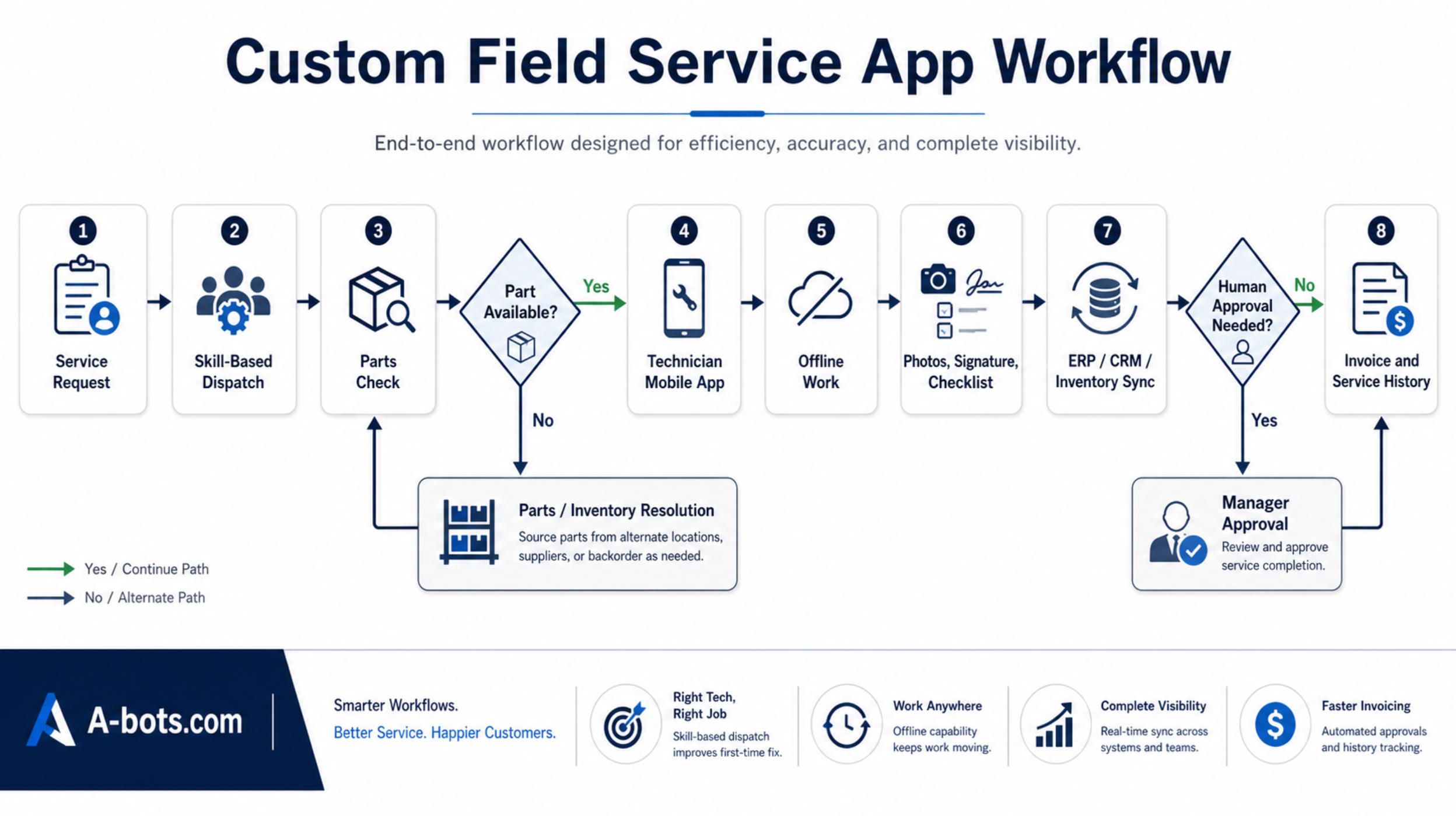
A custom field service app can connect parts to the work order before the technician arrives. It can suggest likely parts based on equipment history and fault category. It can allow barcode scanning in the field. It can update van stock after a job closes. It can trigger replenishment. It can prevent a dispatcher from scheduling work that cannot be completed.
This is one of the strongest commercial arguments for custom development. Many companies do not lose money because they cannot schedule jobs. They lose money because scheduling is disconnected from inventory reality.
The back office should not retype the field
A field service app creates real value only when field data flows into the systems that run the business.
That means CRM, ERP, accounting, inventory, warranty, asset management, customer portals, payment systems, analytics, and sometimes IoT platforms. IFS highlights deep integration with ERP, EAM, and CRM as one of the fastest ROI areas in field service software. The reason is straightforward: field service work is not complete when the technician taps “done.” It is complete when the company can bill accurately, update the customer record, adjust inventory, document warranty, analyze performance, and plan the next service action.
Without integration, digital field data becomes another isolated data source.
A technician may complete a perfect mobile report, but if accounting must re-enter details manually, billing is still delayed. The dispatcher may close a work order, but if CRM does not update the customer’s service history, sales and support remain blind. A part may be used in the field, but if inventory is not updated, the next technician may be sent with false stock assumptions.
This is why custom field service development should start with workflow mapping, not screen design. The team must understand what happens before the service visit, during the visit, and after the visit. Which system owns the customer? Which system owns inventory? Which system owns invoices? Which system owns assets? Which data must sync instantly, and which can sync later? Which actions require human approval?
A-bots.com approaches this type of project as a mobile workflow and integration challenge, not just an app interface challenge. For field service companies, that distinction is essential. The value is not in having a branded app icon. The value is in removing the operational gaps between systems.
AI belongs inside controlled workflows, not on top of chaos
AI is becoming a standard part of enterprise software, and field service is no exception. Gartner predicted that up to 40% of enterprise applications would include task-specific AI agents by 2026, up from less than 5% in 2025. But field service companies should be careful with the order of implementation.
If the underlying workflow is chaotic, AI may simply accelerate confusion. If job data is incomplete, equipment history is inconsistent, parts usage is not captured, and technicians write vague notes, then AI has weak material to work with. The first step is not to “add AI.” The first step is to make the field workflow structured enough that AI can assist responsibly.
In a well-designed custom field service app, AI can support practical use cases:
- Suggest likely causes and repair steps based on similar historical work orders.
- Summarize technician notes and photos into a customer-ready service report.
- Flag jobs at risk of SLA breach, repeat visit, missing part, or warranty dispute.
- Recommend parts to reserve before dispatch.
- Help junior technicians find manuals, procedures, and previous fixes faster.
The important phrase is “support.” In field service, especially HVAC, industrial equipment, facility maintenance, and safety-sensitive work, AI should not silently make high-risk decisions. Pricing, warranty approval, safety exceptions, compliance sign-off, and major repairs should remain controlled by human review.
The strongest custom systems will not be the ones that add the most AI features. They will be the ones that place AI at the right points in the workflow, with clear permissions, audit trails, and escalation paths.
When custom development makes more sense than buying another tool
A custom field service app is not the right answer for every company. If a small service business has a simple workflow, standard invoicing, limited inventory complexity, and no major integration needs, an off-the-shelf FSM platform may be the best decision.
Custom development starts to make sense when the cost of workarounds becomes greater than the cost of building the right workflow.
That point often arrives when the company has multiple technician teams, recurring contracts, specialized equipment, complex parts, branch-level inventory, strict SLAs, safety documentation, warranty rules, or disconnected enterprise systems. It also arrives when management cannot answer basic operational questions without asking several people to assemble data manually.
How many jobs required a second visit because of missing parts? Which technicians are overloaded by admin work? Which customers generate the most emergency calls? Which assets are becoming unprofitable to maintain? Which service reports are delayed? Which warranty claims lack proper evidence? Which jobs are stuck because the field and office are waiting on each other?
If these questions are hard to answer, the company does not have an information problem. It has a workflow design problem.
A custom field service app can be built gradually. It does not need to replace every system at once. In many cases, the smartest approach is to build the mobile operational layer first: technician workflow, dispatch visibility, parts capture, offline sync, and integration with the systems already in place. Then the company can expand into customer portals, AI assistance, analytics, predictive maintenance, and deeper automation.
The best projects start narrow but important. One high-value workflow. One technician group. One region. One integration path. Then scale.
The real product is operational confidence
Field service companies do not buy custom apps because they want more software. They buy them because the existing operation has become too complex to manage through fragmented tools.
They want to know that the technician has the right information before arriving. They want to know that the part is available before the job is promised. They want to know that the customer receives accurate updates. They want to know that the service report is complete before the invoice is created. They want to know that warranty evidence will not disappear into someone’s phone. They want to know that growth will not require hiring more coordinators just to hold the operation together.
That is the real promise of custom field service app development.
Not “digital transformation.” Not “AI-powered innovation.” Not another dashboard.
The promise is operational confidence: every service request becomes traceable, every technician action becomes useful data, every part movement becomes visible, every customer interaction becomes connected, and every completed job strengthens the system instead of disappearing into yesterday’s messages.
For HVAC, equipment repair, and maintenance companies, this is where software becomes more than administration. It becomes the field execution layer of the business.
And when that layer is designed around the company’s real workflow, not a generic template, the mobile app stops being a digital clipboard. It becomes the place where service quality, technician productivity, customer trust, and back-office control finally meet.
✅ Hashtags
#FieldServiceAppDevelopment
#CustomMobileAppDevelopment
#HVACSoftware
#EquipmentRepairSoftware
#MaintenanceSoftware
#FieldServiceManagement
#OfflineMobileApps
#ERPIntegration
Other articles
Canon Printer App for Android: A Real Setup Guide Getting a printer to work from an Android phone should be simple, and with most Canon models it is: the right Canon printer app for Android finds the printer and prints on the first try. But branded printer apps still fail sometimes, as a real Xerox Phaser 3020 case shows, where the official plugin refused with "device not supported." This guide explains what the official Canon printer app for Android options are, why a universal app like NokoPrint often succeeds where the branded one stalls, and the exact manual fix, an IP address plus port 9100, that prints when nothing else will. It closes with how A-Bots.com builds reliable companion apps for connected hardware.
Precision Field Monitoring: Climate FieldView & CropX Review Reviews two leading tools for precision crop and field monitoring. The first half is a detailed, hands-on review of Climate FieldView, the Bayer data platform built around live planting maps, imagery, and variable-rate prescriptions, and CropX, the soil-intelligence system whose in-ground sensors report moisture, temperature, and conductivity by depth. It weighs features, mobile apps, pricing, and real user complaints for each. The second half maps the wider technology stack, the connectivity and integration gaps in off-the-shelf products, and where custom development or independent QA testing makes sense. It closes with how A-Bots.com builds tailored field-monitoring apps, IoT integrations, and tests existing platforms.
Precision Livestock Farming: Halter & CowManager Review Technical review of two precision livestock farming systems built on opposite design choices. Halter is a solar GPS collar that not only tracks cattle but steers them with directional audio, vibration, and a last-resort pulse, using satellite and LoRaWAN links and filtered GPS. CowManager is an ear sensor that fuses ear temperature with accelerometer behavior classification to flag illness, heat, and transition risk days early. The review weighs how each senses, decides, transmits, and acts, with real limits. The second half goes deeper into sensing modalities, rumen boluses, machine-learning trade-offs, and connectivity, then shows where A-Bots.com builds custom apps, firmware, and QA testing.
FMIS Review: John Deere Operations Center & Agworld Review of two farm management platforms built on opposite philosophies. John Deere Operations Center is a telematics-anchored hub: JDLink machine data, Work Planner, a REST and OAuth2 API across 150-plus partners, and dealer remote support, with the trade-offs of a single-vendor ecosystem. Agworld is a collaboration platform built on a shared, farmer-owned dataset, with standout offline-first mobile apps and integrated agronomy and financials. The review weighs how each ingests, stores, and shares data. The second half goes deep into the interoperability stack that decides whether data can move: ISOBUS, ISOXML, and AgGateway ADAPT, plus where A-Bots.com builds custom FMIS and QA testing.
Custom Agritech Development & QA Testing: Build vs Buy The capstone of a four-part agritech series. Across reviews of FieldView, CropX, Halter, CowManager, John Deere Operations Center, and Agworld, the same walls kept appearing: vendor lock-in, per-unit pricing that punishes scale, weak offline behavior, the integration tax of ISOBUS and ADAPT, and data nobody fully owns. This article turns those gaps into a build-versus-buy framework by operation scale, then shows the full stack A-Bots.com builds — device firmware, offline-first apps, interoperability layers, owned analytics — and the independent QA testing that hardens existing platforms. Custom agritech development, whole project or single module, plus testing of what you already run.
Top stories

Copyright © Alpha Systems LTD All rights reserved.
Made with ❤️ by A-BOTS