
Home
Services
About us
Blog
Contacts
Estimate project
EN

How to Build a Custom ERP Mobile App: Architecture, Integrations, Security, Offline Mode, and AI

The Real Question Is Not “How Do We Put ERP on Mobile?”

A custom ERP mobile app should not be understood as a smaller version of a large enterprise system. That is the first mistake many companies make. They imagine that mobile transformation means taking ERP screens, simplifying them, placing them into an app, and giving employees access from a phone or tablet.
custom-erp-mobile-app-architecture.jpg

That approach usually fails because it misunderstands the nature of mobile work.

ERP lives in a world of structured records. Mobile work lives in a world of motion, interruption, weak connectivity, partial information, physical objects, customer pressure, human judgment, and time-sensitive decisions. ERP wants clean data. The warehouse gives it damaged boxes, missing labels, urgent transfers, wrong locations, and workers moving fast. ERP wants validated work orders. Field service gives it basements without signal, spare parts substitutions, customer signatures, unexpected repairs, and technicians making decisions under pressure. ERP wants controlled approvals. Managers approve from airports, production floors, service vans, and client meetings.

The real challenge is not to make ERP available on mobile. The challenge is to make real-world work safe enough to enter ERP.

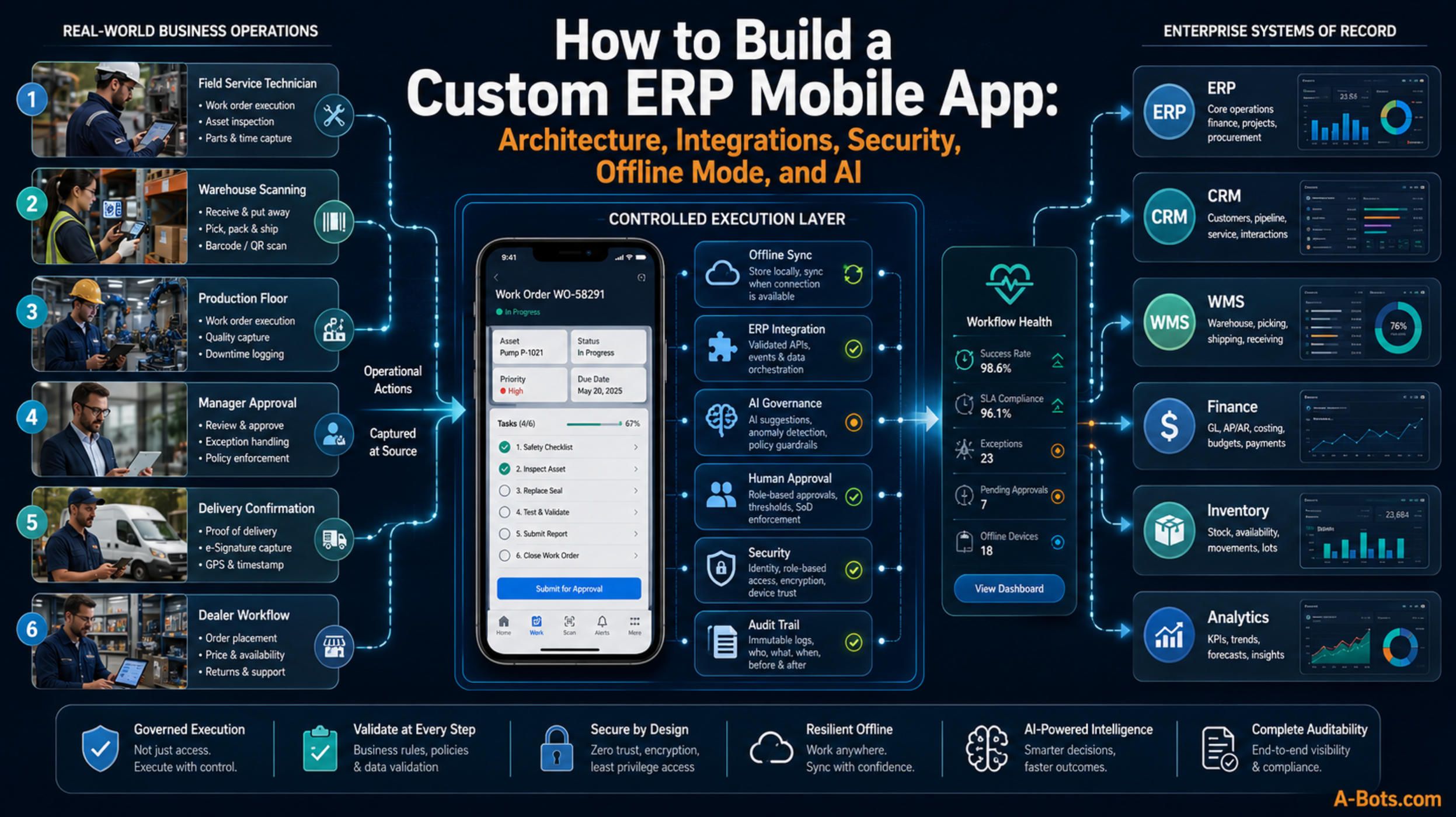
That is why the central idea of a serious custom ERP mobile app is a Controlled Execution Layer.

This is the concept that should guide the entire architecture. A mobile ERP app is not merely a user interface. It is a controlled layer between enterprise planning and physical execution. It absorbs the messiness of real operations, structures it, validates it, secures it, synchronizes it, and only then allows it to affect the system of record.

ERP should remain the official source of truth. But the mobile app becomes the place where truth is captured.

The development problem is therefore deeper than “build an app.” The real product is a controlled execution environment where employees, devices, offline transactions, AI suggestions, approvals, ERP rules, and business evidence all meet under governance.

That is the final lesson of the Mobile ERP App Development series.

A company may need mobile apps for field service, warehouse operations, manufacturing, spare parts, after-sales, delivery, approvals, inspections, or dealer workflows. The use cases differ, but the architecture must answer one strategic question:

Can the business trust what enters ERP from the edge?

If the answer is yes, the mobile app becomes a source of operational control. If the answer is no, the app becomes another channel of disorder.

ERP Is the System of Record. Mobile Is the System of Reality.

Traditional ERP systems are built around records: sales orders, purchase requests, invoices, work orders, stock levels, assets, customers, serial numbers, contracts, delivery notes, production batches, service claims, and financial postings. These records are essential because they make the company manageable.

But records are not reality. They are descriptions of reality.

Reality happens outside the database. A technician replaces a part. A warehouse worker moves a pallet. A driver hands over goods. A supervisor approves an urgent purchase. A dealer registers a machine. A customer signs a service report. A production operator notices a defect. A field inspector takes a photo. A manager sees that a job is no longer profitable.

If these events are not captured accurately when they happen, ERP becomes delayed memory. It may still contain data, but that data arrives too late, with too little evidence, and too much manual interpretation.

This is why mobile ERP app development matters. The mobile app is the bridge between physical reality and enterprise records.

However, a bridge must be engineered. It cannot be a loose connection.

If a mobile app allows employees to update ERP without validation, it can create bad inventory data, duplicate work orders, false job completion, incorrect invoices, unauthorized approvals, broken warranty logic, or inconsistent asset history. If the app is too restrictive, employees bypass it and return to paper, screenshots, messaging apps, calls, and spreadsheets. If the app cannot work offline, field teams lose trust. If it has no audit trail, finance and compliance teams reject it. If AI can suggest or execute actions without boundaries, risk multiplies.

The Controlled Execution Layer exists to solve this tension.

It gives employees speed without giving chaos direct access to ERP.

It gives managers visibility without forcing workers into desktop complexity.

It gives AI a role without allowing uncontrolled automation.

It gives ERP cleaner data without pretending the real world is clean.

This is the architecture that turns a mobile app from a convenient interface into an enterprise-grade system.
enterprise-workflow-command-center-erp-app.jpg

The Controlled Execution Layer: The Core Idea

The Controlled Execution Layer is the middleware of trust between mobile users and ERP.

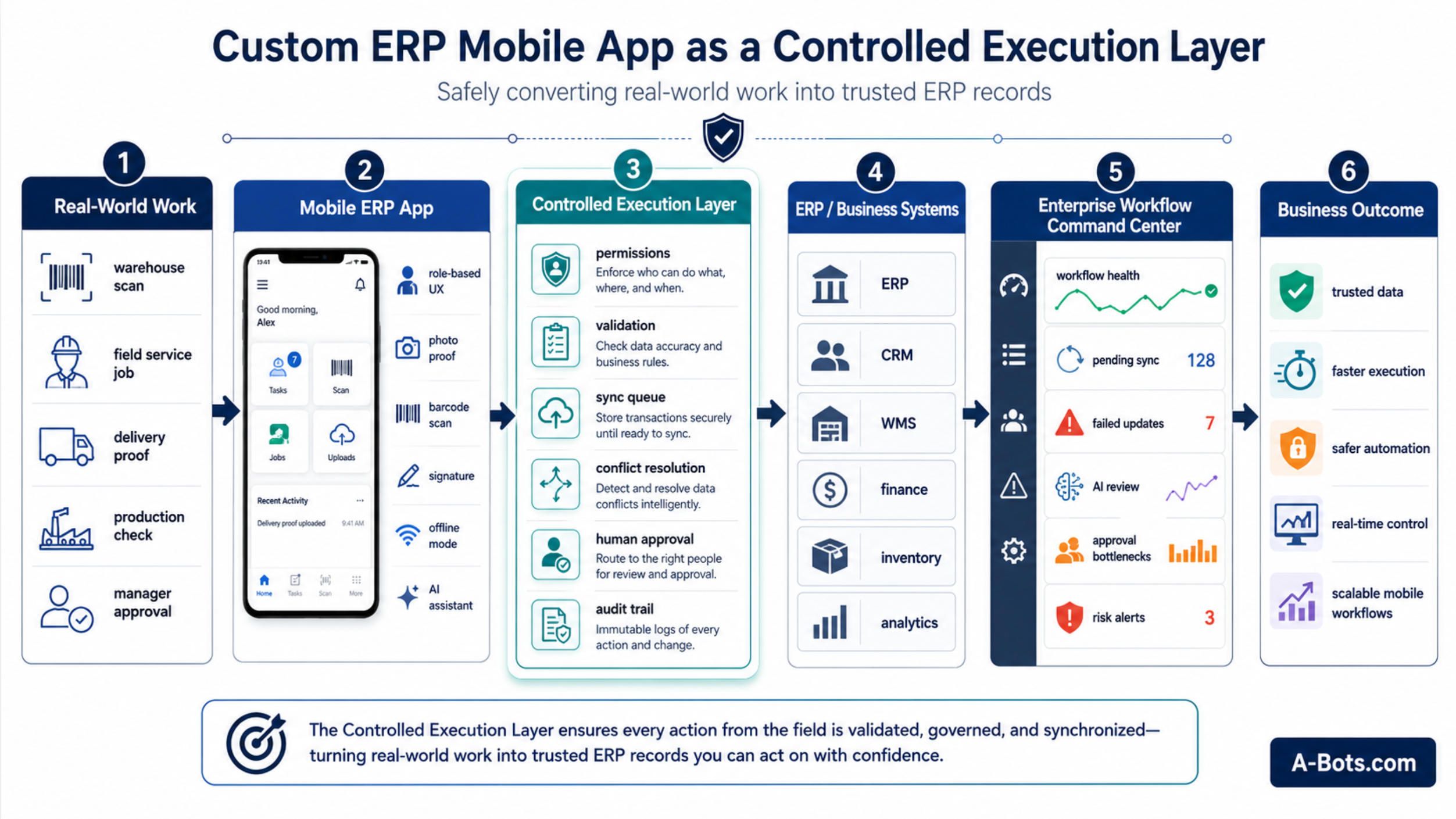
It does not simply pass data from the app to the ERP. It interprets the action, checks permissions, validates business rules, manages offline state, resolves conflicts, creates audit evidence, triggers approvals, and decides what can be synchronized automatically and what needs human review.

Imagine a technician closing a service job from a mobile app. A weak app sends “job completed” to ERP. A controlled app asks a deeper set of questions before the job can become an official ERP event.

Was the technician assigned to this job? Was the customer location confirmed? Were required photos captured? Were parts used? Are those parts billable, under warranty, or included in a service contract? Was the customer signature collected? Was the device offline? Are there unsynced transactions? Did actual time exceed planned time? Does the job require supervisor approval before invoicing? Did AI generate the report summary, and did the technician approve it?

Only after that logic is satisfied should ERP receive the final update.

This is not overengineering. This is enterprise safety.

The same principle applies to warehouse stock transfers, field inspections, purchase approvals, warranty claims, delivery confirmations, production quality checks, dealer registrations, and inventory adjustments. Every mobile action has a business consequence. The Controlled Execution Layer makes that consequence governable.

For a real client, this is the trigger.

The client does not only need an app that “connects to ERP.” The client needs confidence that mobile work will not corrupt the system that finance, operations, sales, service, and management depend on.

That is the commercial power of this idea. It addresses the hidden fear behind every enterprise mobile project: “What if we open ERP to the field and lose control?”

A-Bots.com can position the answer clearly: we do not just build mobile screens for ERP. We build controlled execution layers that make ERP usable at the edge of the business without sacrificing data integrity, security, or governance.

Architecture Begins With the Boundary

The most important architectural decision in a custom ERP mobile app is where the boundary sits between mobile execution and ERP authority.

A poor architecture lets the app talk directly to ERP as if the phone were just another desktop client. That may work in simple demos, but it becomes fragile in real operations. Mobile devices lose connection. Users work offline. ERP APIs change. Workflows require multiple systems. Transactions fail halfway. Permissions differ by role. AI may propose an action. A supervisor may need to approve. A photo may need to be attached. A stock movement may conflict with another movement.

Direct connection does not handle this complexity well.

A mature architecture places a backend and integration layer between the mobile app and ERP. The mobile app becomes fast and role-based. The backend becomes intelligent and controlled. ERP remains protected.

The structure is not complicated in concept, but it must be implemented carefully. The mobile app captures the action. The backend receives it as a business event. The control layer validates the event. The integration layer maps it to ERP logic. ERP accepts the final state. The audit system records what happened.

This architecture allows the company to support multiple workflows without turning the mobile app into a fragile ERP clone.

A technician can close a work order. A warehouse worker can scan a transfer. A manager can approve a purchase request. A dealer can submit a warranty claim. A customer can confirm delivery. Each action may affect different ERP objects, but the control model remains consistent.

The app captures.

The control layer validates.

The ERP records.

That rhythm is the foundation of a trustworthy mobile ERP system.

Offline Mode Is Where Architecture Becomes Honest

Many mobile ERP projects look good in the office and fail in the field because they assume stable connectivity. But real work does not wait for Wi-Fi.

Warehouses have metal racks and dead zones. Technicians work in basements, industrial sites, mechanical rooms, rural areas, elevators, and remote facilities. Delivery drivers move between coverage areas. Production floors may have restricted networks. Dealers install equipment in places where mobile signal is unreliable.

If the app stops working in these conditions, employees will create their own unofficial offline system. They will use paper, photos, notes, calls, and messaging apps. Later, someone will re-enter data manually. At that moment, ERP loses immediacy and trust.

A serious custom ERP mobile app must be offline-first for the workflows that need it.

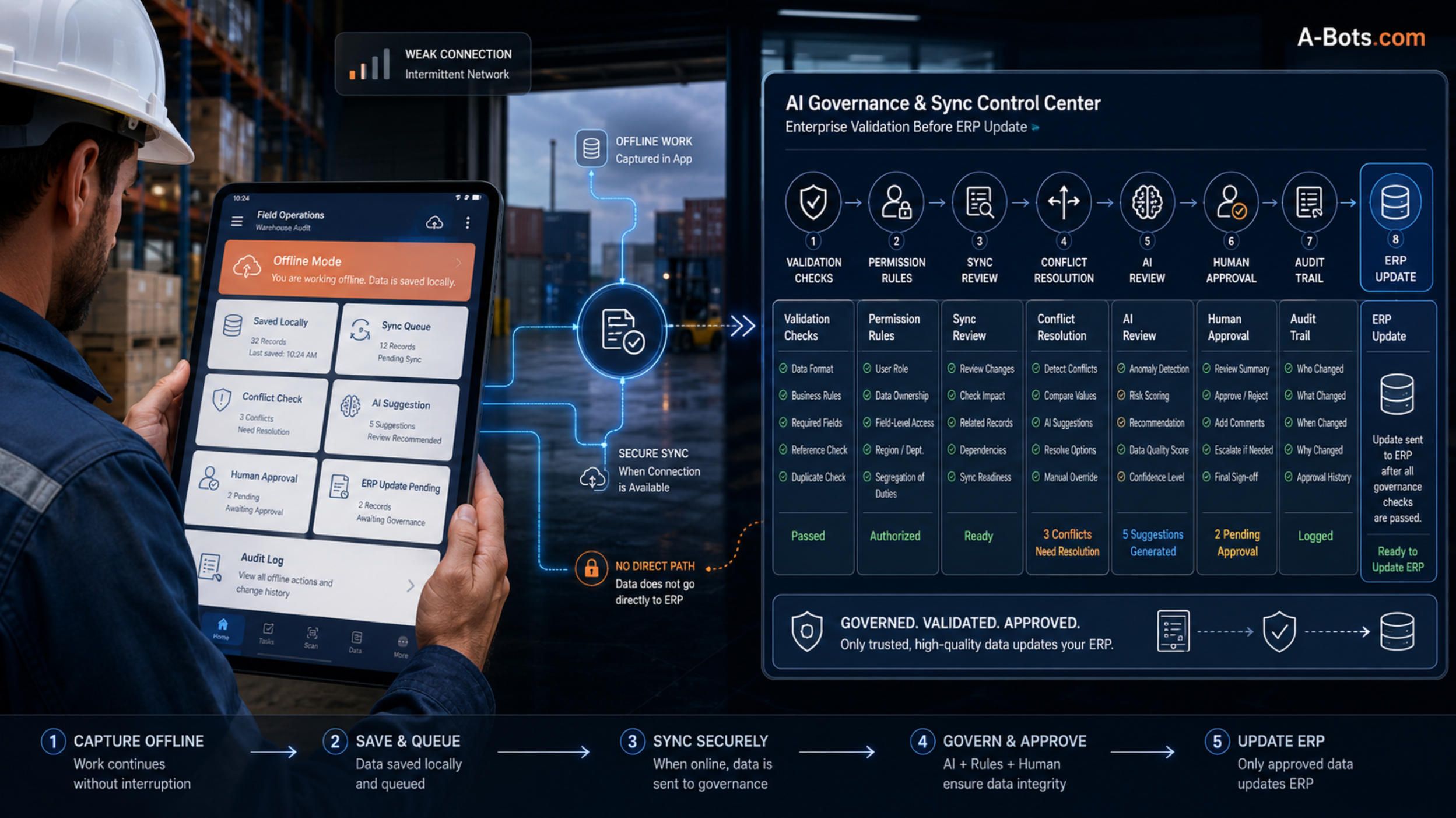
But offline-first does not mean “save something locally and send it later.” That is too primitive. In enterprise workflows, offline actions can change inventory, service status, customer evidence, warranty claims, delivery proof, approval chains, and financial readiness. The system must understand the difference between a locally saved action and an official ERP update.

The Controlled Execution Layer makes this visible.

When a user works offline, the app should clearly show that the transaction is saved on the device, waiting for synchronization, not yet accepted by ERP. When connection returns, the backend should validate the transaction before writing to ERP. If something changed during the offline period, the system should detect conflict instead of silently overwriting data.

For example, a technician may record parts usage offline while another team reserves the same part in ERP. A warehouse worker may transfer stock offline while a sales order allocates that stock. A manager may approve a request offline after its budget status changes. These are not rare edge cases. They are normal consequences of distributed operations.

Offline mode is therefore not a feature. It is a governance problem.

A-Bots.com can make this a major trust point. An enterprise-grade ERP mobile app should tell the business not only what users did, but also whether those actions are local, pending, synchronized, rejected, conflicted, or approved.

That is what separates operational software from a mobile form.
offline-sync-ai-governance-erp-mobile-app.jpg

Integration Is Not Data Exchange. It Is Translation of Business Meaning.

Many companies underestimate ERP integration because they think of it as moving data between systems. In reality, integration is the translation of business meaning.

A mobile app may say: “Technician used part A on asset B.” ERP must understand whether this is inventory consumption, warranty cost, billable item, contract-included item, maintenance kit component, dealer claim evidence, or production quality signal.

A warehouse app may say: “Item moved from location X to location Y.” ERP must understand whether the movement is available stock, reserved stock, quarantine, return inspection, production staging, damaged goods, or branch transfer.

A manager app may say: “Request approved.” ERP must understand approval level, budget impact, purchasing policy, supplier status, document trail, and whether additional approval is needed.

This is why integration cannot be treated as plumbing. It is business logic.

The Controlled Execution Layer should contain a canonical workflow model that the mobile app understands and ERP can trust. It maps mobile actions into enterprise objects without exposing mobile users to ERP complexity.

For companies with multiple systems, this becomes even more important. A field service workflow may touch ERP, CRM, inventory, finance, customer portal, and IoT. A warehouse workflow may touch ERP, WMS, e-commerce, procurement, and delivery software. A manufacturing after-sales workflow may touch ERP, dealer portal, spare parts catalog, warranty system, and asset registry.

The user should not care how many systems are involved. The user should see one clear action. The architecture should handle the rest.

That is the kind of invisible engineering that makes the app feel simple.

Security Must Be Designed Around Work, Not Around Screens

ERP security is often designed around modules, roles, and permissions inside the enterprise system. Mobile security must go further because the context is different.

A mobile user is not only a user. A mobile user is a person with a device, location, network condition, role, task, offline state, and workflow context. The same person may be allowed to view data but not change it. They may be allowed to complete a job but not approve extra work. They may be allowed to scan parts but not adjust inventory. They may be allowed to draft a warranty claim but not submit it without evidence.

This is why security in a mobile ERP app should be action-based.

The question is not only “Who are you?” It is also “What are you trying to do, under which conditions, with which record, from which device, and what will happen if the action is accepted?”

A technician may be allowed to upload service photos for assigned jobs but not browse all customer assets. A warehouse worker may be allowed to pick orders but not perform stock corrections. A dealer may be allowed to submit claims for machines in their territory but not see another dealer’s customers. A manager may approve purchase requests below a threshold but not above it.

This narrow access model can make mobile ERP safer than informal workarounds. Without an approved app, employees often move sensitive business information through personal messages, spreadsheets, screenshots, and emails. A controlled app brings those actions into authenticated, logged, role-based infrastructure.

Auditability is the second half of security.

Every critical mobile action should leave a trail that a manager, IT team, finance controller, or compliance officer can understand. Who performed the action? Which device was used? Was the user online or offline? What was the previous value? What changed? Was AI involved? Was approval required? Was ERP updated successfully? Was there a conflict?

When this is designed well, mobile ERP no longer feels risky. It becomes more transparent than the manual processes it replaces.

AI Should Not Operate ERP. AI Should Operate Inside the Controlled Layer.

AI is becoming unavoidable in enterprise software. Task-specific agents are moving into business applications, and companies are already experimenting with AI-assisted approvals, service summaries, inventory analysis, technician guidance, procurement suggestions, and customer support.

But ERP is not a safe place for uncontrolled AI autonomy.

An AI agent that can freely change ERP records can create serious damage: wrong inventory movement, unauthorized purchase approval, incorrect customer update, false warranty decision, broken invoice logic, or accidental modification of the wrong asset. The problem is not that AI is useless. The problem is that enterprise actions have consequences.

This is why AI must operate inside the Controlled Execution Layer, not outside it.

AI should be allowed to interpret, suggest, classify, summarize, compare, and warn. But when an action affects ERP, the system must constrain it through permissions, validation, action contracts, and human approval for sensitive operations.

A useful AI assistant in a mobile ERP app might summarize a technician’s notes into a service report. But the technician must approve the final report. AI might recommend a spare part based on asset history. But the technician must confirm usage, and ERP must check availability and warranty rules. AI might detect suspicious inventory discrepancy. But a supervisor should approve any stock adjustment. AI might suggest that a purchase request is routine. But budget thresholds and approval policy must still control the decision.

This is not a weakness of AI. It is how enterprise AI becomes usable.

The best AI in ERP mobile apps will not be the most autonomous. It will be the most governable.

A-Bots.com can make this a key message for clients: AI can make the app smarter, but the architecture must keep the business safe. AI should accelerate work without bypassing the rules that protect the company.

Human-in-the-Loop Is Not a Button. It Is a Business Philosophy.

Many products present human-in-the-loop as a simple approval button. That is too shallow.

In an ERP mobile app, human-in-the-loop should be a philosophy of risk management. The system should understand that not all actions are equal. Some actions can happen automatically. Some require user confirmation. Some require supervisor review. Some require finance approval. Some require compliance evidence. Some should be blocked unless missing data is supplied.

A delivery confirmation with photo proof may be low risk. A stock adjustment worth thousands of dollars is not. A routine maintenance note may sync automatically. A warranty claim with missing evidence should not. AI-generated service summary may be useful. AI-approved invoice release would be dangerous without validation.

The app should guide these decisions naturally.

The user should not feel trapped inside bureaucracy. The app should explain why an action needs review: missing signature, high-value part, warranty ambiguity, offline conflict, budget threshold, unusual inventory variance, or AI uncertainty.

This is how trust is built.

People accept control when control is understandable. They reject control when it feels arbitrary.

A well-designed mobile ERP app makes governance part of the workflow, not an obstacle added at the end.

The Command Center: The Feature That Makes the System Visible

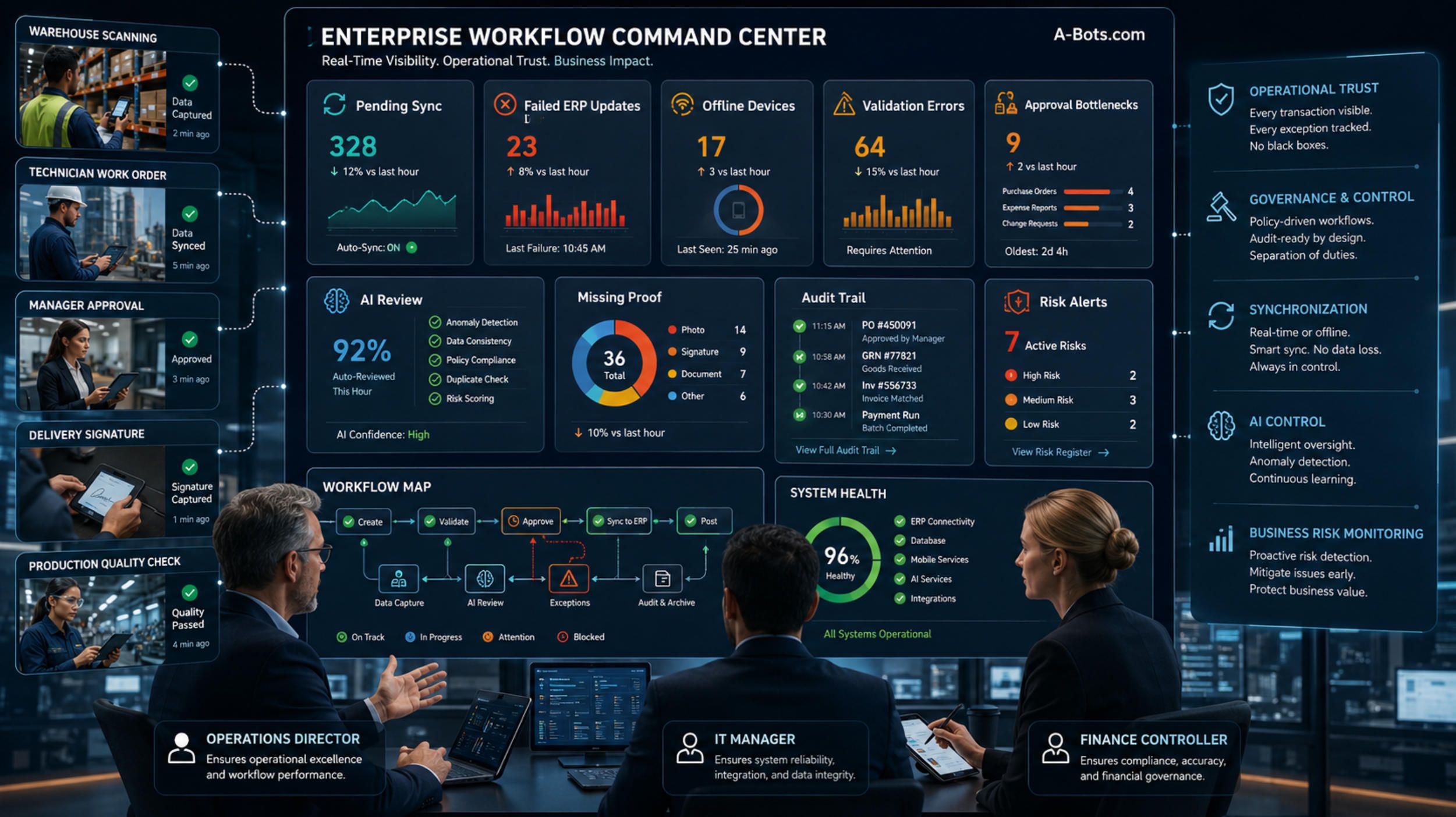
The Controlled Execution Layer becomes even more powerful when it has a visible operational cockpit: the Enterprise Workflow Command Center.

This is the trigger feature that can sell the final concept to serious clients.

Most companies fear what they cannot see. They fear offline transactions stuck on devices. They fear failed ERP updates. They fear employees bypassing rules. They fear AI suggestions nobody monitors. They fear inventory conflicts. They fear incomplete job reports. They fear approvals sitting unnoticed. They fear that a mobile app will become a black box between the field and ERP.

The Enterprise Workflow Command Center removes that fear.

It gives operations, IT, finance, and management a live view of workflow health. It can show which mobile transactions are pending, which devices are offline, which ERP updates failed, which approvals are blocked, which AI recommendations need review, which stock movements have conflicts, which service jobs are missing proof, and which workflows are creating business risk.

This is not just analytics. It is operational assurance.

A service director can see why invoicing is delayed. A warehouse manager can see which transfers are pending sync. A finance controller can see which approvals are blocked by missing evidence. An IT manager can see connector failures. A security officer can see suspicious access. A business owner can see whether the mobile layer is improving control or generating friction.

This is the feature that makes the article non-banal.

The app is not only for workers. The app has a nervous system that management can inspect.

A-Bots.com can build not only the mobile application, but the command center behind it. That is a much stronger offer than “we develop ERP apps.” It says: we build the execution layer and the governance cockpit that make mobile ERP trustworthy.
custom-erp-mobile-app-controlled-execution-flowchart.jpg

The Best MVP Is Not the Smallest App. It Is the Smallest Controlled Workflow.

Companies often ask what the MVP of a custom ERP mobile app should include. The wrong answer is “a few screens.” A few screens may look like progress, but they do not prove enterprise value.

The right MVP is the smallest controlled workflow that solves a painful business problem from beginning to end.

For a field service company, that might be a work order flow: assignment, offline checklist, photo proof, parts used, customer signature, ERP sync, invoice readiness, and manager visibility.

For a warehouse, it might be stock transfer: barcode scan, source and destination validation, offline queue, ERP update, discrepancy flag, supervisor approval, and audit trail.

For a manufacturer, it might be asset registration: serial number scan, customer assignment, warranty start, installation photos, service history, spare parts lookup, and ERP synchronization.

For an approvals workflow, it might be purchase request review: mobile notification, budget context, approval threshold, comment, escalation, ERP update, and audit record.

The common pattern is not the industry. The common pattern is control.

The MVP should prove that the company can safely move one important workflow from delayed, manual, or desktop-based execution into a governed mobile environment.

Once that is proven, the system can expand.

New workflows can reuse the same foundations: authentication, roles, sync engine, audit logs, integration layer, notification logic, approval rules, AI assistant, and command center. This is how custom ERP mobile app development becomes a platform, not a one-off tool.

Why This Matters for Business Leaders, Not Only IT Teams

The technical architecture matters because the business consequences are real.

If warehouse transactions sync correctly, sales can promise stock more confidently. If field service reports are completed with evidence, finance can invoice faster. If warranty claims are structured, manufacturers can reduce leakage. If offline work is controlled, field teams stay productive without corrupting ERP. If AI is bounded, the company gets acceleration without losing governance. If managers see workflow health, they can fix bottlenecks before customers feel them.

This is why a custom ERP mobile app should not be sold as an IT convenience.

It is an operational control project.

The business leader should care because the app affects revenue, margin, customer experience, inventory accuracy, service speed, compliance, and management visibility. The IT leader should care because the architecture protects ERP, APIs, data integrity, identity, security, and long-term scalability. The operations leader should care because the app reduces the gap between what people do and what systems know.

The strongest companies will not ask whether ERP should be mobile. They will ask which workflows are too important to remain trapped at the desk.

The Final Lesson: ERP Must Reach the Edge Without Losing Its Discipline

The entire Mobile ERP App Development series leads to one conclusion.

ERP is powerful because it brings discipline to business operations. But business operations are increasingly mobile, distributed, physical, real-time, and AI-assisted. If ERP remains only a back-office system, it will always lag behind the work it is supposed to control.

The answer is not to expose the whole ERP system on phones. That would only move complexity to smaller screens.

The answer is to build a Controlled Execution Layer.

This layer gives employees practical mobile workflows. It gives ERP clean, validated events. It gives managers visibility. It gives IT governance. It gives AI boundaries. It gives offline work a safe path back into the system of record.

That is the future of custom ERP mobile app development.

Not mobile ERP as access.

Mobile ERP as execution.

Not AI as uncontrolled automation.

AI as governed assistance.

Not offline mode as cached screens.

Offline mode as controlled transaction architecture.

Not integration as data exchange.

Integration as translation of business meaning.

Not an app as a front end.

An app as the living edge of enterprise control.

For companies with warehouses, field teams, production sites, equipment, dealers, delivery operations, approvals, service workflows, and distributed staff, this may be the difference between having ERP and actually operating through ERP.

A-Bots.com can help build that difference.

The most important question for a company is no longer whether it has an ERP system. Many already do.

The sharper question is this:

Can your ERP safely execute at the edge of your business?

If the answer is no, then the next step is not another dashboard. It is a custom mobile ERP app built as a controlled execution layer - secure, integrated, offline-ready, AI-aware, human-governed, and designed around the real work that keeps the company moving.

✅ Hashtags

#CustomERPApp
#MobileERP
#ERPIntegration
#EnterpriseMobileApps
#OfflineFirstApp
#AISoftwareDevelopment
#BusinessProcessAutomation
#ABotsCom

Other articles

How to Build a Custom AI Agent App How businesses can move from basic AI chatbot experiments to production-ready custom AI agent apps. It covers the architecture required for serious AI products, including mobile app UX, AI orchestration, knowledge retrieval, CRM and ERP integrations, workflow automation, data security, guardrails, observability, and human-in-the-loop control. The article shows why a business AI agent must be designed as a secure, integrated software system rather than a simple chat window. It positions A-Bots.com as a custom development partner for companies building practical AI-powered mobile apps and enterprise platforms.

Mobile ERP App Development Why traditional ERP systems often fail at the operational edge - where warehouse teams, field technicians, delivery staff, supervisors, and mobile managers actually perform the work. It explores the concept of a custom mobile ERP app as a focused operational layer over an existing ERP system. The article highlights moment-of-work data capture, offline functionality, barcode scanning, photo proof, GPS, digital signatures, approvals, security, and ERP integrations. It also shows how companies can use mobile ERP app development to reduce delays, improve data accuracy, strengthen accountability, and prepare their operations for AI-assisted workflows.

Field Service ERP Apps: Connecting Technicians, Dispatchers, and Customers How field service ERP apps turn technician visits, dispatcher decisions, spare parts usage, customer communication, and ERP records into one connected workflow. It focuses on the business value of custom mobile app development for service companies, manufacturers, facility teams, equipment providers, and field operations. The key concept is Service Profitability Control - a mobile module that helps companies see whether a visit is becoming profitable or unprofitable before the technician leaves the site. The article also covers offline mode, first-time fix rate, dispatch intelligence, ERP integration, customer proof, AI-assisted service, and secure mobile workflows.

Warehouse and Inventory Mobile ERP Apps: From Barcode Scanning to Real-Time Stock Control How warehouse and inventory mobile ERP apps connect physical stock movement with real-time ERP data. It focuses on barcode scanning, QR workflows, receiving, picking, packing, stock transfers, cycle counts, returns, damaged goods, offline synchronization, audit trails, and ERP or WMS integration. The key idea is the Inventory Truth Engine - a custom module that shows not only stock quantity, but also how trustworthy that quantity is. The article positions custom mobile app development as a practical way for companies to reduce inventory errors, improve fulfillment accuracy, protect margin, and make ERP data more reliable.

ERP Apps for Manufacturing and Equipment Companies: Production, Maintenance, Spare Parts, and After-Sales Control This article explains how manufacturing and equipment companies can use custom ERP mobile apps to connect production data, installed equipment, spare parts, maintenance, warranty, dealer networks, and after-sales revenue into one controlled lifecycle. The key concept is the Installed Base Revenue Radar - a custom module that helps manufacturers understand what each sold machine is likely to need next: maintenance, parts, warranty attention, dealer follow-up, upgrades, or service contracts. The article shows why ERP should not stop at the factory gate and how mobile apps can turn every sold unit into a managed service asset.

Top stories

  • food delivery app development

    food ordering startups

    custom food ordering app

    food delivery startups

    Food Delivery and Food Ordering Mobile App Development

    A-Bots.com offers custom food delivery and food ordering mobile app development for startups and restaurants. From UI/UX to testing, we build scalable apps with real-time tracking, secure payments, and AI personalization.

  • apple watch for seniors

    iOS app development company

    apple watch healthcare apps

    watchOS app development

    senior apple watch app

    Apple Watch for Seniors: Custom Apps and Elder-Care Solutions

    Explore how Apple Watch for seniors transforms elder care. Learn how custom watchOS and iOS app development improves safety, health, and independence.

  • unitree G1 programming

    custom software for unitree G1

    humanoid robot

    unitree G1 control

    unitree G1 SDK

    Custom Unitree G1 Programming and Unitree G1 SDK App Development

    Bespoke Unitree G1 programming, SDK integrations and app development. A-Bots.com creates custom robotics software for advanced humanoid solutions.

  • drones show app development company

    app development for swarm of drones

    software development for drones show

    IoT app development company

    Swarm of Drones and Drones Show Software Development Company

    A-Bots.com is a drones show app development company delivering app development for swarm of drones: orchestration servers, ArduPilot Mission Planner workflows, operator-grade mobile apps, safety-first timing, and scalable IoT integrations.

  • farmer app development company

    agritech app development company

    bespoke agriculture application development

    agriculture app development company

    bespoke agro apps

    Farmer App Development Company - Smart Farming Apps and Integrations

    A-Bots.com - farmer app development company for offline-first smart farming apps. We integrate John Deere, FieldView & Trimble to deliver the best farmer apps and compliant farming applications in the US, Canada and EU.

  • counter-drone software

    drone detection and tracking

    LiDAR drone tracking

    AI counter drone (C-UAV)

    Counter-Drone (C-UAV) Visual Tracking and Trajectory Prediction

    Field-ready counter-drone perception: sensors, RGB-T fusion, edge AI, tracking, and short-horizon prediction - delivered as a production stack by A-Bots.com.

  • pet care application development

    custom pet-care app

    pet health app

    veterinary app integration

    litter box analytics

    Custom Pet Care App Development

    A-Bots.com is a mobile app development company delivering custom pet care app development with consent-led identity, behavior AI, offline-first routines, and seamless integrations with vets, insurers, microchips, and shelters.

  • agriculture mobile application developmen

    ISOBUS mobile integration

    smart farming mobile app

    precision farming app

    Real-Time Agronomic Insights through IoT-Driven Mobile Analytics

    Learn how edge-AI, cloud pipelines and mobile UX transform raw farm telemetry into real-time, actionable maps—powered by A-Bots.com’s agriculture mobile application development expertise.

  • ge predix platform

    industrial iot platform

    custom iot app development

    industrial iot solutions

    industrial edge analytics

    predictive maintenance software

    GE Predix Platform and Industrial IoT App Development

    Discover how GE Predix Platform and custom apps from A-Bots.com enable real-time analytics, asset performance management, and scalable industrial IoT solutions.

  • industrial iot solutions

    industrial iot development

    industrial edge computing

    iot app development

    Industrial IoT Solutions at Scale: Secure Edge-to-Cloud with A-Bots.com

    Discover how A-Bots.com engineers secure, zero-trust industrial IoT solutions— from rugged edge gateways to cloud analytics— unlocking real-time efficiency, uptime and compliance.

  • eBike App Development Company

    custom ebike app development

    ebike IoT development

    ebike OEM app solution

    ebike mobile app

    Sensor-Fusion eBike App Development Company

    Unlock next-gen riding experiences with A-Bots.com: a sensor-centric eBike app development company delivering adaptive pedal-assist, predictive maintenance and cloud dashboards for global OEMs.

  • pet care app development company

    pet hotel CRM

    pet hotel IoT

    pet hotel app

    Pet Hotel App Development

    Discover how A-Bots.com, a leading pet care app development company, builds full-stack mobile and CRM solutions that automate booking, feeding, video, and revenue for modern pet hotels.

  • DoorDash drone delivery

    Wing drone partnership

    drone delivery service

    build drone delivery app

    drone delivery software development

    Explore Wing’s and DoorDash drone delivery

    From sub-15-minute drops to FAA-grade safety, we unpack DoorDash’s drone playbook—and show why software, not rotors, will decide who owns the sky.

  • drone mapping software

    adaptive sensor-fusion mapping

    custom drone mapping development

    edge AI drone processing

    Drone Mapping and Sensor Fusion

    Explore today’s photogrammetry - LiDAR landscape and the new Adaptive Sensor-Fusion Mapping method- see how A-Bots.com turns flight data into live, gap-free maps.

  • Otter AI transcription

    Otter voice meeting notes

    Otter audio to text

    Otter voice to text

    voice to text AI

    Otter.ai Transcription and Voice Notes

    Deep guide to Otter.ai transcription, voice meeting notes, and audio to text. Best practices, automation, integration, and how A-Bots.com can build your custom AI.

  • How to use Wiz AI

    Wiz AI voice campaign

    Wiz AI CRM integration

    Smart trigger chatbot Wiz AI

    Wiz AI Chat Bot: Hands-On Guide to Voice Automation

    Master the Wiz AI chat bot: from setup to smart triggers, multilingual flows, and human-sounding voice UX. Expert guide for CX teams and product owners.

  • Tome AI Review

    Enterprise AI

    CRM

    Tome AI Deep Dive Review

    Explore Tome AI’s architecture, workflows and EU-ready compliance. Learn how generative decks cut prep time, boost sales velocity and where A-Bots.com adds AI chatbot value.

  • Wiz.ai

    Voice Conversational AI

    Voice AI

    Inside Wiz.ai: Voice-First Conversational AI in SEA

    Explore Wiz.ai’s rise from Singapore startup to regional heavyweight, its voice-first tech stack, KPIs, and lessons shaping next-gen conversational AI.

  • TheLevel.AI

    CX-Intelligence Platforms

    Bespoke conversation-intelligence stacks

    Level AI

    Contact Center AI

    Beyond Level AI: How A-Bots.com Builds Custom CX-Intelligence Platforms

    Unlock Level AI’s secrets and see how A-Bots.com engineers bespoke conversation-intelligence stacks that slash QA costs, meet tight compliance rules, and elevate customer experience.

  • Offline AI Assistant

    AI App Development

    On Device LLM

    AI Without Internet

    Offline AI Assistant Guide - Build On-Device LLMs with A-Bots

    Discover why offline AI assistants beat cloud chatbots on privacy, latency and cost—and how A-Bots.com ships a 4 GB Llama-3 app to stores in 12 weeks.

  • Drone Mapping Software

    UAV Mapping Software

    Mapping Software For Drones

    Pix4Dmapper (Pix4D)

    DroneDeploy (DroneDeploy Inc.)

    DJI Terra (DJI Enterprise)

    Agisoft Metashape 1.9 (Agisoft)

    Bentley ContextCapture (Bentley Systems)

    Propeller Pioneer (Propeller Aero)

    Esri Site Scan (Esri)

    Drone Mapping Software (UAV Mapping Software): 2025 Guide

    Discover the definitive 2025 playbook for deploying drone mapping software & UAV mapping software at enterprise scale—covering mission planning, QA workflows, compliance and data governance.

  • App for DJI

    Custom app for Dji drones

    Mapping Solutions

    Custom Flight Control

    app development for dji drone

    App for DJI Drone: Custom Flight Control and Mapping Solutions

    Discover how a tailor‑made app for DJI drone turns Mini 4 Pro, Mavic 3 Enterprise and Matrice 350 RTK flights into automated, real‑time, BVLOS‑ready data workflows.

  • Chips Promo App

    Snacks Promo App

    Mobile App Development

    AR Marketing

    Snack‑to‑Stardom App: Gamified Promo for Chips and Snacks

    Learn how A‑Bots.com's gamified app turns snack fans into streamers with AR quests, guaranteed prizes and live engagement—boosting sales and first‑party data.

  • Mobile Apps for Baby Monitor

    Cry Detection

    Sleep Analytics

    Parent Tech

    AI Baby Monitor

    Custom Mobile Apps for AI Baby Monitors | Cry Detection, Sleep Analytics and Peace-of-Mind

    Turn your AI baby monitor into a trusted sleep-wellness platform. A-Bots.com builds custom mobile apps with real-time cry detection, sleep analytics, and HIPAA-ready cloud security—giving parents peace of mind and brands recurring revenue.

  • wine app

    Mobile App for Wine Cabinets

    custom wine fridge app

    Custom Mobile App Development for Smart Wine Cabinets: Elevate Your Connected Wine Experience

    Discover how custom mobile apps transform smart wine cabinets into premium, connected experiences for collectors, restaurants, and luxury brands.

  • agriculture mobile application

    farmers mobile app

    smart phone apps in agriculture

    Custom Agriculture App Development for Farmers

    Build a mobile app for your farm with A-Bots.com. Custom tools for crop, livestock, and equipment management — developed by and for modern farmers.

  • IoT

    Smart Home

    technology

    Internet of Things and the Smart Home

    Internet of Things (IoT) and the Smart Home: The Future is Here

  • IOT

    IIoT

    IAM

    AIoT

    AgriTech

    Today, the Internet of Things (IoT) is actively developing, and many solutions are already being used in various industries.

    Today, the Internet of Things (IoT) is actively developing, and many solutions are already being used in various industries.

  • IOT

    Smart Homes

    Industrial IoT

    Security and Privacy

    Healthcare and Medicine

    The Future of the Internet of Things (IoT)

    The Future of the Internet of Things (IoT)

  • IoT

    Future

    Internet of Things

    A Brief History IoT

    A Brief History of the Internet of Things (IoT)

  • Future Prospects

    IoT

    drones

    IoT and Modern Drones: Synergy of Technologies

    IoT and Modern Drones: Synergy of Technologies

  • Drones

    Artificial Intelligence

    technologi

    Inventions that Enabled the Creation of Modern Drones

    Inventions that Enabled the Creation of Modern Drones

  • Water Drones

    Drones

    Technological Advancements

    Water Drones: New Horizons for Researchers

    Water Drones: New Horizons for Researchers

  • IoT

    IoT in Agriculture

    Applying IoT in Agriculture: Smart Farming Systems for Increased Yield and Sustainability

    Explore the transformative impact of IoT in agriculture with our article on 'Applying IoT in Agriculture: Smart Farming Systems for Increased Yield and Sustainability.' Discover how smart farming technologies are revolutionizing resource management, enhancing crop yields, and fostering sustainable practices for a greener future.

  • Bing

    Advertising

    How to set up contextual advertising in Bing

    Unlock the secrets of effective digital marketing with our comprehensive guide on setting up contextual advertising in Bing. Learn step-by-step strategies to optimize your campaigns, reach a diverse audience, and elevate your online presence beyond traditional platforms.

  • mobile application

    app market

    What is the best way to choose a mobile application?

    Unlock the secrets to navigating the mobile app jungle with our insightful guide, "What is the Best Way to Choose a Mobile Application?" Explore expert tips on defining needs, evaluating security, and optimizing user experience to make informed choices in the ever-expanding world of mobile applications.

  • Mobile app

    Mobile app development company

    Mobile app development company in France

    Elevate your digital presence with our top-tier mobile app development services in France, where innovation meets expertise to bring your ideas to life on every mobile device.

  • Bounce Rate

    Mobile Optimization

    The Narrative of Swift Bounces

    What is bounce rate, what is a good bounce rate—and how to reduce yours

    Uncover the nuances of bounce rate, discover the benchmarks for a good rate, and learn effective strategies to trim down yours in this comprehensive guide on optimizing user engagement in the digital realm.

  • IoT

    technologies

    The Development of Internet of Things (IoT): Prospects and Achievements

    The Development of Internet of Things (IoT): Prospects and Achievements

  • Bots

    Smart Contracts

    Busines

    Bots and Smart Contracts: Revolutionizing Business

    Modern businesses constantly face challenges and opportunities presented by new technologies. Two such innovative tools that are gaining increasing attention are bots and smart contracts. Bots, or software robots, and blockchain-based smart contracts offer unique opportunities for automating business processes, optimizing operations, and improving customer interactions. In this article, we will explore how the use of bots and smart contracts can revolutionize the modern business landscape.

  • No-Code

    No-Code solutions

    IT industry

    No-Code Solutions: A Breakthrough in the IT World

    No-Code Solutions: A Breakthrough in the IT World In recent years, information technology (IT) has continued to evolve, offering new and innovative ways to create applications and software. One key trend that has gained significant popularity is the use of No-Code solutions. The No-Code approach enables individuals without technical expertise to create functional and user-friendly applications using ready-made tools and components. In this article, we will explore the modern No-Code solutions currently available in the IT field.

  • Support

    Department Assistants

    Bot

    Boosting Customer Satisfaction with Bot Support Department Assistants

    In today's fast-paced digital world, businesses strive to deliver exceptional customer support experiences. One emerging solution to streamline customer service operations and enhance user satisfaction is the use of bot support department assistants.

  • IoT

    healthcare

    transportation

    manufacturing

    Smart home

    IoT have changed our world

    The Internet of Things (IoT) is a technology that connects physical devices with smartphones, PCs, and other devices over the Internet. This allows devices to collect, process and exchange data without the need for human intervention. New technological solutions built on IoT have changed our world, making our life easier and better in various areas. One of the important changes that the IoT has brought to our world is the healthcare industry. IoT devices are used in medical devices such as heart rate monitors, insulin pumps, and other medical devices. This allows patients to take control of their health, prevent disease, and provide faster and more accurate diagnosis and treatment. Another important area where the IoT has changed our world is transportation. IoT technologies are being used in cars to improve road safety. Systems such as automatic braking and collision alert help prevent accidents. In addition, IoT is also being used to optimize the flow of traffic, manage vehicles, and create smart cities. IoT solutions are also of great importance to the industry. In the field of manufacturing, IoT is used for data collection and analysis, quality control and efficiency improvement. Thanks to the IoT, manufacturing processes have become more automated and intelligent, resulting in increased productivity, reduced costs and improved product quality. Finally, the IoT has also changed our daily lives. Smart homes equipped with IoT devices allow people to control and manage their homes using mobile apps. Devices such as smart thermostats and security systems, vacuum cleaners and others help to increase the level of comfort

  • tourism

    Mobile applications for tourism

    app

    Mobile applications in tourism

    Mobile applications have become an essential tool for travelers to plan their trips, make reservations, and explore destinations. In the tourism industry, mobile applications are increasingly being used to improve the travel experience and provide personalized services to travelers. Mobile applications for tourism offer a range of features, including destination information, booking and reservation services, interactive maps, travel guides, and reviews of hotels, restaurants, and attractions. These apps are designed to cater to the needs of different types of travelers, from budget backpackers to luxury tourists. One of the most significant benefits of mobile applications for tourism is that they enable travelers to access information and services quickly and conveniently. For example, travelers can use mobile apps to find flights, hotels, and activities that suit their preferences and budget. They can also access real-time information on weather, traffic, and local events, allowing them to plan their itinerary and make adjustments on the fly. Mobile applications for tourism also provide a more personalized experience for travelers. Many apps use algorithms to recommend activities, restaurants, and attractions based on the traveler's interests and previous activities. This feature is particularly useful for travelers who are unfamiliar with a destination and want to explore it in a way that matches their preferences. Another benefit of mobile applications for tourism is that they can help travelers save money. Many apps offer discounts, deals, and loyalty programs that allow travelers to save on flights, hotels, and activities. This feature is especially beneficial for budget travelers who are looking to get the most value for their money. Mobile applications for tourism also provide a platform for travelers to share their experiences and recommendations with others. Many apps allow travelers to write reviews, rate attractions, and share photos and videos of their trips. This user-generated content is a valuable resource for other travelers who are planning their trips and looking for recommendations. Despite the benefits of mobile applications for tourism, there are some challenges that need to be addressed. One of the most significant challenges is ensuring the security and privacy of travelers' data. Travelers need to be confident that their personal and financial information is safe when using mobile apps. In conclusion, mobile applications have become an essential tool for travelers, and their use in the tourism industry is growing rapidly. With their ability to provide personalized services, real-time information, and cost-saving options, mobile apps are changing the way travelers plan and experience their trips. As technology continues to advance, we can expect to see even more innovative and useful mobile applications for tourism in the future.

  • Mobile applications

    logistics

    logistics processes

    mobile app

    Mobile applications in logistics

    In today's world, the use of mobile applications in logistics is becoming increasingly common. Mobile applications provide companies with new opportunities to manage and optimize logistics processes, increase productivity, and improve customer service. In this article, we will discuss the benefits of mobile applications in logistics and how they can help your company. Optimizing Logistics Processes: Mobile applications allow logistics companies to manage their processes more efficiently. They can be used to track shipments, manage inventory, manage transportation, and manage orders. Mobile applications also allow on-site employees to quickly receive information about shipments and orders, improving communication between departments and reducing time spent on completing tasks. Increasing Productivity: Mobile applications can also help increase employee productivity. They can be used to automate routine tasks, such as filling out reports and checking inventory. This allows employees to focus on more important tasks, such as processing orders and serving customers. Improving Customer Service: Mobile applications can also help improve the quality of customer service. They allow customers to track the status of their orders and receive information about delivery. This improves transparency and reliability in the delivery process, leading to increased customer satisfaction and repeat business. Conclusion: Mobile applications are becoming increasingly important for logistics companies. They allow you to optimize logistics processes, increase employee productivity, and improve the quality of customer service. If you're not already using mobile applications in your logistics company, we recommend that you pay attention to them and start experimenting with their use. They have the potential to revolutionize the way you manage your logistics operations and provide better service to your customers.

  • Mobile applications

    businesses

    mobile applications in business

    mobile app

    Mobile applications on businesses

    Mobile applications have become an integral part of our lives and have an impact on businesses. They allow companies to be closer to their customers by providing them with access to information and services anytime, anywhere. One of the key applications of mobile applications in business is the implementation of mobile commerce. Applications allow customers to easily and quickly place orders, pay for goods and services, and track their delivery. This improves customer convenience and increases sales opportunities.

  • business partner

    IT company

    IT solutions

    IT companies are becoming an increasingly important business partner

    IT companies are becoming an increasingly important business partner, so it is important to know how to build an effective partnership with an IT company. 1. Define your business goals. Before starting cooperation with an IT company, it is important to define your business goals and understand how IT solutions can help you achieve them. 2. Choose a trusted partner. Finding a reliable and experienced IT partner can take a lot of time, but it is essential for a successful collaboration. Pay attention to customer reviews and projects that the company has completed. 3. Create an overall work plan. Once you have chosen an IT company, it is important to create an overall work plan to ensure effective communication and meeting deadlines.

  • Augmented reality

    AR

    visualization

    business

    Augmented Reality

    Augmented Reality (AR) can be used for various types of businesses. It can be used to improve education and training, provide better customer service, improve production and service efficiency, increase sales and marketing, and more. In particular, AR promotes information visualization, allowing users to visually see the connection between the virtual and real world and gain a deeper understanding of the situation. Augmented reality can be used to improve learning and training based on information visualization and provide a more interactive experience. For example, in medicine, AR can be used to educate students and doctors by helping them visualize and understand anatomy and disease. In business, the use of AR can improve production and service efficiency. For example, the use of AR can help instruct and educate employees in manufacturing, helping them learn new processes and solve problems faster and more efficiently. AR can also be used in marketing and sales. For example, the use of AR can help consumers visualize and experience products before purchasing them.

  • Minimum Viable Product

    MVP

    development

    mobile app

    Minimum Viable Product

    A Minimum Viable Product (MVP) is a development approach where a new product is launched with a limited set of features that are sufficient to satisfy early adopters. The MVP is used to validate the product's core assumptions and gather feedback from the market. This feedback can then be used to guide further development and make informed decisions about which features to add or remove. For a mobile app, an MVP can be a stripped-down version of the final product that includes only the most essential features. This approach allows developers to test the app's core functionality and gather feedback from users before investing a lot of time and resources into building out the full app. An MVP for a mobile app should include the core functionality that is necessary for the app to provide value to the user. This might include key features such as user registration, search functionality, or the ability to view and interact with content. It should also have a good UI/UX that are easy to understand and use. By launching an MVP, developers can quickly gauge user interest and feedback to make data-driven decisions about which features to prioritize in the full version of the app. Additionally, MVP approach can allow quicker time to market and start to gather user engagement. There are several benefits to using the MVP approach for a mobile app for a company: 1 Validate assumptions: By launching an MVP, companies can validate their assumptions about what features and functionality will be most valuable to their target market. Gathering user feedback during the MVP phase can help a company make informed decisions about which features to prioritize in the full version of the app. 2 Faster time to market: Developing an MVP allows a company to launch their app quickly and start gathering user engagement and feedback sooner, rather than spending months or even years developing a full-featured app. This can give a company a competitive advantage in the market. 3 Reduced development costs: By focusing on the most essential features, an MVP can be developed with a smaller budget and with less time than a full version of the app. This can help a company save money and resources. 4 Minimize the risk: MVP allows to test the market and customer interest before spending a large amount of resources on the app. It can help to minimize risk of a failure by testing the idea and gathering feedback before moving forward with a full-featured version. 5 Better understanding of user needs: Building MVP can also help a company to understand the customer's real needs, behaviors and preferences, with this knowledge the company can create a much more effective and efficient final product. Overall, the MVP approach can provide a cost-effective way for a company to validate their product idea, gather user feedback, and make informed decisions about the development of their mobile app.

  • IoT

    AI

    Internet of Things

    Artificial Intelligence

    IoT (Internet of Things) and AI (Artificial Intelligence)

    IoT (Internet of Things) and AI (Artificial Intelligence) are two technologies that are actively developing at present and have enormous potential. Both technologies can work together to improve the operation of various systems and devices, provide more efficient resource management and provide new opportunities for business and society. IoT allows devices to exchange data and interact with each other through the internet. This opens up a multitude of possibilities for improving efficiency and automating various systems. With IoT, it is possible to track the condition of equipment, manage energy consumption, monitor inventory levels and much more. AI, on the other hand, allows for the processing of large amounts of data and decision-making based on that data. This makes it very useful for analyzing data obtained from IoT devices. For example, AI can analyze data on the operation of equipment and predict potential failures, which can prevent unexpected downtime and reduce maintenance costs. AI can also be used to improve the efficiency of energy, transportation, healthcare and other systems. In addition, IoT and AI can be used together to create smart cities. For example, using IoT devices, data can be collected on the environment and the behavior of people in the city. This data can be analyzed using AI to optimize the operation of the city's infrastructure, improve the transportation system, increase energy efficiency, etc. IoT and AI can also be used to improve safety in the city, for example, through the use of AI-analyzed video surveillance systems. In general, IoT and AI are two technologies that can work together to improve the operation of various systems and devices, as well as create new opportunities for business and society. In the future, and especially in 2023, the use of IoT and AI is expected to increase significantly, bringing even more benefits and possibilities.

Estimate project

Keep up with the times and automate your business processes with bots.

Estimate project

Copyright © Alpha Systems LTD All rights reserved.
Made with ❤️ by A-BOTS

EN